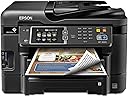
🖨️ Work smarter, print faster, stay connected—your office’s new MVP!
The Epson WorkForce WF-3640 is a wireless all-in-one inkjet printer designed for busy professionals who demand speed, quality, and convenience. Featuring PrecisionCore technology, it delivers sharp black-and-white prints at 19 ppm and vibrant color at 10 ppm. With versatile connectivity options including Wi-Fi Direct, Ethernet, and mobile printing, plus a 35-page Auto Document Feeder and auto duplex printing, it streamlines your workflow. Integrated Amazon Dash Replenishment ensures you never run out of ink, while its cost-efficient operation saves up to 40% compared to color laser printers.
| ASIN | B00JXLGEUC |
| Additional Printer Functions | Copy |
| B&W Pages per Minute | 19.00 |
| Best Sellers Rank | #313,471 in Office Products ( See Top 100 in Office Products ) #195 in Ink Tank Printers |
| Brand | Epson |
| Built-In Media | Printer Accessory |
| Color | Black |
| Color Depth | 24 bpp |
| Color Pages per Minute | 10.00 |
| Compatible Devices | Laptops, PC, Smartphones |
| Connectivity Technology | Ethernet, USB, Wi-Fi |
| Control Method | Voice |
| Controller Type | Amazon Alexa, Vera, iOS |
| Customer Reviews | 3.8 out of 5 stars 2,389 Reviews |
| Display Type | LCD |
| Dual-sided printing | Yes |
| Duplex | Manual |
| Global Trade Identification Number | 00010343908161 |
| Hardware Interface | USB |
| Ink Color | Color |
| Item Dimensions D x W x H | 20.2"D x 21.1"W x 15.6"H |
| Item Weight | 30.2 Pounds |
| Manufacturer | Epson |
| Maximum Copies Per Run | 35 |
| Maximum Copy Resolution Black and White | 19 |
| Maximum Copy Resolution Color | ≥ 5760 x 1440 dpi |
| Maximum Media Size | 8.5 x 11 inch |
| Maximum Print Resolution Black and White | ≥ 5760 x 1440 dpi |
| Maximum Sheet Capacity | 500 |
| Maximum print Resolution Color | ≥ 5760 x 1440 dpi |
| Model Name | WF-3640 |
| Model Number | C11CD16201 |
| Model Series | WorkForce |
| Number of Ethernet Ports | 1 |
| Number of Trays | 1 |
| Other Special Features of the Product | Auto Document Feeder |
| Paper Size | 8.5 inch x 14 Inches |
| Print media | Envelopes, Paper (plain) |
| Printer Connectivity Type | Ethernet, USB, Wi-Fi |
| Printer Output Type | Color |
| Printer Type | Inkjet |
| Printing Technology | Inkjet |
| Resolution | 5760 x 1440 |
| Scanner Type | Sheetfed |
| Special Feature | Auto Document Feeder |
| UPC | 010343908161 |
| Warranty Description | 1 year limited |
| Warranty Type | Limited Warranty |
| Wattage | 100 watts |
B**S
If only the rest of my life were this simple.....
Update, August 18, 2015 I had a strange thing happen with my printer that I still don't fully understand. I'm using the WF-3640 completely wirelessly. Even my desktop prints via the wireless router. I had to replace my router. I bought a combination Wi-Fi router and cable modem. Right after I installed the new router/modem, I printed a 92 page booklet from my desktop. Again, printing via the new router. No problem whatsoever. BTW, the duplex printing is pretty doggone amazing! The next morning, however, I could get nothing to print. I checked the router, the printer showed up as a connected device but no test page, nothing. I wound up having to completely uninstall the printer & all Epson software, then reinstall all of it. Now it works fine. Strange. ******************************************************************************************************************************************************************* If only the rest of my life were this easy. I went a little overboard on this because I don’t fax a lot, nor do I do an inordinate amount of scanning or copying. Just fits & starts of scanning photos for family albums, a couple of copies three or four times a week. But at this price & the packed feature list, how could I say no? This is my first Epson printer since, oh, about 1997 when I bought my first-ever inkjet. (Lord, has it been that long ago?!?) I really loved that printer and it lasted me quite a few years but, eventually, cartridges became harder and harder to find. Since then, I guess I slipped into some kind of printer coma and punished myself with another, more bloated brand that shall remain nameless. I'll just say that every subsequent model by that manufacturer became more and more of a Hideous Product. Anyway, my last AIO bit the dust about a year ago. I postponed replacing it because there just didn’t seem to be any decent models in my price range. The scanning & copying I needed to do I could accomplish using my phone. This week, however, that all changed. I suddenly had quite a bit of scanning that I really needed to get done. I just couldn’t make it work with my phone so I started shopping for a new AIO. I was trying to get the most bang for my buck while doing my best to stay below $150 with shipping. Another critical criterion was the device’s ability to use re-manufactured cartridges, something my old printers refused to accept. An expensive proposition, at best. No matter how positive the review, I purposely avoided my old brand. I did look at similar models from Brother, Lexmark & Canon but the reviews here on Amazon & elsewhere gradually eliminated all of them from the running—Sorry, Billy Blanks, I really liked those ads! I was leaning first toward the WF-3520 before I stumbled across a glowing review of the 3540 which, at the time, was linked to another online retailer with the lowest price of $129. I followed the link only to find that the 3540 was no longer available and had been replaced by a link to the 3640. Fully expecting a case of bait-and-switch sticker shock, I followed the link to find the new latest model had the same price! After comparing the price with Amazon, I placed my order. After all was said and done, the WF-3640 came in at $155 & change with tax, next day shipping & a 2-year extended warranty. Add another $17 for a set of remanufactured cartridges, each with 1100 page capacity. I have finished the initial setup of the printer. I have to say I honestly can’t remember ever having any initial device setup be such a breeze. Setting up our two laptops for wireless connection to the printer was simplicity itself, too, I’m happy to report. With one laptop I simply used the software disc that came with the printer. The other has a dead optical drive so I just downloaded the software from Epson’s support site. Setting up Epson Connect for email printing was a snap, too. Just had to change the default email address for the printer to something easier to remember. Getting the phones ready for cloud printing was just a matter of downloading & installing the free app. I haven’t done a lot of printing just yet but what I have printed has yielded crisp, sharp text that just blows away my old AIO, not to even mention my current inkjet. Is it better than a color laser? I can’t make that distinction right now. I’ll have to do some comparisons with docs here and at the office where there is a 10-month-old $900+ AIO model. Scanning performance is breathtaking, for me, anyway. I was astounded at how quickly the WF-3640 scanned the forms I needed to add to one of my web sites. It took literally less than 5 seconds from the time I clicked "Scan" for each form to appear in the directory. While there are far more features than probably I will ever need or use, for the price of this machine you simply can't go wrong. Could my needs have been adequately met with the WF-3620? Probably. But for the higher capacity paper trays, the price difference is negligible.
H**T
A really nice “combo” printer at a reasonable cost
Epson WF3640 – WOW ! A really nice “combo” printer at a reasonable cost. I’ve had FIVE (5). Five you say, ----- why five (5)? Well, after a period of time the head blocks up, and the printer becomes useless. This may be a fault of the printer, or the fact I don’t like being gouged by Epson to buy their very expensive refills and choose to buy online inks. Realistically this shouldn’t be a big problem. I read online that Epson created a special print head to improve the quality of their prints….. well they succeeded!!! Quality is outstanding! ----- BUT the heads seem to get blocked often! I don’t know if using Epson ink would solve the blockage problem (other reviews don’t make that clear) but the online inks seem to work OK for a while. Unless you spend many frustrating hours attempting to clean the heads, (Which is what I do --call me “chump”) ………….. You are out a printer. I’m running a small business out of my home running Win 10 and can’t afford to go without the features that Epson offers (at a very reasonable price). So I buy a new one, and play with fixing the old ones. If and when I get them fixed --- It’s actually kind of fun/frustrating. Then give them away to my family. So I spend $10-15 a month for an excellent printer. Think about it --- easy set-up, Wi-Fi, copy, scan, excellent color prints and speedy black and whites, faxing (who’d thought it still existed), don’t forget scanning (which is an easy setup). SO! The bottom line is --- Is this a “good” value. For me it is. I would like to get more mileage out of them, but I don’t think it’s all Epson’s fault. When this one goes …. I’ll probably buy another. I went thru this with HP printers, so I think I’m the villain. No I did not get paid to review this, but still 5 stars – just don’t expect too much – it’s just a printer!
H**Y
Update to the Update... Epson is a POS company and the printer is going to the recycle center. I'm going back to HP!!
My son and my neighbor both have Epson printers and love them. I, on the hand seem to be striking out. First I need to say that Amazon gets five stars for their involvement and handling of this experience. I ordered a WorkForce 3640 printer from Amazon and received it two days later via Amazon Prime. Since my old HP printer had died and I really needed to get a couple of things printed (one being a mailing label), I was excited to get my new printer and get it up and printing. Epson printers are very intuitive and require very little user interaction during set up. My printer made an ominous squawk during the set up routine and gave me an error message that wasn't explained anywhere in any of the material provided so I went to the Epson site to try to find and fix the problem. After talking with a hapless/helpless Epson support person for about 10 minutes it was determined that my problem was hardware related and the unit needed to be replaced. I returned to the Amazon website and report my problem on the Return/Replace page. Amazon immediately sent a second unit and gave me a link to a mailing label so I could return the defective printer. The were even intuitive enough to give me the option to email the link to a friend who printed the mailing label for me. The second printer showed up two days later and went through all the startup steps flawlessly. Problem solved...right? Well sort of. The unit is working fairly well; however, this morning the paper kept jamming and I am unable to find any good counsel for a fix on the Epson website. It seems to have resolved itself after I reloaded the paper tray about three times. Further, the first few times I printed anything, all the printer did was puke out several blank pages. I'm thinking maybe I should have stayed with an HP printer. The ink is way more expensive (I think HP is in the business of selling ink not printers), but I have owned two HP printers over the past 10 years and both have been pretty reliable. So far, I am not very impressed with this Epson WF 3640 printer. As a follow-up to my initial review, I have now had the Epson Workforce 3640 printer for a few weeks and have printed and copied with it a number of times. I managed to locate and download a fairly complete manual for this printer at the Epson website. The material that they send with the printer is abysmal. Armed with the digital manual for this printer, I was able to locate a fix the paper issues I was experiencing and have set-up and used airprint a number of times. I still can't seem to get things printed from my new iPhone 6 but am not blaming this issue on the printer, since it is working well from my iPad and other Mac computers via WiFi. Overall, I would now upgrade the printer to four stars; Epson technical supports still sucks. So this is my 12/20/2016 update: This printer, once I got through all of the initial "bugs", with very little help from Epson, has performed pretty well for several months. The print cartridges empty themselves pretty fast and when one is empty/low the printer stops working, even if there is plenty of black ink and you only want to print black print! Sooo, this week my printer started printing bands through all of my printed documents. I went to the Epson website and followed all to the protocols in the FAQ section to correct this "banding" problem. I ran the protocols four times, wasted a ton of ink, and still have the banding problem. I've tired for two days to find a number to call to talk to someone at Epson directly for help and all I get is this continuous loop back to the FAQ!! I did manage to talk with an Epson service center 100 miles (nearest center) from my home who was very helpful, but learned, as I knew I would, that the unit isn't worth fixin. I could get another POS printer like this one for $99 from Amazon Prime rather than drive 100 miles each way and pay a minimum of $85 to have them look at it with no guarantee that it could even be repaired. I'm going back to HP. At least they will talk to you when you have a problem.
A**Z
Good Unit
Got this to replace a failing HP. Never looked back. Using it in a local private school environment, it excels at its job as a multifunction. It prints faster and better than the 8600-class HP it replaced, the ink is cheaper and lasts longer, the machine uses less power and is quieter and it has never dropped off the network like the HP did every few hours. Wireless printing from iProducts and Android devices is simple and reliable, wireless is steady and sure. The fax works well, though very infrequently (honestly - WHO uses fax in this day and age?). The Workforce series so impressed the staff that two of them bought similar units for their homes. It isn't perfect. There is an issue with the scan-from-pc client that makes it unreliable in Network mode under Windows 7 and 8.x and the ADF doesn't really like heavy paper or very light paper. Neither of these are worth dinging the rating, though because you have to load the paper to be scanned anyway, and it is THREE TOUCHES to scan from printer to PC, and by the time you are back at your desk, it is done, so that is a non-issue for us, and the unit has a flat-bed scanner for the stuff the ADF doesn't much like scanning, so again, irrelevant for us. Overall exceptional unit.
G**E
Very nice so far, with a few minor irritants
This is a very nice multi-function printer and scanner. The original unit I received would not set up properly, but Epson support got a replacement to me in about a week. I use this for printing, scanning and copying with US Letter size paper. I don't anticipate ever using the fax function. The copy function is basically scan and then print. The machine also has ports on the front for USB thumb drives and for memory cards - I have not used them yet. Printing on plain paper is fast and very good quality for documents - faster and somewhat better than my aging HP DeskJet. I have not used photo paper yet. Double-side printing has no problem. There are two paper trays with 250-sheet capacity each, and one single-sheet feed at the back. I have not used the single-sheet feed yet for regular paper or photo paper. I did try to print some USPS Flat Rate shipping labels using Avery 8126. Surprisingly, those did NOT feed at all in the single-sheet slot, and I did not try them in a paper tray. (I shifted to that HP printer for that.) Scanning is good but with a few issues. One of my principal reasons for getting this machine was to aid in digitizing my paper records, because the scanner features automatic double-sided scanning. It is slower than I expected, though. In some modes, scanning in color can be very slow. After some experimentation I found a combination of color, feature and dpi settings that works for me. Paper weight (thickness) and coating is critical. Some of the magazines and journals I receive are printed on very thin coated paper and jam in the double-side feeder. That slows the process because I have to scan those a page at a time on the flatbed table. The content pages of other journals and magazines, printed on heavier paper, scan double-sided just fine. (Sometimes the covers are too thick - so back to the flatbed.) Still, an advantage is that I can proceed with other work while the scanner is doing its job. The machine can be attached directly to an existing local area network (LAN) - it does NOT have to be directly attached to a computer. This allows it to do some other cool stuff after setting up on an Epson website. First, you can send print jobs to it by e-mail or through the Google cloud print service. (I recently surprised a geek sister-in-law who wanted to print something from her i-device by giving her an email address to send the document to!) Second, you can scan directly to cloud services such as Evernote, Google Drive, Microsoft OneDrive, Box, Dropbox and so on. (I have not tried that yet.) Finally, the memory card port and USB port show up on networked computers as additional drive letters for removable devices after the Epson drivers are installed. The machine does have a lot of settings for power-saving, such as going to sleep after a preset interval of non-use. It also has an "eco" mode which, as far as I can tell, uses somewhat less ink. However, it also automatically turns off after 12 hours of non-use, and I can't find a way to work around that. If you are printing to it by email or over the cloud and the printer is off, the jobs are saved and then printed after you turn it back on. So this "feature" is only an irritant rather than a show-stopper. Overall, a very nice machine so far. For my current needs, it works well in all respects.
A**R
More features than I expected, lower price than I expected
While it might be a bit early to make an authoritative judgement, I've experimented enough to say that this printer is pretty impressive for its price and has a number of features I wouldn't have expected. I bought this printer after giving up on attempts to reconfigure an old Canon multi-function printer to play nicely on my growing home network. You can read about the various features and most common strengths in a bunch of other reviews, but I'll try to point out a few things that I didn't see mentioned. I have little doubt that the wireless functionality works (that's the most common method), but I wanted to use the wired (ethernet) connection. While the printer refused to properly query/set its IP using DHCP, unlike most other printers of its price point, it allows you to set the IP manually directly from the printer. After that, you can use a browser from any PC/tablet/phone on the local network to finish the configuration with the printer's built-in web configuration utility. I was able to set up names, ports, various addresses and network settings all in one place, without even installing the drivers on my PC. For most people, that might not have much value, but for someone who does a lot of work on Linux workstations, it's a big plus to not need a windows PC to troubleshoot a printer. Along those lines, the printer is also one of the more feature-packed network printers I've seen at this price. I would hope that new printers would work well with service discovery protocols, but I didn't expect the printer to support SLP, Bonjour, WSD, and LLTD, and allow you to configure each of them. It supports normal driver-native printing, as well as more UNIX/Linux friendly IPP, RAW and even LPR printing from the printer. It supports NTP (synchronizing the printer's clock to an internet or local server). And it can be configured to join a Windows workgroup so that it can be easily found/installed on windows computers. As a nice bonus, the printer shows up in its configured workgroup as a fileserver, allowing you to browse and copy (but not write/erase) files on any media cards or USB drives attached to the printer. As a bonus, the scanner can not only email documents, but can also upload them to Google Cloud services, or load them directly onto a Windows PC (assuming you have the MS networking settings configured properly). I only really needed it to scan to a USB drive. Scanning directly to a printer was a nice bonus. I scored this as 5 stars to conform to the web standard where a full score means "I didn't have any problems". There certainly is some room for improvement here, but it does more that I asked it to and cost less than I'd expect. The scanner/maintenance hinges are a little more loose than I'd suggest if you have a lot of people using them constantly. The LCD screen can feel a little awkward to use sometimes, and while the print quality is excellent for an inkjet, the blacks just don't have the contrast you'd get with a laser printer. And while I love the advanced configuration, I'll be the first to admit that it isn't for novices, and its not a terribly polished experience. The end results, however, are quite satisfying for the price.
M**E
Not bad, but some frustrations
I bought this printer around 20 months ago (June 2015). I have to say, for my purposes, it's a pretty good machine. It prints well, easy to use, easy to install. It's also survived 3 different moves (one across state lines) without damage or issue. It is, at times, a little slow to get going when you hit print, but that really shouldn't be a big deal. All of my home color printers have been this way. Now, that said, I did find something odd happen. In my last move, it took them almost 3 weeks to deliver my items which meant my printer sat in a box. I hadn't expected it to go quite so long, but things happen. Anyways, when I set up the printer, I ended up having to replace the ink because it no longer registered the cartridges as having ink. Not too big a deal cause I hadn't replaced them yet so I let that one go. I figured I maybe should've removed them prior to the move (not that I'd ever had to do that before so not sure there). The thing that makes me drop two full stars: 1. I ran out of black ink and the printer will not print at all without it. I tried even removing the cartridge to see if it'd print in color, but it will not. I actually turned it off cause it wouldn't stop complaining (beeping/displaying error messages) 2. In trying to shop for ink, it's been vastly frustrating because every website matches this WF-3640 to the black XL cartridges. These do NOT fit in the machine. It makes it hard to find and buy the right one online because you have to really investigate to verify the size, even then, if it's the XL (twice the size as the thin color cartridges), it's too big. Thus far, I've not had luck in finding the right ink size, certainly not for the cheaper/discount ink. I think I might have finally found the right size for OEM (which is a good 3 times the cost). That second negative point has frustrated me so much, I'm considering purchasing a new printer just to not have to deal with that hassle anymore. I've gone to, at least, half a dozen ink websites, and all have the wrong ink sized for this printer. I bought the XL before so yes, I'm positive it does not fit. Anyways, something to consider when purchasing
V**T
This Replacement Worked Perfectly Right Out of the Box
Strike One: This original unit delivered Friday, 12/5, left on the neighbor's front step. Strike Two: I noticed on a "Track Package" that it had been delivered, but it was not on my front step -- I went looking and found it on the neighbor's front step and brougnt it home. Strike Three: Once I got it home, out of the box and plugged in, it did not work -- at all. It turned on, started its set-up cycle, then alternated between an error message that required turning the machine off and back on again, simply to re-start the setup, or a paper jam (no paper in the machine!), which, after more than an hour of fiddling, resulted in a great deal of anger and frustration. Saturday morning, 12/6 I called Epson Technical Support, where we repeated what I had spent the previous evening doing, alternating between the error message and the non-existent paper jam, when finally, I was told that I needed to return the machine. Duh! I already had that figured out. I contacted Amazon, simply stated that it was not working, that Epson Technical Support recommended returning it and I requested a replacement, since I really wanted this particular model. This is where it gets GOOD. Amazon approved the return within minutes, provided the return label for UPS and had my replacement ordered within minutes, to deliver Monday (today) and it delivered at 9:40 this morning. At the same time, I boxed up the lemon, took it over to the UPS Store and shipped it back within an hour, so they got theirs back and I got my replacement very quickly. I had this unit up and running in about an hour, wireless and all, including a firmware update from Epson. It is QUIET!! I have never heard a printer so incredibly quiet! And FAST! -- it printed a full page of 10 font text in just seconds, faster than any printer I have owned in the past 15 years. I love the two paper trays, one for legal, one for letter and the auxiliary feed for envelopes and specialty stuff that I work with now and then. And it's all entirely wireless -- even the scan works on wireless, unlike any other printer I have used previously. Having said all this, in summary, following its first day in service, I simply LOVE this printer. My next question is, "Will it fall apart a few days after the warranty runs out, or can I look forward to several years of dependable service?" Only time will tell...
Trustpilot
1 week ago
1 month ago