Some deliveries may take a little longer than usual due to regional shipping conditions.

DOWNLOAD THE APP


Customer Services
Copyright © 2025 Desertcart Holdings Limited
DOWNLOAD THE APP


⚡ Dominate every frame with ASUS TUF VG279QM – where speed meets precision!
The ASUS TUF Gaming VG279QM is a 27-inch Full HD Fast IPS monitor designed for pro gamers, featuring an ultrafast 280Hz refresh rate and 1ms response time. It supports ELMB Sync and is G-SYNC Compatible, ensuring tear-free, blur-free visuals. Certified DisplayHDR 400 delivers enhanced color and contrast, while connectivity includes DisplayPort 1.2 and dual HDMI 2.0 ports. Plus, enjoy 3 months of complimentary Adobe Creative Cloud access with purchase.



| ASIN | B0845QFDVM |
| Adaptive Sync | G-Sync |
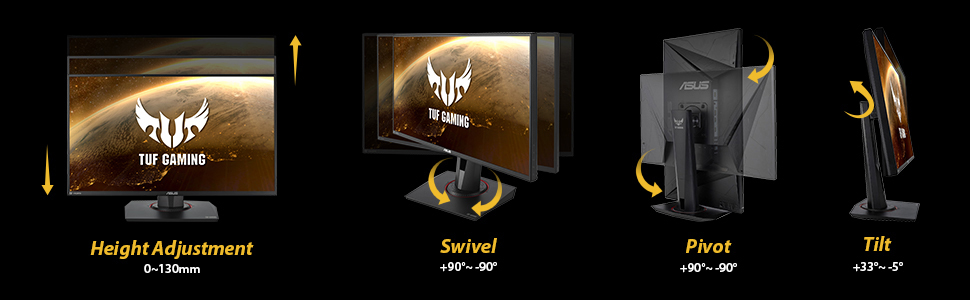
| Additional Features | Blue Light Filter, Built-In Speakers, Flicker-Free, Height Adjustment, Tilt Adjustment |
| Aspect Ratio | 16:9 |
| Best Sellers Rank | #6,539 in Electronics ( See Top 100 in Electronics ) #231 in Computer Monitors |
| Brand | ASUS |
| Brightness | 400 |
| Built-In Media | 1 x DisplayPort 1. 2, 2 x HDMI(v2. 0) |
| Color | BLACK |
| Color Gamut | 99.0 |
| Compatible Devices | NVIDIA G-SYNC compatible devices |
| Connectivity Technology | wired |
| Contrast Ratio | 1,000:1 |
| Customer Reviews | 4.6 out of 5 stars 2,124 Reviews |
| Display Resolution Maximum | 1920 x 1080 |
| Display Technology | IPS |
| Display Type | IPS |
| Hardware Connectivity | DisplayPort, HDMI |
| Has Color Screen | Yes |
| Image Contrast Ratio | 1,000:1 |
| Item Dimensions D x W x H | 8.32"D x 24.39"W x 14.83"H |
| Item Type Name | ASUS TUF Gaming VG279QM 27” HDR Monitor, 1080P Full HD (1920 x 1080), Fast IPS, 280Hz, G-SYNC Compatible, Extreme Low Motion Blur Sync (ELMB SYNC), 1ms, DisplayHDR™ 400, Eye Care, DisplayPort Dual HDMI |
| Item Weight | 12.3 Pounds |
| Manufacturer | ASUS |
| Model Name | VG279QM |
| Model Number | VG279QM |
| Mounting Type | Wall Mount |
| Native Resolution | 1920x1080 |
| Number of Component Outputs | 2 |
| Picture Quality Enhancement Technology | TÜV Flicker-free TÜV Low Blue Light VESA DisplayHDR 400 G-SYNC Compatible |
| Power Consumption | 26 Watts |
| Refresh Rate | 280 Hz |
| Resolution | FHD 1080p |
| Response Time | 1 Milliseconds |
| Screen Finish | Matte |
| Screen Size | 27 Inches |
| Screen Surface Description | Matte |
| Shape | rectangular prism |
| Specific Uses For Product | Business, Gaming, Personal |
| Total Number of HDMI Ports | 2 |
| Total USB 3.0 Ports | 2 |
| Total Usb Ports | 4 |
| UPC | 192876505939 |
| Viewing Angle | 178 Degrees |
| Voltage | 12 Volts |
| Warranty Description | 3 Year Warranty with ARR |
| Warranty Type | 3 Year Manufacturer Warranty |
L**A
The BEST 1080p monitor I've ever used.
I paid $300 for this thing in January 2024, it is now July 2025 and it's now $200 dollars on sale. Please, do yourself a favor and grab this asap. It is an absolute steal for this monitor, let me tell you why. I usually don't write reviews, like ever.... but I just wanted to take a quick moment to say that I have used many different monitors in the past, ranging from a SceptreY40, Acer Predator Z35, also Z35p (1440p variant), a Samsung G65b, an Aorus FV43U, and a recent 1440p KTC monitor, and despite all those I found myself going right back to the ASUS TUF Gaming VG279QM 27” 1080p. YES, it is that good! I can't believe that a small 27" 1080p screen outshines those other ones. Where it lacks in size and pixels, it makes up for it with great colors, outstanding speed and motion clarity, with 280hz refresh rate. It's so fast and smooth it makes you feel like you have super human precision when playing FPS games, or any game for that matter. There is almost absolutely no ghosting at all (I never noticed any), no overshoot issues, etc. I mean this thing just feels crazy fast, and the HDR400 on this thing, while being entry level HDR, looks outstanding imo. As a matter of fact it almost looks as good as the HDR600 from the Samsung G65b and that thing gets really bright. It's also very colorful. I like to turn the HDR on, bump up SDR content brightness settings level in System > Display > HDR, and then I open Nvidia control panel and bump up digital vibrance to about 55% and the color on it looks immaculate (at least to me). And I expected nothing less considering it's a fast IPS display, so it makes sense. But yeah this monitor is way better than I expected, even other monitors of high resolution and bigger size can't compete with this little monster, Asus did an outstanding job with this model. I'd say if this was too small and you wanted a somewhat alternative to this thing like an ultrawide, the ASUS TUF Gaming 34” 1440P 1500R Curved Monitor (VG34VQL3A) is probably the way to go as it is wider and looks much better despite being a VA panel though it lacks in motion clarity, and even then, I STILL don't think it's quite like this little 27 inch 1080p screen. Whether you're an esports gamer or just a casual, I think this monitor will make anybody happy unless you're looking for bigger size and a curve, which this obviously doesn't have. Imo if you're upgrading from this thing, you should be aiming for a good OLED or Mini LED, otherwise just get this thing, best value for money in my humble opinion. I hope this helps someone out there!
K**N
Great monitor for gaming!
Great monitor! A little fyi for some: the normal refresh rate for this monitor is 240 Hz, but if you overclock it, you can get the 280 Hz as advertised. I was confused at first thinking I was getting scammed at not getting 280 Hz right of the bat but then realized that is only when you overclock it. Other than that, it works great, color is great, and games run very smooth on it. Also, it provides many different angles so you can adjust it to pretty much whatever you want which is another good feature. You can play sound from the monitor, which isn't the best and isn't that loud but it can still get the job done but I'd definitely recommend using headphones. Finally, it was very easy to set up.
D**.
asus monitor review
great monitor. amazing colors and great gameplay with it. A little vibrant on colors right out the box but it has good sharpness and amazing brightness. frames are great. no lag from of to monitor. i didn’t the included monitor stand but it is very easy to set up.
7**3
Fantastic monitor
After using a 1080p 60hz monitor for years, switching to this monitor absolutely blew me away. This monitor has excellent low blue light capability. You hardly notice it is enabled, there is no significant red tint to it. The sRGB mode is fantastic as well. Colors are true to life. Then, the best thing of all is the 240 hz refresh rate. Once you try a high refresh rate monitor, you'll never go back to a regular 60hz monitor. Scrolling is so much smoother. Game graphics are much less "choppy" is the only way I can describe it. Overall, this is a great monitor for the price. I have no complaints about it. Just make sure to use the DisplayPort connection and NOT the HDMI for best experience.
F**R
Good monitor but you could get better monitor that is 1440p not 1080p
It is good however it doesn't look great because you can clearly see each pixels but overall is good, when 1 pixel broke because the green was out, asus warrenty fixed it for me hich was perfect however I just don't like how you can see each pixels clearly.
D**T
Possibly the best 1080p monitor
For a couple hundred dollars and some change, you are getting HDR, GSYNC, and insanely high framrates. I have yet to test the 280hz functionality, but so far, I can confirm that you get 240hz straight out of the box. It is unnecessarily high framerate. The setup is incredibly easy. You are even provided a screwdriver, albeit a strange L-shaped one. I do appreciate that no outside tools are technically needed for the setup. It is an intuitive process. Out of the box, the monitor presents a solid image. It is not as sharp as my previous LG 1080p monitor, but the HDR actually elevates the image within games. The stand is solid and sturdy. I appreciate that the height and angle are completely and easily adjustable. Now, some features of the monitor are not explained in a menu. Rather, they are set up via a menu in the monitor. My only gripe with the monitor is that I wish they explained how to enable GSYNC within the manual. The monitor appears to not have GSYNC capabilities if you look in your NVIDIA settings. You have to enable it using the monitor's menu. That is a small complaint because the monitor is otherwise a great value for the price. I would recommend this monitor to anyone with a RTX 4060 (or similar NVIDIA card) wanting to get the best image out of their graphics card without using DLSS or sacrificing performance by using a 1440p monitor. 2K and 4K are the future of gaming, but for those of us on a budget (or without much desk space,) this is the way to go! Sidenote: I thought that I was experiencing a dead pixel, but it was in fact a black spec on the screen. I also have not experienced any ghosting. I have played Dead Space (2023) and Detroit: Become Human with this monitor thus far. I did experience screen tear in Detroit: Become Human, but this was resolved when I set the max framerate to 60 instead of the default 30.
S**E
The Best and fastest monitor created
The monitor I picked is the "ASUS TUF Gaming VG279QM 27” HDR Monitor, 1080P Full HD (1920 x 1080), Fast IPS, 280Hz, G-SYNC Compatible, Extreme Low Motion Blur Sync (ELMB SYNC), 1ms, DisplayHDR 400" I only had one problem with this monitor and that was the data cable that comes with the monitor (you get 1 HDMI and 1 Data Cable in box plus power cord). I had to purchase a "Infinnet DisplayPort 1.4 Cable 8K 60Hz, 4K 144Hz, 4K 120Hz, 2K 280Hz 240Hz, 1080p 360Hz DisplayPort to DisplayPort Cable DP 1.4 HBR3 Cord, HDR, VESA Certified, 3 Meters (9.84 ft) Black" (that is on Amazon for $30) and this cable is so much better than the one that comes in the box (because its gold tipped and not silver like the one you get with monitor) and it actualy fits into my graphics card. Plus it makes the images and text crystal clear and not fuzzy than the original cable. It was so nice of Amazon to help pay for the costs for that new cable. Thanks Amazon!! Now to get Gsync ability you must use the data cable, not the HDMI cable. Some people complain that the resolution isn't good enough, then buy the cable I mentioned. Ever hear of downsampling? Look it up, you can simulate 4k resolution on this monitor (so you get the best of both worlds, better visual and fast hz) and will not hurt it one bit, even though they recommend not doing so, so use at your own discretion but I think its because they want you to purchase the more expensive monitor. Unless you got 32 GB of memory in your rig like I do, then you can do supersampling to boost the visuals and images. I also recommend using at least a MSI Geforce GTX 1080 graphic card for best performance. Now while most software cant go beyond 240 hz yet while this monitor can perform at 280 hz, lets hope the programmers out there can kick it up a notch. Make sure to turn on HD mode in windows when using this monitor even though it will turn off Game Visual in the monitors menu option when you do. Shadow Boost will also be disabled in menu options, not sure why but it doesn't matter, the monitor is bright enough even at HDR 400. The ability to swivel, tilt, height adjustment on this monitor is amazing, you can even view content with your monitor sidways if you wish. There was no bleeding, dead pixels or damages on the monitor and it was very secure in the box when shipped. I recommend getting Prime when purchasing and you can get it monthly instead of yearly. I received it in just 2 days after purchase. The BEST and FASTEST monitor created!
A**M
Best monitor I've ever had
The refresh rate on this monitor with the features and the price point are great. I like player vs player games, so 1080p is perfect for me. The difference between 60hz and 280hz was insane. Granted, you will need a computer/setup that is capable of producing the amount of frames this monitor can display. Setup is easy. Just be careful unpacking as the metal base fell out while I was lifting the monitor out of the box and hit my toe. You can display FPS, crosshairs, and change picture quality very easily with the buttons on the side of the computer. The buttons aren't confusing like some. The cable included is perfect for this monitor, you will not need a faster transfer speed cable.
Trustpilot
2 weeks ago
1 month ago