Some deliveries may take a little longer than usual due to regional shipping conditions.

DOWNLOAD THE APP


Customer Services
Copyright © 2025 Desertcart Holdings Limited
DOWNLOAD THE APP
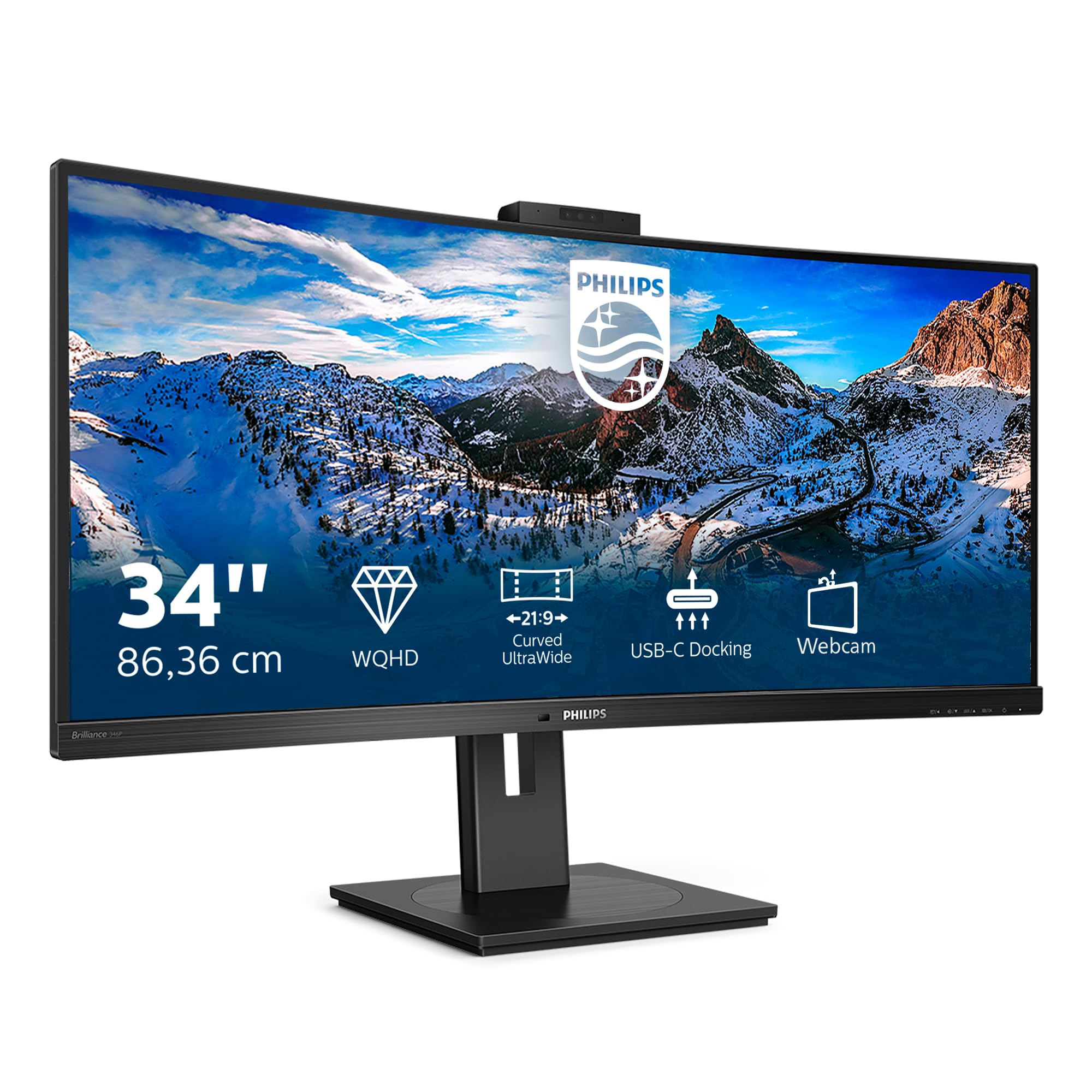


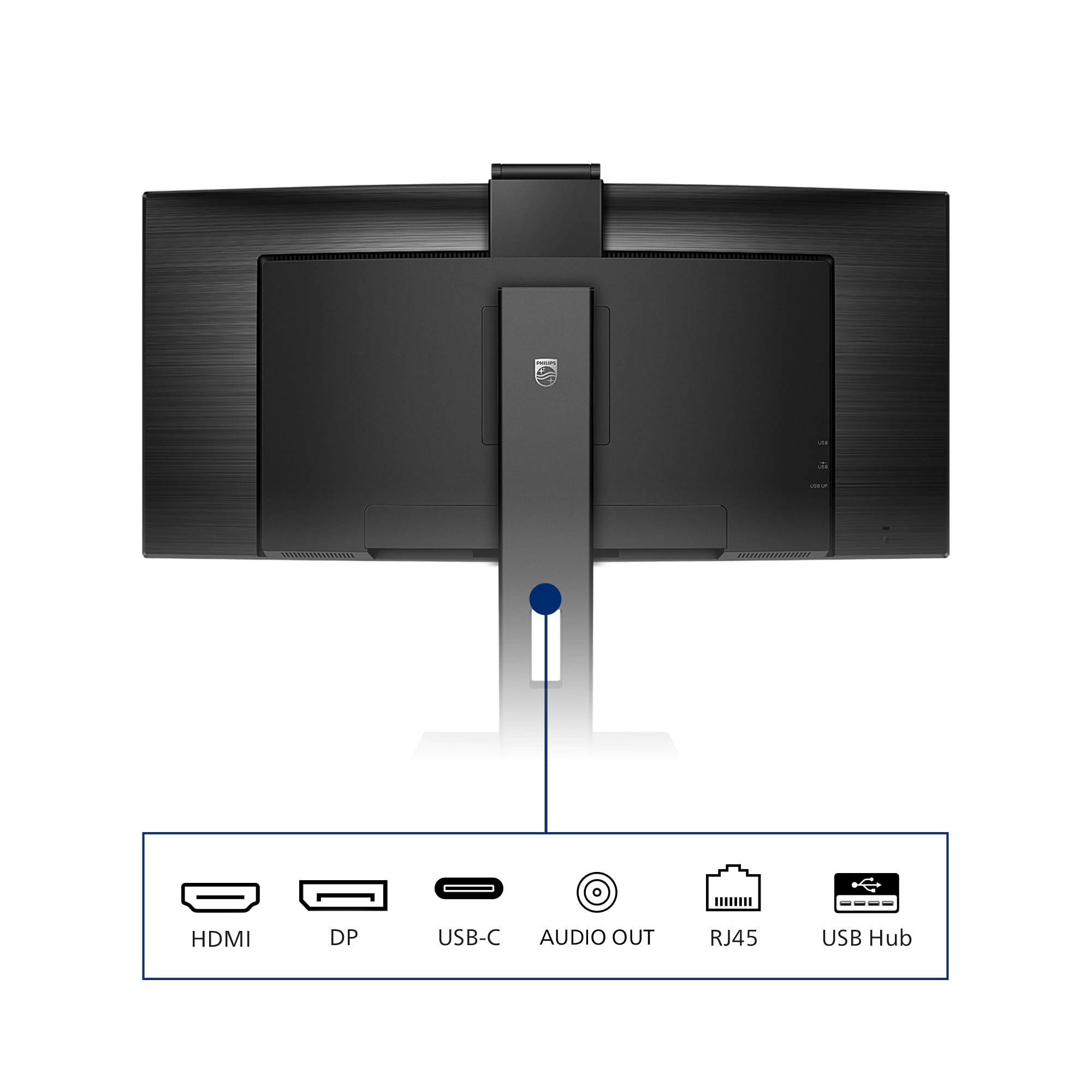
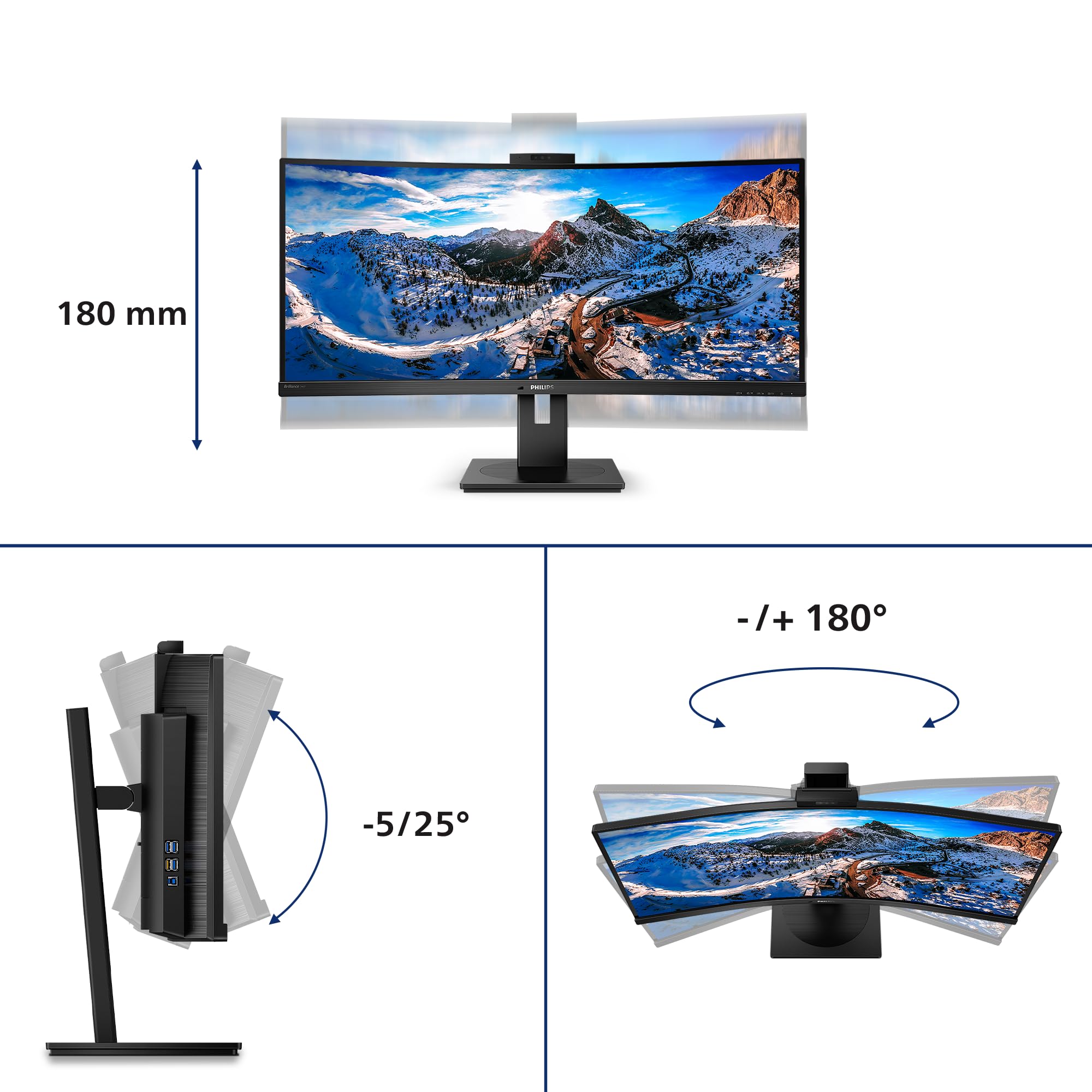

🚀 Elevate your workspace with ultrawide clarity and effortless connectivity!
The Philips 346P1CRH is a 34-inch curved ultrawide monitor featuring a sharp 3440x1440 QHD VA panel with 100Hz refresh rate and 4ms response time. It offers versatile connectivity through USB-C with power delivery, Ethernet, and multiple USB ports, plus an integrated flip-up webcam and speakers. Designed for professionals balancing productivity and multimedia, its ergonomic stand and HDR 400 support deliver comfort and vivid visuals for work and play.


| ASIN | B085YSDXDF |
| Are Batteries Included | No |
| Best Sellers Rank | 54,229 in Computers & Accessories ( See Top 100 in Computers & Accessories ) 948 in Monitors |
| Brand | Philips |
| Colour | HDMI - DP - USB-C 3.2 |
| Computer Memory Type | DIMM |
| Customer Reviews | 4.2 4.2 out of 5 stars (178) |
| Date First Available | 12 Mar. 2020 |
| Graphics Card Description | Dedicated |
| Guaranteed software updates until | unknown |
| Hard Drive Size | 128 GB |
| Item Weight | 11.6 kg |
| Item model number | 346P1CRH/00 |
| Lithium Battery Energy Content | 2.6 Watt Hours |
| Lithium Battery Packaging | Batteries contained in equipment |
| Lithium Battery Weight | 5 Grams |
| Manufacturer | Philips |
| Number of HDMI Ports | 1 |
| Processor Count | 1 |
| Product Dimensions | 23.66 x 31.77 x 9.84 cm; 11.65 kg |
| Resolution | 3440 x 1440 Pixels |
| Screen Resolution | 3440x1440 |
| Series | Curved UltraWide LCD Monitor with USB-C 346P1CRH/00 |
| Standing screen display size | 34 Inches |
| Voltage | 220 Volts (AC) |
D**5
Great piece of kit for home working.
Very good piece of kit and easy to set up. Incredibly sturdy and Features are great. Multiple USB ports on side rather than underneath is good & one cable into laptop makes it easy to use when more than 1 person is using the study to work - no messing about switching cables. Flip up camera with facial recognition is very handy & graphics nice & clear on huge screen. Very good for the price.
H**E
Very nice display
I recently bought an LG CX OLED tv to use as a computer monitor. It was great, huge in fact and really fantastic image. There was just one major problem with it; it gave me eye strain or DES so I had to stop using it. I'm pleased to say i'm not suffering that issue with this monitor after using it for 8-10 hours a day. After swapping out the OLED TV, I figured the next best thing would be to buy an ultrawide and I'm really happy I managed to pick this one up on offer. The price seems to keep bouncing around but I managed to snag it once it was on offer. Really beautiful display. I love the gentle curve. I tried an Asus ROG curved display before but it had really bad backlight bleed when watching movies / when the display was dark. But I have none of those problems on this display. During the day time, I have this hooked up via USB-C to a 2019 macbook pro and with just one single USB-C cable, I can connect my ethernet, the webcam, the display itself and it keeps the MBP at 100% charge as well. At night, I have it hooked up to my gaming PC and it's really great for watching movies, surfing the web, playing games etc. It's really cool to be able to have a browser and my terminal window/other apps side by side and not have to switch between them. My macbook display just shows my outlook now, and all my productivity happens on this monitor. G-SYNC works fine, there's no tearing in games, no flickering, and the 100Hz is nice. I've heard some people complaining about a whining noise from the display but I'm not having this issue. I am however having a slight networking issue in that if I power off the macbook that's connected via USB-C my network dies completely. I haven't figured that out now, but so far I just either sleep the macbook or unplug the ethernet cable. Would love to figure that one out. All that faf about IPS vs TN ? I can't tell you the difference, and i've got 3 monitors, two of which are IPS and this TN monitor. Whatever angle I look at the display, it looks the same to me. Maybe not as bright if I look at it from a really far angle that I'm not ever gonna sit at. The curve is very nice too. I wasn't a big fan of curved displays due to geometric distortion, but it's such a gentle curve it's not at all noticeable to me on this monitor. The webcam is pretty cool too. I like the fact I can pop it out and pop it back in when not using it and the resolution is nice too although I do feel the popping in / out thing might wear out eventually but time will tell I suppose. I like the stand too. I was thinking before I bought it about getting a desk arm for it, but honestly I don't need it. It doesn't take up that much space and I can raise it, lower it, tilt it .. no problem. Overall I'm very impressed. If I could fix the network problem i'd say 10/10 but I haven't marked it down for this, I think i just need to figure out what's causing this first.
N**T
Happy
does the job
K**M
Good product
Good product, my downside is that it does not come with a remote and the controls are a little fiddly . But I use this for my work and it’s a good screen and size, not too big or small. I use it for my creative and design work.
K**N
Good monitor but drivers may be needed for mac users
After going through two previous monitors in the last 6 months to get some sort of comparability with my new M1 MacMini I have finally (I think) found one, no flicker issues at all, stable and nice looking two, just be warned some mac users may need to download a driver for the usb C side of life
E**I
Great monitor
Really impressed with quality and build of this monitor. Nice stand that easily moves around. Screen quality is very good! The only downside I have to say is that the screen is very bright and most preset modes are too bright for working in the dark. I had to dim it to the lowest brightness setting manually and save as my preset. And to be honest I would like it to go even a bit more dimmer than that but that is the lowest setting. It is still quite bright on white background websites in the dark but somewhat got used to it. Nice to watch movies and YouTube. I am mainly using this for office and home media. It’s pretty good. I thought initially that this monitor will increase productivity with splitting screen and stuff but it does not work for me that well. Bit annoying having to manually resize the apps to split them on the screen. For myself I hav4 busted that marketing myth.. other than that it’s really nice and if you love big screen you will enjoy it.
M**D
Perfect for MacBook Pro - USB C power + video link
Perfect for MacBook Pro as one USB C link provides power for the laptop, video link, audio and webcam plus extends to the monitor’s USB ports. Internal KVM switch allows you to move between two computers, if required. Menus are a bit confusing but it’s not like you use them all day long. Good value for money if you buy it when discounted
M**.
horrible setup for a Mac
terrible and still awaiting my return
P**E
pour le prix bon produit
O**N
Très content de cet achat, à recommander !
D**.
El monitor tiene un tamaño ideal. Lo utilizo a diario para trabajar, programando concretamente. Tiene 100hz que ayudan a reducir el cansancio visual, así como varios modos de color y demás ajustes que son útiles para aquellos que sepan más del tema. Incluye un dock mediante el cual se pueden usar sus entradas y salidas de manera que estas estén conectadas al dispositivo que esté conectado mediante un USB tipo C (incluido en el paquete). Entonces se puede tener señal de vídeo, conectividad, webcam, sonido y carga de un ordenador portátil u otro dispositivo con un único cable USB-C. Se pueden tener varios dispositivos conectados al mismo tiempo con pantalla dividida. Incluye también un cable HDMI y un cable DisplayPort. La altura, inclinación y rotación son modificables. Tiene una peana de gran calidad y fácil de modificar. Por último, cuenta con altavoces, que no tienen un sonido de gran calidad, pero te pueden sacar de un apuro, al igual que la webcam. En general la imagen se ve muy nítida y sin problemas a día de hoy. Lo recomiendo mucho.
J**A
He tenido ocasión de probar 3 monitores de 34” curvos ultrapanoramicos (Lg-35wn75C) (Samsung 34H892) (Philips 34641) y este sin duda para mi gusto es el mejor. Se ve igual de bien o incluso mejor que el Samsung, y mucho mejor que el Lg que tenía los colores y los negros como apagados., mejor conectividad que el Samsung, con más puertos y mas accesibles, esto también lo tenía bien el lg, pero sus colores y negros no me gustaron. La mejor peana y la que permite mayor amplitud de movimientos. La del Samsung por su forma ocupada media mesa y se quedaba muy cerca de mi, prácticamente me “comía” la pantalla.. en definitiva, si no te puedes permitir pagar Tanto el Philips 34-641 es muy buena opción. (Mejor que lg y Samsung) y si puedes, este desde luego por colores, negros, curvatura 1500R, conectividad y peana es el mejor, solo tiene un aspecto a mejorar, que son sus teclas de menú, aquí si eche de menos un jostick. Pero por lo demás, es el mejor con diferencia.
C**A
Um den Monitor und seinen Ständer zusammensetzen braucht man kein Werkzeug und es ist fast selbsterklärend. Den Hinweis, das Panel in seiner Transportschale zu lassen bis der Fuß dran ist, sollte man beherzigen. Gleich nach dem Aufstellen fiel die supersofte Höhenvestellung auf, auch die anderen Verstellmöglichkeiten laufen geschmeidig, das ist richtig gut. Die Verarbeitung des Fußes und des Gehäuses sind gut, so sollte es sein. Ein Test mit dem browserbasierten Eizo Monitortest ergab, dass keine fehlerhaften Pixel vorhanden sind. Schrift wird sehr scharf dargestellt, matschige Darstellung in Outlook oder anderen Office Programmen liegt nicht am Monitor, auch hier zeigt der Eizo Monitortest was der Monitor kann. Farbdarstellung und Verläufe sind für mich gut, ein paar Anpassungen beim einrichten vorausgesetzt. Taschenlampeneffekte der Hintergrundbeleuchtung sind gering und fallen im Normalbetrieb nicht auf, Abdunkelungen zu den seitlichen Rändern hin gibt es vllt auf den letzten 5mm. Die Bedienung des Monitormenüs über die Tasten ist mühselig, z.B. einstellen des PbP oder PiP, aber wenigstens sind die Tasten gut erreichbar und es gibt alternativ auch ein Progrämmchen für den Desktop. Begeisterung löste der Powersensor aus, das klappt sehr gut, mit dem Fenster im Rücken hat der Lichtsensor wohl etwas Probleme, ich habe bis jetzt da keine befriedigende Einstellung gefunden. Am für mich fast wichtigsten Feature wäre ich allerdings beinahe gescheitert: 2 Rechner im Picture by Picture Modus bildfüllend darstellen zu lassen. Dass man auf jedem Rechner 1720x1440 als Auflösung einstellen muss ist ja logisch und der Monitor sagt einem das auch noch mal, aber wenn das Ergebnis dann nur ein 1720x1440 Bild auf einem Viertel der Monitorfläche (860x720 Pixel) ist (siehe Bild 1), dann hilft weder die Bedienungsanleitung noch sonst eine FAQ oder Forum bei Philips. Der Trick ist hier die Auflösung nicht über Windows „Anzeigeeinstellungen“ einzustellen, sondern über die speziellen Programme der Grafikkartenhersteller. Viele werden wohl einen Laptop mit einer Intel UHD GPU anschliessen wollen, da sie häufig bei Laptops in Unternehmen vorhanden ist, hier muss im UHD Control Panel zur Auflösung auch noch eingestellt sein, dass der Monitor das Scaling bestimmt (Maintain Display Scaling) und nicht etwa das Seitenverhältnis (Maintain Aspect Ratio), siehe Bild 2. Win10 Hello (Anmeldung per Gesichtserkennung) klappt gut mit der Kamera, auch im Dunkeln. Für gute Bilder braucht die Webcam allerdings viel Licht. Die Umschaltung über den KVM zwischen Laptop und Desktop-Rechner funktioniert auch gut, mit 10-20 Sekunden Verzögerung für den USB Update muss man rechnen, aber dann steht neben Keyboard und Maus auch die Webcam in Skype oder Teams zur Verfügung. Den üblichen KVM-Ärger mit Logitech Funkdongels, wie dem für meine MX Master Maus, habe ich, wie sonst auch, mit einem weiteren zwischengeschalteten USB-Hub umgangen. Selbst die KVM Auto-Umschaltung beim Wechsel des Monitoreingangs läuft gut. Im Lieferumfang ist übrigens ein kombiniertes USB-C-C/USB-C-A 100W bzw. 5A Ladekabel enthalten. Auf einem Ende des Kabels steckt ein USB-C-A Adapter den man abziehen kann, das erkennt man nicht so gut, solange das Kabel in seiner Tüte ist. Durch die relativ starke Krümmung wirken Dokumente ein wenig, als wenn sie auf ausgerolltem Papier wären, man gewöhnt sich dran. Ich bin kein Hardcore Gamer, aber bei den FPS die ich bis jetzt gespielt habe sah‘s gut aus, sehr immersiv. Wenn der Monitor jetzt auch noch lange Zeit hält, dann bin ich rundum zufrieden, damit halte ich es noch eine Weile im Corona Home Office aus. Nachtrag: Etwas geht mir bei dem Monitor doch auf die Nerven: Wenn man von einem zum anderen Rechner umschaltet wird kurz die Verbindung zwischen Monitor und den Rechnern gekappt, unter Windows bedeutet das, dass sich die offenen Fenster auf dem Windows Desktop neu sortieren. Bei dem einem Rechner sind dann alle Fenster links oben in der Ecke in gleicher Größe gestapelt, beim Laptop wird alles erstmal auf den Laptopbildschirm geschoben und dann wieder auf den Monitor. Also kann man nach jedem Wechsel wieder anfangen, die Fenster auf die richtige Größe und den richtigen Platz zu schieben. Ich überlege noch, ob ich deswegen abwerten soll.
Trustpilot
3 weeks ago
3 weeks ago