
DOWNLOAD THE APP


Customer Support

Desert Online General Trading LLC
Warehouse # 7, 4th Street, Umm Ramool, Dubai, 30183, Dubai
DOWNLOAD THE APP
Customer Support
Desert Online General Trading LLC
Warehouse # 7, 4th Street, Umm Ramool, Dubai, 30183, Dubai




🚀 Elevate Your Build with GIGABYTE B550M DS3H!
The GIGABYTE B550M DS3H motherboard is a powerful Micro ATX solution designed for AMD Ryzen 3rd generation processors. It features dual M.2 slots, PCIe 4.0 support, and high-quality audio components, making it ideal for gamers and professionals seeking top-tier performance and reliability.


| RAM | DDR4 |
| Memory Speed | 3600 MHz |
| Wireless Type | 802.11a/b/g/n/ac, 802.11a, 2.4 GHz Radio Frequency, 801.11ac |
| Number of USB 2.0 Ports | 2 |
| Brand | GIGABYTE |
| Series | B550M DS3H |
| Item model number | B550M |
| Item Weight | 1.98 pounds |
| Product Dimensions | 10.43 x 10.43 x 2.12 inches |
| Item Dimensions LxWxH | 10.43 x 10.43 x 2.12 inches |
| Computer Memory Type | DDR4 SDRAM |
| Batteries | 1 Lithium Ion batteries required. |
| Manufacturer | GIGABYTE |
| Language | English |
| ASIN | B089FY7QT1 |
| Date First Available | June 16, 2020 |
J**F
B550M Motherboard is small but is very reliable
I put the B550M Motherboard in a Fractal Design G-Mini case. Fits perfect. I also put a Noctura fan 1500: https://www.amazon.com/dp/B00KF7O58G/ref=cfb_at_prodpg which I got on Amazon at the top of the case. I have a Ryzen 5700G with 32 gig Corsair LPX Vengeance 3200, Gigabyte B550M DS3H micro board and a EVGA 750 GA modular power supply. The case has several areas to run your cords through to the back. Many ways. Had a place in the back to put a ssd but I wanted to use the front hard drive holder which I put a crucial SSD (acquired from Amazon too). It does have two spots for a dvd drive too. I use one. I would but this again if I had the need. Hope this helps. Oh and I don't overclock and with all the fans in the case the cpu runs at 34c in a 74F room. The motherboard has more usb ports than I thought and has DVI, HDMI and Displayport. I was hoping to use an adapter for the DVI but you CANNOT do so. I needed a vga available just in case the person I was building it for didn't have that on their monitor. I did not see that noted in the description so keep that in mind. The Displayport and HDMI do not have that issue. The motherboard is F1 bios which accommodated my 5700G with no update. I installed Windows 10 and then upgraded to 11 with no issue. No problems with the motherboard at all. No cons.
K**
Pretty Tight If you have a 3080 and above card
Upgraded to the B550 everything was looking cherry, dual nvme's slots, 2 pci slots, 4 dimm slots, for an micro ATX board it was i think half and inch longer than my old micro, but it fit nicely. Now the problem is, I have a B I G ass gigabyte rtx 3080. Thing would not sit on the bottom slot due to the F A T ass card touching the bottom COM pin connector, if I moved it to the top slot then it clamps on the fan cable thats above the slot then the end of the card touches the SATA connectors thus the damn GPU not sitting flush and straight. Now my solution was a riser cable BUT doing that makes the card be flush with the glass panel, the fans are like 1/16th from the glass. The solution I came up with was setting it vertically and keeping the side panel open. Not sure if I'll buy the mesh or just get a bigger case. So Beware if u dudes thats my only con with this board. Oddly enough with my old mobo the damn card fit nicely with no problems, albeit it was and old board the asrock A320m.Edit. I got a new case and somehow got it to sit nicely, just had to get some sata cable that wasn't bulky, now it sits flush.
J**N
Highest Quality-Price Ratio AM4 board
After fidgeting with three different ASUS boards for an AMD 5600X I got for a build quite some time ago, I was about ready to throw it away. I bought this as a last resort to see if I could get the CPU to work . After using a UD3 with my i7-970 some years ago and it's still plugging away, I figured it was my best shot.It worked flawlessly upon install. Gigabyte's appstore prompts to install upon booting Windows for the first time and just needs a .Net 4.5 update to start automatically installing drivers, in the correct order. The board even revived a stick of Ripjaws V G.Skill RAM that had failed on the ASUS boards.I'm probably going to recommend Gigabyte from now on and to avoid ASUS. I don't know how three different boards could have the same CPU and RAM issues. Whatever Gigabyte does allows these fidgety components to work right out of the box. This board was inexpensive, has a nice clean CMOS UI, and installed quickly. 5/5 recommend to anyone looking to build with a compatible Ryzen CPU.
T**Y
It Saved Me!
I was intent on building a new PC, which I had not done in 20 years. Boy--was I in for a shocking surprise. For one thing, PC technology has really changed! I had to re-learn and learn new realities about the process. What really set me back, however, was the fact I kept ordering system boards which didn't work!! In one case, when I complained to the companies tech support--they had the nerve to BLAME ME!When I ordered this board--I had very little hope my system would work. I had ordered several CPUs in the process of mixing and matching RAM, etc.--you name it! Spent countless sleepless nights trying to get what I getting wrong. It seemed so basic, yet nothing worked...! Until I ordered this B550 BOARD.It proved all the boards and previous attempts were the Board seller issue, since all the components worked on this B550!! I was so happy and grateful. I still could and did build a new PC.
C**S
Nice Affordable MoBo
I purchased this GIGABYTE B550M MB for my recent overhaul/upgrade of my rig. It's a small ATX but packs a punch with features. This MB's features worked out very well with my new configurations I had planned. The M.2 connectors was something new for me so, I just had to grab a 1TB NVMe to add to my upgrade package. I have owned several Gigabyte MBs prior that were great so, I had no hesitation when it came to purchasing this one. This MB is handling my EVGA 750 BQ Power supply, AMD Ryzen 5500, 64GB DDR4 Corsair memory, and 8GB Radeon RX 6650XT with no issues at all.
A**N
Great cheap board
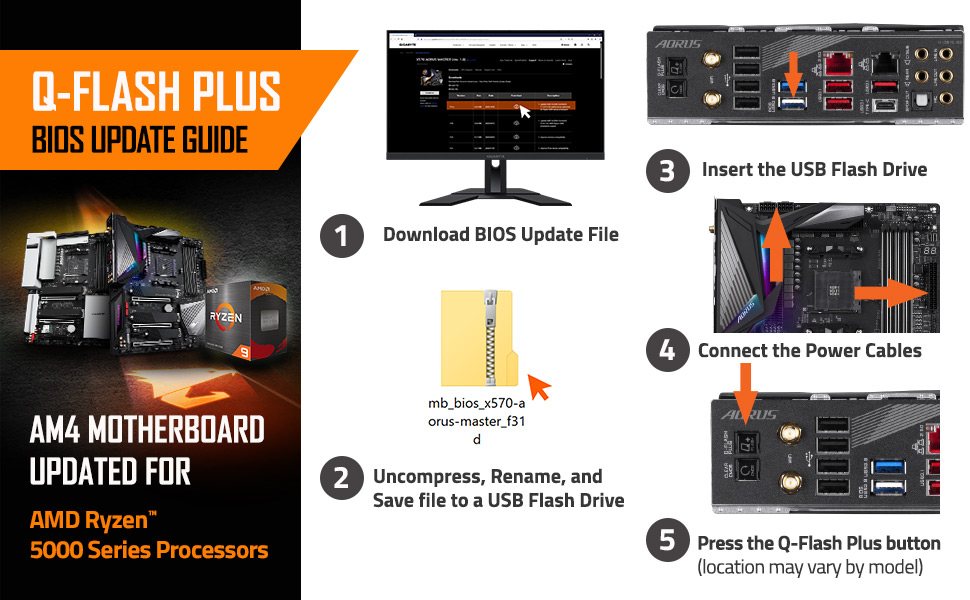
Bought this for a first time build. Works great! Only issue I had with it was with the chip versions. This board had had a lot of revisions, and BIOS updates are a little tricky. It is not apparent on the box or in the manual what version you are sent, you have to physically check the board. I initially received a old version, then returned it and received the most recent one, so there is still older stock out there.Make sure you take care flashing the BIOS if you get an older board. It is tricky an not clear on the website, and flashing the BIOS can brick a board if done incorrectly.
Trustpilot
2 weeks ago
1 month ago