


⌨️ Elevate your desk game with silent speed and vibrant style!
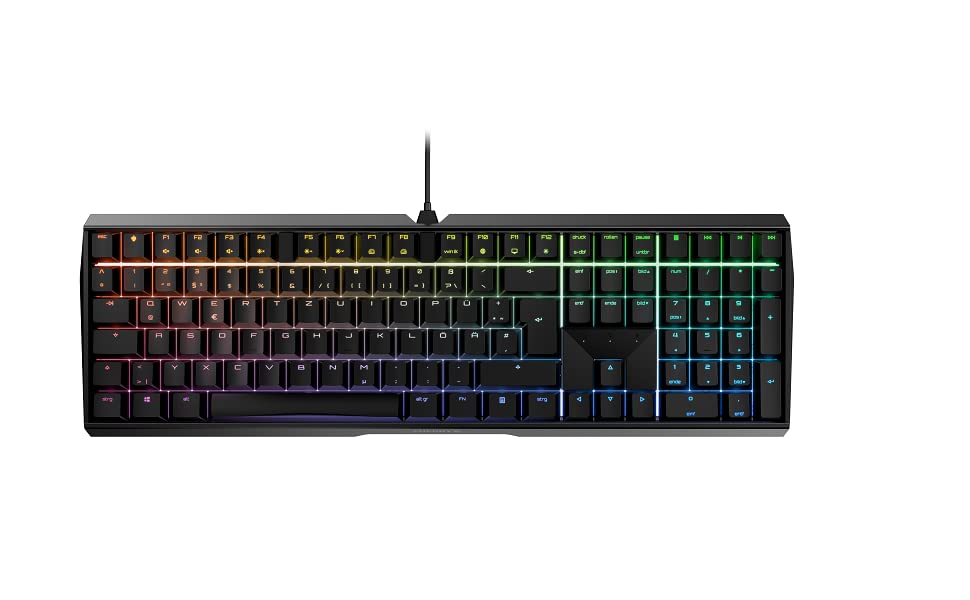
The MX Board 3.0 S is a wired mechanical keyboard featuring authentic Cherry MX Red Silent switches for ultra-quiet, linear keypresses. Its robust extruded aluminum housing with screw-in metal legs guarantees stability and durability, while RGB backlighting offers over 16 million customizable colors. Designed for both gaming and professional office use, it includes abrasion-resistant keycaps and a detachable mini-USB B cable, making it a premium choice for millennial professionals seeking precision, style, and longevity.




| ASIN | B08YRRLV25 |
| Additional Features | Backlit |
| Antenna Location | Gaming, Home Office, Office, Programming |
| Best Sellers Rank | #2,299 in Video Games ( See Top 100 in Video Games ) #189 in PC Gaming Keyboards |
| Brand | Cherry |
| Built-In Media | USB Cable |
| Button Quantity | 109 |
| Color | Black |
| Compatible Devices | PC |
| Connectivity Technology | USB-A |
| Customer Reviews | 4.6 out of 5 stars 798 Reviews |
| Enclosure Material | Extruded Aluminum |
| Generation | 3rd Generation |
| Hand Orientation | Ambidextrous |
| Item Dimensions L x W x H | 16.93"L x 5.51"W x 1.42"H |
| Item Height | 1.42 inches |
| Item Type Name | Mechanical Gaming Keyboard |
| Item Weight | 2.26 Pounds |
| Keyboard Backlighting Color Support | RGB |
| Keyboard Description | Gaming |
| Keyboard Layout | QWERTY |
| Manufacturer | CHERRY |
| Model Name | CHERRY MX BOARD 3.0 S |
| Model Number | G80-3874LWAUS-2 |
| Number of Keys | 109 |
| Number of Sections | 7 |
| Power Source | Corded Electric |
| Processor Count | 1 |
| Style Name | Classic |
| Switch Type | Linear |
| Theme | E-Sports |
| Unit Count | 1.0 Count |
| Warranty Description | 2 Years |
H**Y
Feels good
Great so far- the heaviness and quality of the keyboard is excellent. It is definitely worth the price for the quality. You are getting mechanical keys that do not make much sound if any- I think the only sound comes if you're taping very fast or mashing. I don't like the location of the FN key, I think its a bit too far but that will just take some getting used to. Keys are soft and comfortable, but I would appreciate if they were a little taller or not as sloped. I also wish the pegs that came with for the incline were a bit taller as well. RGB filters are pretty good, I just wish there was more filter/ pattern options that don't have the keyboard go dark for a bit. RGB settings can be adjusted and personalized when you download the hardware- link included in instruction manual- but even when I increase the speed of the filters I still find the majority of patterns boring. I only really like 2 of them. You can change to ANY color light if you pick one solid color which is nice since I like an orchid pink and that isn't common of a color on RGB items. My last keyboard was a very old Apple keyboard, likely the 2001 model and I loved that it had USB ports. My boyfriend told me it is not common now for keyboards to have USB ports anymore but just in case.. if that is a feature you looked for (I tried but none of the review or stock photos showed the back side of the keyboard) just know it does not have that function. I think if you really want a keyboard to last you for a while you should try this one. I'm glad I picked this one over the others I was considering.
T**E
Fabulous keyboard!
I winced a bit about spending north of $100 for a keyboard, but I wanted a Windows keyboard with backlighting and I didn't want a "chicklet" keyboard because they tend to be "bouncy:" sometimes, a key press results in no letter at all, other times, too many. I'm not a touch typist, so reliable results from a key press matter. I also wanted a full-sized, three column keyboard, and wired because a wireless keyboard needs battery changes or charges annoyingly often and it works only intermittently with my KVM. This one fit the bill on all counts. What I received is impressive. It's impressively heavy, heavily (and beautifully) built, and it has great haptics. The keys aren't silent, but just on the right side of quiet. They don't "clack," it's more of a "whump." They provide good feedback and offer just the right amount of resistance. Apparently, it's also cleanable (I'll find out once I spew or dribble coffee on it). The light show annoys me (personal preference) but it can be tamed quickly via the app which installs near-automagically at a press of the Cherry key. I also appreciate little thoughtful details such as the feet that can be screwed in to change the keyboard's angle. I thought that I'd have to stuff the rubber feet into the raised feet after removing them to expose the threads, but no, the the threaded feet come with their own. Additional tweaks can be accomplished via the app. I'll use it for gaming now and then and am likely to appreciate the ability to assign custom functions to hotkeys and to store those in different profiles. However, for everyday use, this has ticked every single block. I don't wince anymore; I've paid a reasonable(ish) amount of money for a thoughtfully designed, very high-quality product.
A**B
Great keyboard, solid purchase, no complaints.
Oh wow! I really like this keyboard so far! Let’s preface this with the fact that I am not a gamer. I work from home and type a lot. I searched high and low for something that would make typing comfortable and allow me to keep up my speed with accuracy. This keyboard did not disappoint. It has tiny risers you can use and it gives the board just enough height for me to type comfortably without slowing me down or sacrificing accuracy. It is not super loud and it has makes just enough noise to have that rhythmic click that seems to help me focus when I type. I can’t explain that part. It is not so loud that I make others around me crazy either. The other thing I like is it is rather responsive and I do not feel like I need to press hard on the keys to complete the task. My fingers move more easily when typing as I am not having to press so hard on the keys. The keyboard has some weight to it so it certainly does not move on my desk. Not unless I physically pick it up and move it. Even with vigorous typing it does not move or slide around in the desk like some keyboards. I have not changed the color of backlights yet. It has a rainbow wave type pattern that I like so far. I know it can be customized to my liking and seems like the instructions are straightforward to make any needed changes when and if the time comes. Overall I am happy with this purchase and if anything goes wonky, which I don’t think it will, I will update my review. But so far it has been a a solid purchase.
G**S
The perfect keyboard
I love this keyboard. It feels very functional and responsive when pressing the keys, but with almost no sound. It’s great for headphone gamers that way I don’t annoy my wife with all the clicking. The build quality is also incredible. Plus, it’s weighted and never slides. If you’re looking to invest in a great keyboard without breaking the bank, this is a must-have and will last you many years.
D**S
Cherry MX 3.0 S: Robust, Solid, Stable…Quiet, But Not Quite “Silent”
My taste in keyboard feel runs toward mechanical key switches with a distinct tactile bump-through and an audible click, as with the Cherry MX Greens and Blues – but that click is for home, not for the office, where a good neighbor doesn’t use a clicky keyboard. Good office neighbors choose quiet key switches. So I used to use the rubber-dome-type keyboards, the best of which, in my experience, was the Logitech K740, quiet and with adequate tactile feel. But rubber-dome keys wear out (I’ve had three of those boards), and the K740 is now a collector’s item. Hence, I looked around for a mechanical keyboard using the Cherry MX Silent Red switches. In the good old days, I would have ordered a custom board from WASD Keyboards, but those folks, sadly, appear to be out of business. There are good-quality boards from many brands using other Cherry switches, but darned if I could find any others with the Silent Reds – the regular Reds, yes, but the Silent Reds are rare. That’s why I bought this board, one of Cherry’s own, and using the Silent Reds. (It’s available with other Cherry switches, too.) About these switches: I am informed that “linear” switches – no tactile bump, just a smooth swish to the bottom of travel – are preferred by many gamers. That’s not what I am, and as above, I like a tactile bump on the way down. But one learns by trying, so I’m getting used to the linear feel of these keys. How is the board otherwise? It’s metal-bodied, heavy, solid, and stays put. If one is used to relatively flat rubber-dome keyboards or laptop keys, one might want to add a wrist rest to use with this “taller” board, and if so, that’s easy. The board comes with optional screw-in metal feet to raise the rear edge slightly, if desired. But then there’s the blaring, candy-colored rainbow backlighting in the product description’s photos. In action, this actually moves, and it’s the out-of-the-box default. If you’re a kid trying to impress other kids, okay, that’ll do it. If you’re an adult and trying to concentrate on work, you’ll want to turn this into something else. Fortunately, the documentation explains that with a simple key combo you can cycle through many variants of colors and moving patterns, two of which, thankfully, are “off” and “just constant white backlighting, please.” I’ve included a couple photos of the keyboard with the latter turned on, and that’s how I run it at work. Reminds me of my WASD Code Mechanical board at home. (In the first photo, taken from directly above, some red is “leaking” around some of the keys. This seems odd, but it isn’t a factor when working with the keyboard from one’s normal viewing angle, as seen in the second photo.) Finally, are the Cherry Silent Red key switches actually silent? Well, no. When a key hits bottom there’s a subtle thump, and the keys have the usual mechanical freeplay. Office neighbors close by will know when you’re in action, albeit only if they are themselves bored. Suffice it to say that these Silent Reds are more quiet than other mechanical keys, even regular Reds or the stiffer Blacks, and also more quiet than the tactile-bump non-clickers such as the MX Browns. I should add that one can download some optional Cherry software that makes a wide range of customization possible. But that isn’t necessary for simply changing the color scheme, and I haven’t any use for customization, because I use several other machines and keyboards and so must be satisfied with the standard layout and function. So to sum up, this is a robust and solid board with mechanical key switches that, unlike rubber-dome types, will never wear out. The key feel is consistent across the board, every press the same. The key action is smooth and…almost Silent.
C**.
My favorite keyboard I've purchased
I don't like keyboards that click clack too much, so this one is really nice. It has the perfect sound and touch. I love the silky feeling of the keys and the quality overall. I also love that I can program the lights individually as well. ❤️ I use it for work and gaming. It works completely fine both ways. If cherry comes out with cute keycaps I will definitely love to purchase them. Overall I think it's a quality keyboard and worth the price.
N**O
Beautiful keyboard
The Cherry MX Board 3.0 S offers a premium typing experience in a clean, professional package. The full-aluminum case and doubleshot keycaps feel incredibly sturdy and durable, providing a build quality that stands above much of the competition. The genuine Cherry MX switches (I chose Reds) deliver reliable, smooth performance for both typing and gaming. The slim design is perfect for saving desk space without sacrificing the Numpad. Bottom Line: A fantastic, high-quality board for those who value an elegant design and genuine Cherry reliability over aggressive "gamer" aesthetics. A solid workhorse that performs where it counts.
E**L
Silent - Wife Happy
I had been using a Corsair K70 RGB MK.2 for the past two years, with Cherry Speed switches. My wife’s computer is next to mine in our office and, yeah, it was time to say goodbye to it, due to how loud it was. Unfortunately, despite it using cherry switches, they weren’t replaceable. In comes the MX 3.0s (wired) with silent cherry switches. Night and day difference. Pros: - Very quiet (with Silent Cherry switches) - Build quality - Software is easy to use, minor quirks. - Lighting is beautiful. - Assignable keys, with text and macros, too. - Calculator, Cherry and 3 multimedia keys. - 11 RGB modes are built into the keyboard plus one per key customizable mode. - Once you reassign keys and/or adjust lighting modes and apply the settings, the keyboard will remember them. In other words, you don’t need the Cherry Utility software loaded at setup. For example, I made the track up/down/stop buttons to be volume up/down/mute. These volume keys exist as commands on the Fn-keys, but I wanted them separate. Cons: - USB connector. It is detachable, but you’ll need to find a specific cable. I bought a 10’ braided micro-USB to USB but it wouldn’t fit into the keyboard’s deep socket. The narrow opening versus the sheathing around the cable didn’t mesh. I ended up using a USB extension cable to provide the extra length I wanted. - The lighting is gorgeous, but the white is more cool white… if it matters to you. - The optional wrist rest… hard to find, and it’s optional. More below. I’d buy this again and would recommend it. So, the optional AC 3.3 wristrest…. Cherry America hasn’t responded to my US availability inquiry and if I could buy it direct from them.. It’s been several days. You can’t find this thing anywhere in the western hemisphere. I ended up changing regions in Amazon to UK and bought the silver/white AC 3.3 accessory for $29 shipped (standard delivery to the US). It was onsale for $14 plus another $15 in shipping. It arrived in new condition within the week.
Trustpilot
2 months ago
1 month ago



