
DOWNLOAD THE APP


Customer Services
Copyright © 2025 Desertcart Holdings Limited
DOWNLOAD THE APP

🚀 Stay ahead with blazing-fast, cable-free internet—wherever life takes you!
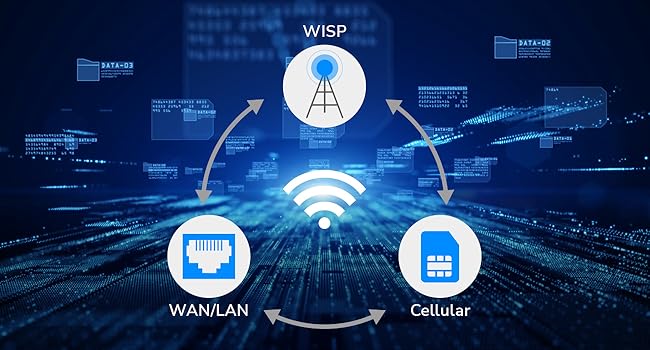
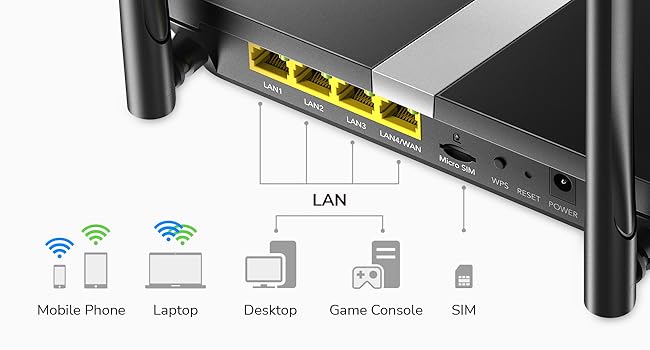
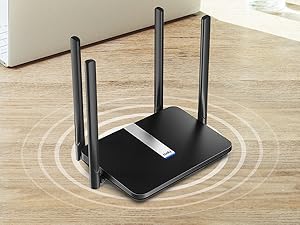
The Cudy AC1200 Dual Band 4G LTE Router (model LT500) delivers up to 150Mbps LTE cat4 speed and dual-band WiFi (867Mbps on 5GHz + 300Mbps on 2.4GHz) with four high-gain antennas for superior coverage. Featuring plug-and-play SIM support, 4 RJ45 Ethernet ports, and advanced VPN clients, it’s designed for seamless, secure connectivity in locations without cable internet. Ideal for professionals needing reliable, fast internet on the go or in temporary setups.










| ASIN | B089JW8H4N |
| Antenna Location | Commercial |
| Antenna Type | Fixed |
| Best Sellers Rank | 12,565 in Computers & Accessories ( See Top 100 in Computers & Accessories ) 90 in Routers |
| Box Contents | No |
| Brand | Cudy |
| Brand Name | Cudy |
| Colour | Black |
| Compatible Devices | Laptop, Security Camera, Smartphone, Tablet |
| Compatible devices | Laptop, Security Camera, Smartphone, Tablet |
| Connectivity Technology | Ethernet |
| Control Method | App |
| Controller Type | App Control |
| Country of Origin | China |
| Coverage | wide |
| Customer Reviews | 4.2 out of 5 stars 2,848 Reviews |
| Data Transfer Rate | 150 Megabits Per Second |
| Frequency | 5 GHz |
| Frequency Band Class | Dual-Band |
| Frequency band class | Dual-Band |
| Global Trade Identification Number | 06971690791209 |
| Has Internet Connectivity | Yes |
| Has Security Updates | No |
| Is Electric | Yes |
| Is Modem Compatible | Yes |
| Item Dimensions L x W x H | 25L x 13.9W x 3.6H centimetres |
| Item Weight | 308 Grams |
| LAN Port Bandwidth | 100 megabits_per_second |
| Manufacturer | Shenzhen Cudy Technology Co., Ltd. |
| Maximum Upstream Data Transfer Rate | 50 Megabits Per Second |
| Model Name | LT500 |
| Model Number | LT500 |
| Model name | LT500 |
| Number of Antennas | 4 |
| Number of Ports | 4 |
| Operating System | RouterOS |
| Other Special Features of the Product | Remote Access |
| Product Warranty | 2-Year Warranty |
| RAM Memory Installed | 128 MB |
| Router Firewall Security Level | basic |
| Router Network Type | wireless, cellular |
| Security Protocol | WPA2-PSK |
| Special feature | Remote Access |
| Unit Count | 1.0 count |
| Voltage | 12 Volts (DC) |
| Wireless Compability | 802.11a/b/g/n/ac |
| Wireless communication standard | 802.11a/b/g/n/ac |
S**E
Router for our caravan
We have been wanting to sort internet access at our caravan for some time. After sorting a good data sim deal I purchased the Cudy LT50. It was very easy to set up, on powering up, the led flashes red then steady red as it makes the connection, then once internet is established it turns to steady blue. This gives you a clear indication of the set up stages then completion. The signal strength took a bit to settle down and because the caravan is a metal shell it seems to works best near the window side of the unit. I also adjusted the 4 antennas to get the optimal signal strength. We watched a whole series on ITV X last night with absolutely perfect streaming, no buffering whatsoever. I connected the TV with the supplied Ethernet patch cable, but the WiFi works well with our mobiles and laptops. Adequate speed and very good area coverage, it works well outside too. All in all very good value and painless set up. Can definitely recommend it.
C**L
Mega Impressed
I was coming to the end of my Sky Broadband contract and didn't want to commit to another 12, 24 month contract as my house is for sale and I will probably move into temporary accommodation. So I was looking for something that could support up to 3 people WFH, TV streaming (I have Sky Stream,2 Fire Sticks and Hive all depending on access to the internet. After carrying out research I thought that a Netgear Nighthawk M1 would be good, so got one on eBay at around £130. Although it worked, the signal was not that great around parts of the house: but one of the key reasons that I re-sold the Netgear, was that every 24 hours the PPP connection (via the SIM card) was reset, but the Netgear router could not deal with this and needed to be manually reset. So I then came across this Router, which had plenty of good reviews. So I ordered one and set it up (which was really easy). Unlike the Netgear, the signal was better around the house, but importantly it automatically dealt with the PPP reset without the need for me to do anything. The router has easily dealt with everything that I have thrown at it - I do not see any difference between fibre broadband (I had 150Mbs) and the Cudy router using Tesco Mobile (on O2) - the speed is less - I think on average it is around 50Mbs, but everything works very well. Certainly I have had no complaints from anyone WFH, and Sky Stream (connected via power line adapters) is as responsive as it was previously. And the biggest surprise - this is a lot cheaper than I was going to have to pay to Sky. I have a Tesco Mobile unlimited SIM for only £20 per month, which is just as well as I have gobbled up over 40Gb in just over 2 days!
Z**N
Honestly not a bad piece of tech
I currently live on a farm with no internet access so I had to go for something that could use sim cards and compared to other routers I’ve had previously this one has been the most successful. From a technical standpoint: I went from getting 3-10 mbs to getting 40-50 with this router. And for someone who likes to do online gaming I’ve had no issues with input delay or drops. Issues I’ve encountered: The main 2 issues I’ve had is one there is no off button and the reset isn’t a button so you have to put a pin in it. And the other issue is when running the router for too long like a day the speeds reduce heavily when playing games from getting 40-50 ms in game to 200 if it’s left on over night. The common fix I’ve found is just to disconnect the sim when not using the router. Conclusion: Honestly I haven’t tried it connected to a modem with wps but for the sim card feature it works really well, and it was so easy to set up i believe it too 5 minutes. I’d really recommend picking this up if you are looking for good quality network connection in remote areas.
G**R
Easy Install And Works
Update: 8 months on and still going strong. Never has needed a reboot and I use it for Teams meeting for work and other stuff :) Initial Review: Great affordable router , very easy to install using WiFi option. I bought a Lebara unlimited Data sim (runs on Vodafone network) from Uswitch website for a promo price for 3 months. Anyway router is great, offers both 2.4 and 5 G WiFi connections. I am using 2.4G on my mobile and I tested the router signal from all over the house and strength is STRONG and using my sim I’m getting 10M downloads via router. Websites are fast and YouTube streaming works great too. So you can try different SIM data cards depending on your network coverage , but router itself is great so far in day 1.
D**N
Nowhere near 867 Mbps in real use
This router is advertised as “867 Mbps (5GHz)”, but that figure is basically meaningless for actual internet speed. In real-world use the unit is crippled by 10/100 (Fast Ethernet) ports, so even with a fast broadband line you’ll hit a hard ceiling below 100 Mbps. On a 500 Mbps connection it never got remotely close, and Wi‑Fi topped out around ~70 Mbps. Yes, “867 Mbps” is a theoretical Wi‑Fi link rate under ideal lab conditions, but selling it like a performance expectation is misleading when the hardware cannot route anywhere near that speed because the WAN/LAN side is only 100 Mbps. This product should be marketed clearly as a 100 Mbps router, not with big AC1200/867 Mbps numbers that suggest high throughput. If you have anything above ~80–90 Mbps broadband, avoid. If you need 500 Mbps, buy a router with gigabit WAN and LAN.
R**.
Strong 4g signal required.
It is not "blazingly fast" as described on the box. This is only a class 4 router. If you are over 1km from a mast you will get a slow speed. No issues with the WiFi though. Product support good though.
C**R
I cannot believe how well this works!
Worth every penny! I had HUGE problems with my fibre broadband provider , super slow speeds and no internet whatsoever at times! I was a bit nervous and reluctant to change from fibre broadband to a sim in a router as it felt risky I need not have worried at all set up was SUPER easy , just put sim in slot after plugging in , get password from the bottom of router and CONNECT and Bob is your Uncle lol I was soooo nervous about speeds after struggling SO much on fibre broadband in my area but I am currently upstairs as far away from the router i ever WILL be and it is still LIGHTENING fast , so much so i am just getting used to it still , it is faster than it has ever been like blink of an eye fast which I am NOT used to at all!! I am shocked and in awe of this unpretentious basic looking router which works and absolute treat :-) Beyond happy and signal is remaining strong and not dropping at all after MONTHS on 'medium' signal with my fibre broadband provider plus I am saving money on my contract!! Unlimited data , just hope I do not go over the fair usage policy , but we will see , as have an internet hungry teenager ( not gaming but watching Youtube all day , as do I actually , sort of lol ;-) ) I HIGHLY recommend this router and if I can set it up , anyone can!! The plan contract I am on I can take a risk as if I go over the FUP I can just downgrade the plan for an £8 a month mobile phone one and stop my other phone one , then look for another solution , but lets hope we stay within the FUP :-) :-) Thanks Cudy
N**S
Easy to use, plug in and play...
Simple to set-up... insert any voice or data only SIM, plug in and switch on wait two minutes and away you go... Easy to set up control panel via the app. Giving me very good WiFi 5 or 4 throughout my small to medium size house with two floors. Very good for the price. I would very much recommend this WiFi router with SIM card slot.
Trustpilot
3 weeks ago
5 days ago