Some deliveries may take a little longer than usual due to regional shipping conditions.

DOWNLOAD THE APP


Customer Services
Copyright © 2025 Desertcart Holdings Limited
DOWNLOAD THE APP

⚡ Power up your network with speed and silence — the future-proof switch you deserve!
The NETGEAR MS108EUP is an 8-port Multi-Gigabit Ethernet switch featuring four Ultra60 PoE++ ports and four PoE+ ports with a combined 230W power budget. It supports 1G and 2.5G speeds, offers a fanless design for silent operation, and includes a user-friendly managed interface for advanced network configuration. Ideal for professionals seeking reliable, high-performance networking with lifetime hardware protection and expert support.


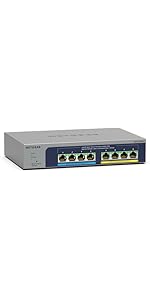

| ASIN | B09M1JMJS7 |
| Are Batteries Included | No |
| Best Sellers Rank | #96,602 in Computers ( See Top 100 in Computers ) #629 in Network Switches |
| Case material type | Metal |
| Color | Gray |
| Customer Reviews | 4.3 4.3 out of 5 stars (67) |
| Data transfer rate | 2.5 Gigabits Per Second |
| Date First Available | 29 November 2021 |
| Interface type | RJ45, PoE, PoE+ |
| Item Weight | 898 g |
| Item model number | MS108EUP |
| Item weight | 1.98 Pounds |
| Manufacturer | Netgear |
| Maximum power | 57.5 Watts |
| Product dimensions | 21.1L x 14W x 4.1H centimeters |
| Series | 8-port Ultra60 PoE++ Multi-Gigabit (2.5G) Ethernet Plus Switch |
| UPC | 606449156942 |
| Voltage | 120 Volts |
K**K
Works great for my home network. I just need a switch that can configure vlan and support 2.5gbe this works perfectly. Plus, it has POE and POE+. There are not many cheap options on the market but I got it with heavy discount from Amazon Warehouse. Really nice
J**R
Upgraded a segment of my LAN to 2.5GB speed and needed a managed switch.. Switch works fine, is PoE but I'm not using it for PoE currently. Just for a couple of VLAN's I run. I have a GS108PEv3 that I use for PoE cameras in my attic. The only reason I mention the GS108 switch is that it is also managed and VLAN's are a snap to set up and fairly intuitive if you've worked around them. This MS108EUP management console has an attractive interface but the VLAN setup is just not intuitive at all and PVID settings are in a weird place. Ultimately I got it set up and it didn't take too long but it is a real head scratcher. Also mine needed a firmware update out of the box as well. Actually seemed to be a couple versions or more behind. Netgear makes decent managed switches but the cost for PoE, Managed, and 2.5GB is kind of crazy for an 8 port switch and of course one port gets lost just hooking it to the network, so I call it a 7 port switch. It works, and it works fine but for the cost there should be a couple more ports. Last thing.....you get 4 60 watt PoE ports. That = 240 watts. You get 4 30 watt ports. That = 120 watts. That is 360 watts total. The actual budget for the switch is 230 watts total so you certainly can't max the switch out. If using for PoE just crunch your numbers first before buying. I'm happy with the switch but in my mind it is a $180 switch, not a $250 switch.
R**Y
I would give it 5 stars but why Netgear designed it with no vents and / or fan kind of worries me. I found out the hard way to never stack this on another piece of equipment since my internet connection kept going down. I found out in case that happened, I would just log into the switch and select reboot and the connection came back up. I have since then repositioned the switch and so far, so good. I like the fact that it is 1)2.5Gbe 2) POE and 3) managed. So it can do VLANS. Since I'm new to VLANS, I watched a few videos before receiving the switch. After a few tries, I finally got it the way I want. So to those that are just starting out and expanding from an all in one firewall / router / wifi box, get something like this. Setting up vlans... the basics so remember this... T = tagged (or just say trunk); imagine a tree trunk and all of your vlans are running through the trunk from the firewall / router to this switch. Then the vlans branch out. Ports to a computer can be thought as leaves. Okay, enough with the tree analogy. Also, a port that runs to another managed switch can be tagged as well. A "regular" switch will be untagged. U= untagged (or let's just say access port). And you can set a port / ports to a certain vlan or vlans. The connection from your firewall / router to this switch must be set to Tagged. Your computers will be untagged. An access point like a Unifi will be set to tagged if you have vlan traffic. E= exclude - excludes ports from the vlans. Lots of vlan videos on youtube so go watch them if you're getting your feet wet. :)
A**R
Gets warm when under full load but nice piece of gear.
F**4
Arrived undamaged and as described
Trustpilot
1 month ago
2 weeks ago