
DOWNLOAD THE APP


Customer Services
Copyright © 2025 Desertcart Holdings Limited
DOWNLOAD THE APP


🚀 Unlock Triple Display Power & Lightning-Fast Charging — Your Ultimate Workstation Upgrade!
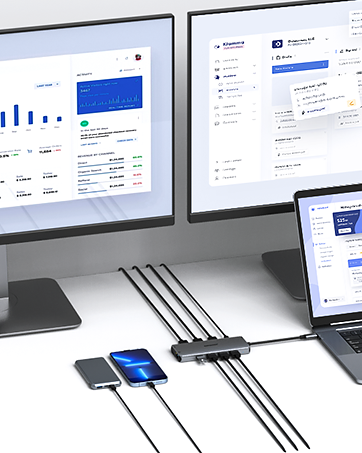
The ABIWAZY 14-in-1 USB-C Docking Station is a powerhouse hub designed for Dell, HP, Lenovo, and Surface laptops. It expands a single USB-C port into dual 4K HDMI outputs, VGA, multiple USB 3.0/2.0 ports, Gigabit Ethernet, SD/TF card readers, and a 3.5mm audio jack. With up to 100W Power Delivery, it charges your laptop while supporting triple display setups and ultra-fast data transfers, making it the perfect all-in-one solution for professional multitasking and seamless connectivity.



| ASIN | B09WDCH35N |
| Best Sellers Rank | #5,735 in Electronics ( See Top 100 in Electronics ) #101 in Laptop Docking Stations |
| Customer Reviews | 4.1 4.1 out of 5 stars (3,904) |
| Date First Available | March 24, 2022 |
| Item Weight | 2.12 ounces |
| Item model number | AB0218 |
| Manufacturer | ABIWAZY |
| Product Dimensions | 6.5 x 3.54 x 0.71 inches |
I**Y
Nice HUB with ability to use on USB c for data and another for Power.
Not sure what all it can do but I used it to recover information from a Samsung galaxy note 10 plus with a broken screen. It also works for Samsung DEX, basically turning the cell phone into a LAPTOP where a normal Laptop may not have all the Applications.
E**E
Transformed My Work Setup – Highly Functional and Reliable!
I’ve been using the ABIWAZY USB C Docking Station for about four months now, and it has completely transformed my work-from-home setup. This 14-in-1 hub is an absolute powerhouse! It turns a single USB-C port into 14 functional ports. The dual monitor support is a game-changer for productivity. I can easily connect two 4K monitors (or three with VGA) and multitask like a pro. I also love the Gigabit Ethernet port—it provides a stable, ultra-fast wired connection that’s way more reliable than Wi-Fi. The build quality is solid, and everything works as advertised. If you’re looking for a reliable, feature-packed docking station, this one is worth every penny.
B**O
Short LIfespan - didn't even last 2 years.
Hello All, EXCELLENT CUSTOMER SUPPORT. They refunded half my money. I am raising the stars because of the customer service. My original review is below in quotes. I had originally gave 2 star because it only lasted for a year and 11 months but started failling maybe after a year and a half. At the beginning it worked great. Real nice device. It did get hot. But still worked. Again a real nice product. I almost feel like there is something that is causing these things to fail early. I had a ThinkPAD docking station at Intel and it lasted for at least 2.5 years. The whole time I worked there. So I was expecting this to work for the same amount of time. "It only lasted a year and 11 months. The USB ports don't all work. Sometimes only 1 monitor works. Now the ethernet port does not work. It did get warm often. I have not reached out to the vendor yet."
R**4
Excellent Docking Station with So Many Slots
The docking station is superb and totally compatible with my Lenovo Yoga laptop. So many slots that have come in handy in the several weeks I have had it. HDMI, ethernet, USB, etc. All work very well.
M**S
This device burned my USB C Port
I normally wait a few months before writing a review. Everyone goes thru the "honeymoon" phase when they buy a shiny new toy. It's only after a few months that you really get to see if the "shiny new toy" was worth the hard earned money you spent on it. Yea, it worked great & as expected for about a month. However, I immediately noticed that my laptop was complaining about an inconsistent charging by displaying an exclamation on the battery. I pulled the charger from the device and plugged it directly to my laptop to avoid any charging issues. It was still in the "honeymoon" phase and I didn't let it bother me. This should have been a red-flag for me. One day (shortly after having it plugged in for a month) the 2 monitors I had plugged into this device stopped working. I'm an extremely technical person so I started doing some troubleshooting. It works when I plug it into another laptop. Same symptoms with charging. I plugged in the monitors directly to the laptop using the one HDMI connection available. Both monitors work perfectly fine individually. I plugged in each monitor using an HDMI -> USB-C cable. This was the original setup that worked perfectly fine. I was just trying to reduce the number of wires that I had to plug and unplug on a daily basis. However, the port just wasn't working. Each monitor was not being recognized using the HDMI -> USB-C Cable. After a month of having this device plugged in the USB-C port on my laptop is no longer working. I've tried using other USB-C devices and they don't work using the the same port that this device was plugged into. Luckily it's my work laptop which is probably worth a $couple thousand. I just need to let the I.T. Dept know it's not working to get it replaced - it's an inconvenience but had it been my laptop I would've been much more upset.
E**R
Stopped Working :( CUSTOMER SUPPORT AWESOME!
Worked since i bought it on August 18th with no problem. Setup was easy and worked immediately with dual HDMI monitors. Then, just yesterday, one of the HDMI ports stopped working. I switched up monitors, changed cords, did all the troubleshooting stuff, but that's it. Interestingly, for a couple of weeks, both of my connected monitors would flash on and off, on and off, on and off--then sorta do a reset and work for a bit longer. Now, it seems that perhaps it was failing during that time because now the HDMI 2 port just doesn't work. I have contacted support with ABIWAZY and will update this post if things get resolved. Frankly, I would use it again in the future, but after just over 5 weeks it shouldn't have failed. Not sure if this is a buyer beware--Afterall, things fail from time to time, so if the warranty doesn't replace it THEN I would say perhaps try a different one... I will update soon! ***UPDATE*** I contacted their customer support and Alice contacted me very soon after--she asked questions and understood that one of the HDMI ports stopped working and said she would ship a replacement. This was just last night (9/26) and this morning (9/27) there was a new one on my doorstep! wow--thank you!
M**N
Does what it says on the box
V**R
Ich wollte meinen Lenovo Laptop mit 2 meiner externen Monitore verbinden. Bisher konnte ich nur einen externen Monitor über die HDMI Schnittstelle verbinden, aber wozu habe ich 2 externe Monitore, wenn ich sie nicht nutze. Ein Original Lenovo Dock kostet 250+ Euro, deshalb habe ich mir dieses kleine schlanke Teil gekauft. Kosten waren völlig ok, und es hat alles underbar funktioniert. Strom an das Teil, das USBC Kabel in den Lenovo (und er bekommt damit auch Strom) und die beiden Montore via HDMI an das kleine Teil angeschlossen - und ich konnte mit 3 Monitoren arbeiten (2x extern, und 1x intern). Windows 11 hat beide Monitore sofort als externe Monitore erkannt und ich konnte meinen Screen auf 3 getrennte ("erweiterte") Monitore ausdehen. Perfekt.
M**N
Good! Exactly as ordered
R**T
Prima
C**N
1. Pour quel appareil utilisez-vous l'adaptateur ? Lien avec mes PC Lenovo et Dell avec souris, clavier, imprimante, écran via HDMI, Casque USB 2. L'adaptateur a-t-il compatible / fonctionné bien avec votre appareil ? Oui, mais pour le Dell il faut le chargeur réel en plus 3. Comment l'aimez-vous ? C'est parfait pour connecter tous ces appareils car les nouveaux PC manquent de prises ainsi tout passe par la prise USB-C qui connecte la station
Trustpilot
3 weeks ago
3 days ago