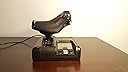
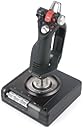
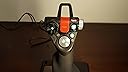
I bought this flight stick along with a Saitek Pro Flight Rudder Pedals , as a replacement to my older Saitek X45. Some misfortunes or bugs with previous versions, the Saitek X45 had a very stiff spring within the joystick causing significant problems. Also, the X45 suffered a loose connection on the throttle controller connector to the joystick, and had to resplice the cable. The Saitek X36 only had 32 bit drivers, but there are open source drivers with the additional bug of not being Signed Drivers, causing boot problems with later versions of MS Windows. These previous controllers had the wonderful embedded rudder within the throttle. So far, I am extremely impressed by the quality of workmanship after just a few hours! Initially, I thought this was going be another plastic toy I was going to live to regret purchasing. # lsusb -v Bus 003 Device 003: ID 06a3:0762 Saitek PLC Saitek X52 Pro Flight Control System idVendor 0x06a3 Saitek PLC idProduct 0x0762 Saitek X52 Pro Flight Control System Linux Driver: joystick Windows Driver: Windows Update and Saitek Website. Both, Windows Update and the Saitek Website drivers are the same. Pros: 1) The colors and lighting are very conservative. As opposed to the color of the X45 looking like a toy from a childs' toy boxes. (NOTE: Many of the photos of this joystick on the Internet, have the LED's at maximum brightness. It is far more likely common to significantly reduce the brightness within the driver settings.) 2) The main joystick spring is much lighter than the X45, fixing the previously mentioned bug. Matter of fact, I just noticed the main joystick rod is made of metal, which effectively allows for a smoother bearing surface compared to using plastic! Any future problems can be easily mitigated by a drop of oil. 3) On MS Windows 8, Saitek drivers installed easily and cleanly, separate of any bloat ware. (ie. Other less useful or possibly buggy software.) 4) There are three colors within each of the LED lights! (ie. Green for Common Buttons, Yellow for Counter Measures, Red for Fire or Braking.) With the numerous buttons, this helps to identify buttons that are not easily labeled! 5) A three toggles at the base of the joystick, providing an additional six switches. (ie. Map one toggle to recenter view.) 6) Mode switch might be more well placed near the joystick top hat axis, with an associated three color blue purple red to each of the three modes, to help identify which mode the joystick is currently in. 7) Throttle display, displays three time zones including GMT. 8) Main triggers have hardware mechanical switching, while other buttons have similar quality switching mechanisms. All of which, seem to be superior to previous models of this joystick! 9) The twist rudder within the joystick, can be disabled by a sliding mechanism within the joystick. (ie. You have rudder pedals or prefer to fly without rudder.) I have noticed, it's best to use the joystick twist rudder when flying helicopters. Using additional rudder pedals might provide additional rudder control, during times the twist rudder is commonly inadequate during stressful flight dynamics. Flying helicopters without the embedded throttle rudder or joystick twist rudder, solely depending on floor rudder pedals, is almost virtually impossible or extremely difficult within the current computer simulations or games. Cons: 1) NO Embedded Rudder Controller within the Throttle Handle! The rudder is now embedded within the main joystick axis as a twist, which is hated by most. However, was likely engineered to free the throttle handle for other features, buttons and axis. Workaround is to buy a set of rudder peddles, and will likely provide a better simulated experience? 2) Not sure if MS Windows 8 provides default drivers for the joystick or rudder pedal for this X52, but if they do, they will likely omit such features as controlling the LED light levels and colors, for which most of us dislike not needed bright lighting. Also, default Windows drivers will likely omit setting the throttle time zones. 3) Stupid safety cover for the fire button. On my X45, I simply taped the thing in the open position. (Who cares if I accidentally use it? It's just a game. ;-) On this X52, the cover does halfway stick open and has a neat effect of turning the LED green when closed. 4) My throttle LED display flickers. All other LED's have a steady consistent glow. No apparent loose connections and have tried multiple powered USB ports. This looks to be due to the dimness of the LED display on the throttle, being lowered further than it's specifications causing a flicker effect. (I'll choose to ignore the flicker, as I prefer the dim display.) 5) I brought the device from outside 30F temperatures and all knobs were very stiff. After warming to ~69F, the knobs moved much more easily. 6) There is a catch at minimum and maximum thrust axis. Likely for locking the thrust and preventing further movement of the thrust axis when on ground, or locking into afterburner or maximum thrust while in flight. But over all, it might be more annoying to some, such as when flying a helicopter. (Shrugs, not really much concern currently.) 7) The style or feeling of gripping the controls at first, seems a little awkward as compared to previous versions; such as the X36 and X45. After a few hours or so, I'm getting much more accustomed. 8) About the only really significant Con so far and I noticed almost immediately, the two dial knobs on the throttle have a difficult to feel center, due to the center notch or dimple on the axis not being significant enough. The bottom knob on the throttle controller is very stiff and difficult to turn, while the top knob is slightly easier to turn. (Past versions had adequate easily turning knobs with a definite feel for the center of axis.) 9) For the past twelve hours, I ran into a bunch of .NET errors with the Saitek Profiling software, resulting in MS Windows 8 crashes. Avoiding it's usage and only depending on Saitek's drivers, seems to preserve stability. 10) I avoid the Saitek Profiling or Programming software and, at most and when needed I only use Saitek's drivers. Saitek's Profiling software, along with it's interface drivers are subject to cause operating system instabilities. More specifically, the Saitek Programming or Profiler Direct Output or Direct Input driver is the cause of problems. Again, especially users of Windows 8, avoid the Saitek Profiler or Programming software and only install the device driver! (I have been getting operating system crashes with something in reference to "IRQ NOT LESS THAN", I simply uninstalled the software after the second kernel level crash.) So far, Con #8 is probably the only significant degrading factor, but even then, I am still thoroughly impressed! If you have one of the older X36 or X45 controllers, probably a good time to upgrade even though you might have to purchase additional rudder pedals. That's it for now. Again, a very nice product. HACKS AND FIXES 1) Plugs keep pulling out. To prevent this, use a hot glue gun to place a ring of hot glue around the plug. This pretty much solves the problem, but isn't pretty. Additionally, use two eight inch wire ties to tie the plugs wire to one of the empty eye wholes within two corners of both the base units. (Both bases of the joystick and throttle controller have two empty eye wholes.) 2) Can't feel the middle axis for X and Y axis. The throttle controller has had some really excessive grease used on some of the axis, such as the X and Y rotation axis. (ie. "E" and "!" button axis.) The excessive grease prevents the indention device from signalling the middle of the axis. This can be solved by removing the throttle controller cover, using a mixture of small philips screwdrivers, averting having to open the base. Once open, the rotation axis plastic gears and plastic bearing surfaces can be cleaned using something like a 50/50 mixture of Ammonia and vinegar to aide in breaking plastic safe grease. The X rotation axis ("!" button) has a spring indention device that may buckle underneath the bearing surface, or at least mine was malfunctioning due to unsecured plastic pins holding this metal spring in place. Use a hot glue gun to place a small dab of glue at the base of the two plastic pins while making sure the metal spring is raised above the middle of the plastic bearing surface. This ensures the spring relaxes to at least the middle of the bearing surface, while also ensure the spring does not slip off the plastic bearing surface. The Y axis (or "E" button axis) can be cleaned of the excess grease, but to remove all the grease, the four or five tiny phillips screws need to be removed from the face of the button, which are underneath the plastic outer snap-in rippled ring. Care needs to be used to prevent stripping the heads of these screws. Removing and clean is then trivial. When replacing the gears, have the Windows Control Panel joystick game controller software open to find the center of the axis, and then insert the gear and place the spring into the dimple on the bearing surface. 3) Excessive force is required when moving the throttle to maximum or minimal axis. Open the bottom base of the throttle controller. On the plastic plate, there is an indenting device placing force on the plastic bearing axis of the throttle. Lift of the plastic or rubber indenter and you'll find two small springs. You can remove one of the springs. You may also desire to remove some of the grease per #2 above, but I haven't bothered as removing one springs seems have solved this issue. 4) Flickering Lights. I tried looking for loose wires and have found none that I can see. From the amount of grease used on the axis, including electronic axis swivels, it is possible this grease maybe shorting the power from the device. However nothing I do seems to reproduce any flicker. I have found mention on the Cypress Semiconductor website concerning something about a firmware bug within their Cypress Semiconductor CY7C64215-56L TXC controller chip causing problems between 3.3v and 5v devices. Cypress has published a fix, but it's kind of unknown whether Saitek has pushed this fix into their devices. I initially contacted Saitek by email about this issue, but they have dropped subsequent follow-ups for return or replacement. So I've taken it upon myself to figure some of the problems and provide possible fixes. If while removing the covers, you find you need to loosen some wires secured by hot glue from the manufacturer, the hardened glue will break it's bond easily with the plastic parts and wires with a little pressure applied with a small screw driver. Hot glue can then be easily reapplied. 2013.10.16 - I have reduced the star rating from five star to three star after noticing excessive grease used within the X and Y rotation axis on the throttle controller. (ie. "E" and "!" button axis) Also, the throttle axis has too much tension on a indenting device, causing using maximum and minimum throttle to require excessive force. The solution for this problem is to remove one of the two springs providing force on the indenting device. Switching the LED display to use the two lowest level causes the throttle lights to flicker. I'm not sure if it's caused by excessive grease applied to the axis control slider, loose connection, or a bug with the firmware embedded within the Cypress Semiconductor CY7C64215-56L TXC controller chip within the throttle controller. (The firmware bug mentions something about a 3.3v and 5v bug.) Added some fixes.