
DOWNLOAD THE APP


Customer Services
Copyright © 2025 Desertcart Holdings Limited
DOWNLOAD THE APP


🎬 Elevate Every Frame with Pro-Level Monitoring
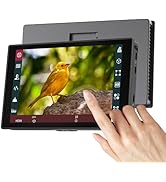
The Portkeys PT5 II is a 5-inch Full HD touchscreen DSLR field monitor featuring 1920x1080 resolution, 400 PPI, and a wide 178° viewing angle. It supports 4K30P input/output and offers advanced video assist tools including 3D LUT, new peaking, and comprehensive waveform scopes (Luma, RGB, Histogram). Lightweight and compact at just 0.28lb, it’s compatible with Sony NP-F and Canon LP-E6 batteries (not included), making it an ideal on-camera companion for professional videographers seeking precise color and exposure control in a portable design.








| ASIN | B0B9BWM1WW |
| Best Sellers Rank | #7 in Video Monitors |
| Customer Reviews | 4.1 4.1 out of 5 stars (702) |
| Date First Available | August 11, 2022 |
| Is Discontinued By Manufacturer | No |
| Item Weight | 1.12 pounds |
| Item model number | PT5II |
| Manufacturer | Portkeys |
| Product Dimensions | 0.72 x 5.35 x 2.83 inches |
| Resolution | 1920 x 1080 |
| Standing screen display size | 5 Inches |
P**Y
Nice monitor for my Canon R6 MK II
I shoot the occasional talking head and solo guitar video and found the rear screen of my Canon R6 MK II too small for self-shooting. I considered a Portkeys model with camera control—touchscreen for auto-focus and other advanced features. But at nearly $400, it was a bit pricey. So the PT6 Camera Field Monitor landed on my doorstep instead. I immediately popped in a spare Canon LP-E6NH battery, jacked in the included HDMI cable, and turned on my camera. Within a few seconds, it was working perfectly in Liveview and video mode without messing around in the TAB menu. Good show! It’s petite—about the size of a smaller smartphone—and very light. It’s mostly plastic, so don’t drop it. The included metal tilt mount is okay—not great—but I have a much nicer one from Smallrig. All the menus, icons, overlays, and AF boxes show up exactly like they do on the R6 MK II’s rear screen, but larger. I have to use the camera’s physical controls to select options or move AF points. The Portkeys touch controls are only for Portkeys functions. I found the image quality of the 5.2" 600nit touchscreen to be excellent. Indeed, better than I expected. I mainly video indoors with LED softboxes, and the 600nit screen proved to be clear, sharp, and plenty bright enough. If you mainly shoot in bright sunlight, you should pay extra for a brighter monitor, but I’m pleased with 600nit for indoor use. All in all, a great little monitor for a Benjamin: easy to use, sharp and clear, petite, and silent (no fan).
P**L
Great little monitor — affordable and super helpful on set
I wanted a small monitor to save my neck, and this did exactly that. Now I don’t have to bend down so much to see my screen, which makes a big difference during long shooting days. It’s cheap, but honestly feels like it’s worth more than what I paid. It also has most of the overlays you’d expect — false color, waveforms, etc. For the price, it’s a solid field monitor that gets the job done.
D**D
Amazing for the price, beware of brightness and interesting power input with USB. Solution provided
USB POWER FIX INCLUDED BELOW 👇 Incredible monitor for the price. It has a lot going for it in the spec of the panel and it's software, but it has its downsides as expected. Firstly, it's not especially bright, and can be drown in bright California daylight, even with the included (albeit flimsy) sunshade. Additionally, it can get every hot do don't leave it in the sun either. Secondly, the included case is nice and sturdy but seems to be a standard sized case that's not purpose built to the monitor itslef. This means it's hard to find a configuration to fit the monitor as well as cables in the case without feeling like you'll damage the monitor, and I've resorted to just using the case for only the monitor and sunshade with cables stored separately. Thirdly and most interestingly, there's a quirk with the power input that can be very discouraging until you figure it out. It has DC input (not included), battery input (not included), and USB A input (sorta). I've gone with USB, but don't try to power it with a USB C to A cable by plugging the USB A side of the cable into the USB A input on the monitor and the USB C side of the cable to a power source, it won't work. For some reason I'm unsure of, probably something to do with out of spec USB implementatiom with a quirk in the USB handshake, USB C to A cables somehow become directional with this monitor - they will only work one way, and conveniently it's the way opposite of what you'd expect. I had to plug the USB C side of the cable into the USB A port on the montor made possible with a USB C to A adapter, and then I was able to plug the USB A side of the cable into my power bank. That was the only way I've gotten it to run, and it's annoying to need an adapter to power it, and it does add stress and a weak point to the rig, but it works fine and I've had no real issues so far. I'll post pictures as soon as I can. Perhaps a USB A to A cable will work and not require an adapter, but I found this solution to work especially with the plethora of those and lengths of USB C to A cables I have. I would recommend only buying this monitor if you add a USB C to A adapter to your cart. That all being said however, I will be keeping the montor as it's unbeatable for the price, and fits my needs well enough. Just beware of it's shortcomings before hitting Buy Now.
Y**S
Great monitor for its size, It got all the functionality that you would need on a budget
C**N
Excelente producto, funciona muy bien , lo recomiendo mucho ,tiene mucha calidad de imagen
A**L
Very good field monitor on a budget
M**D
حبيت الشاشه فادتني اثناء التصوير كثيير استخدامي لها داخل استوديو ماجربتها برا
F**K
webの写真だと伝わりにくいですがiphoneと同じくらいの大きさでさらに軽いです。 ジンバルのアームに乗せるディスプレイとして購入したため、大きく重いのは避けたかったのでちょうどいいサイズで満足してます。 モニターマウントに若干不安を感じたためsmallrigのものを別途購入しましたが、付属のマウントも軽量で十分満足できるものでした。サンシェードの取り外しも簡単でいいです。 付属のHDMIケーブルは固めのものなので、ジンバルモーターを制限してしまいます。このケーブルは別途50cm程度の軟らかいものを準備したほうがいいと思います。
Trustpilot
1 week ago
4 days ago