



🖥️ Elevate your workspace, elevate your game.
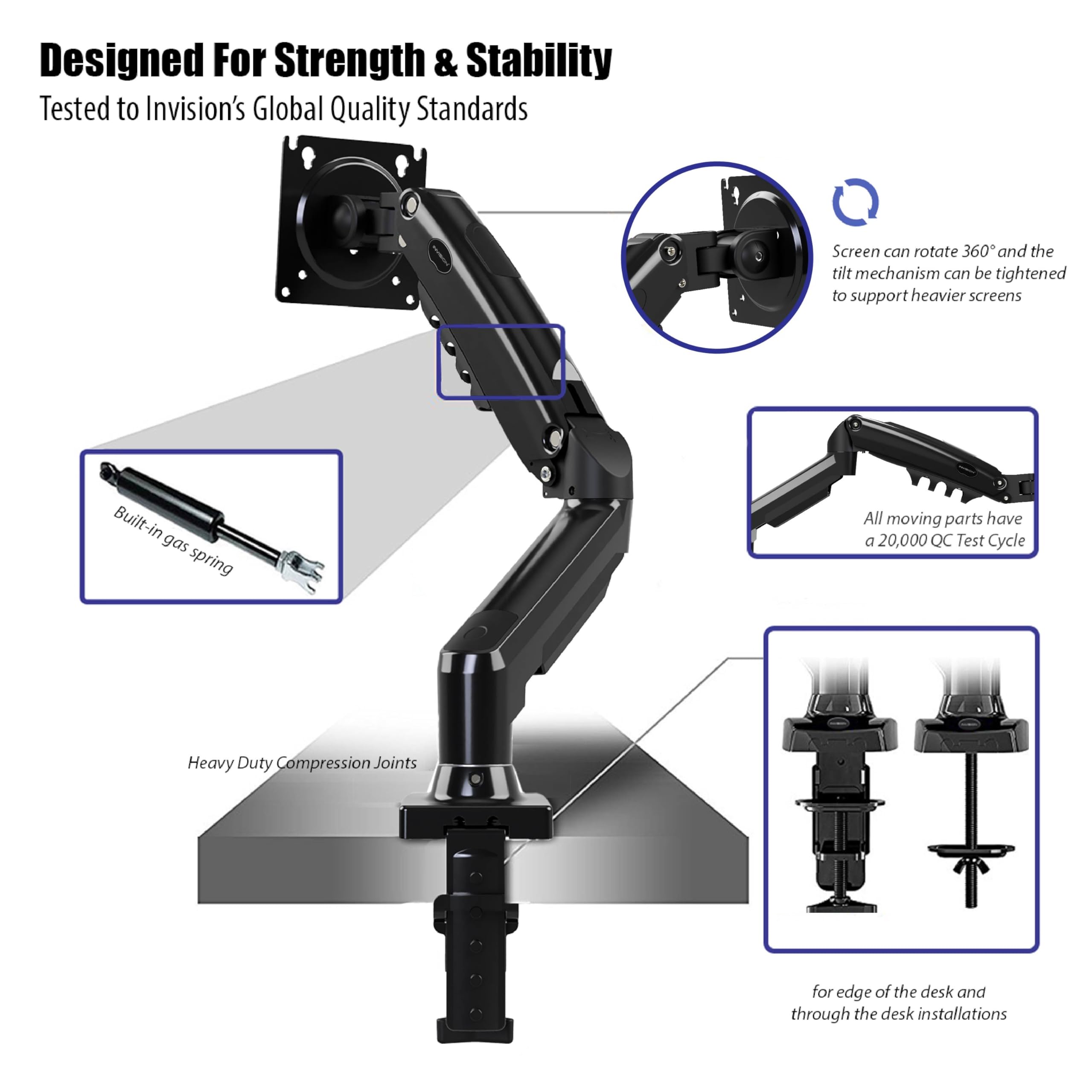
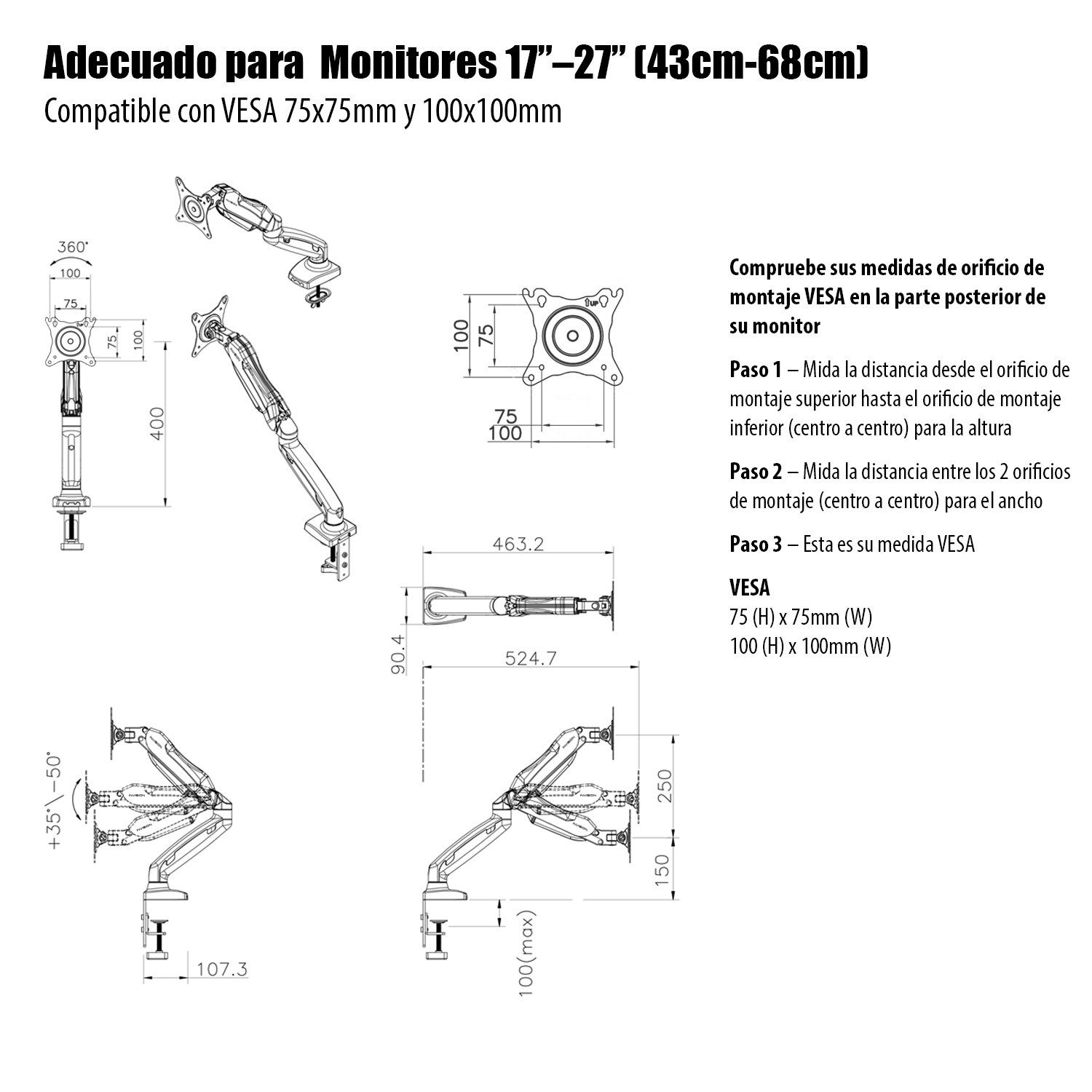
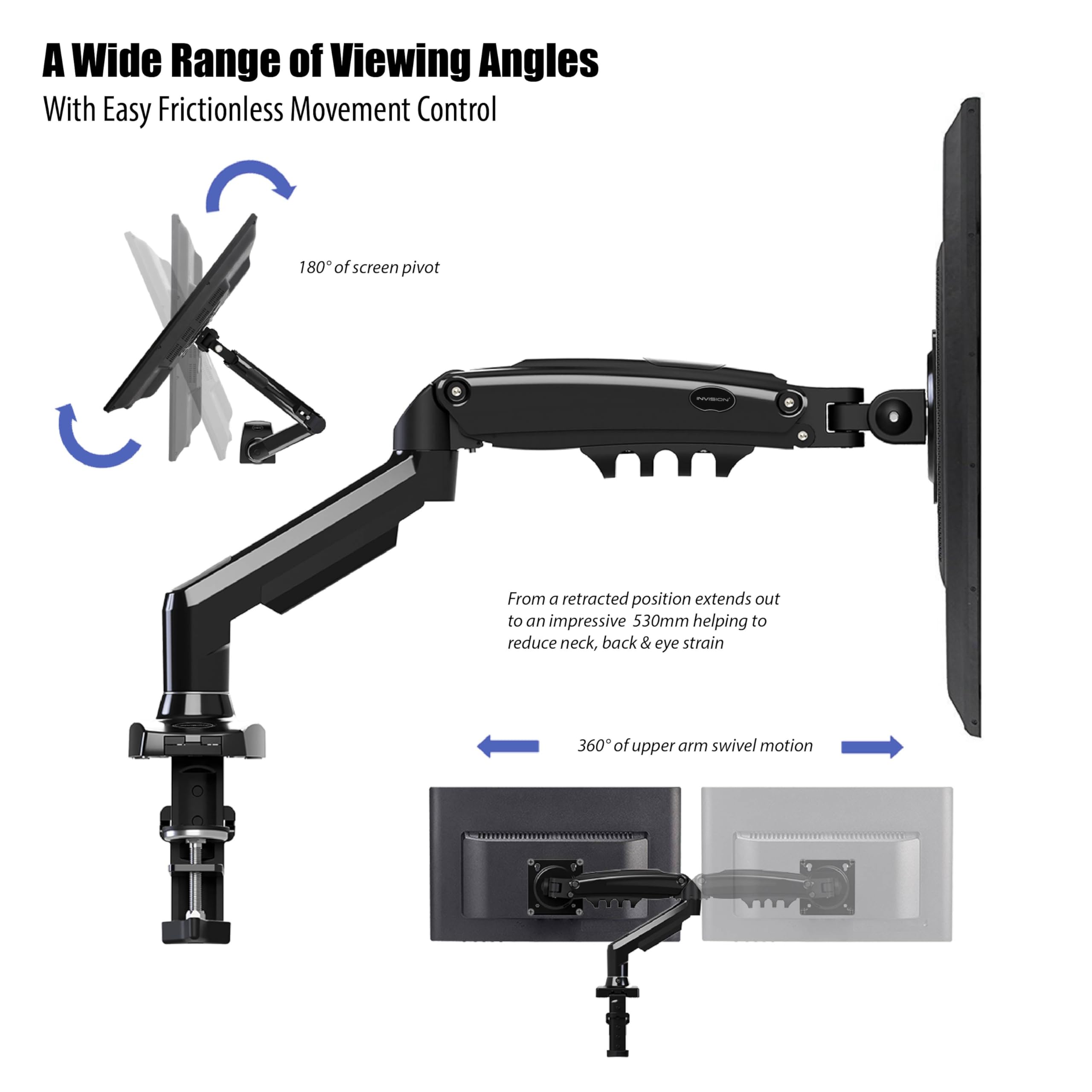
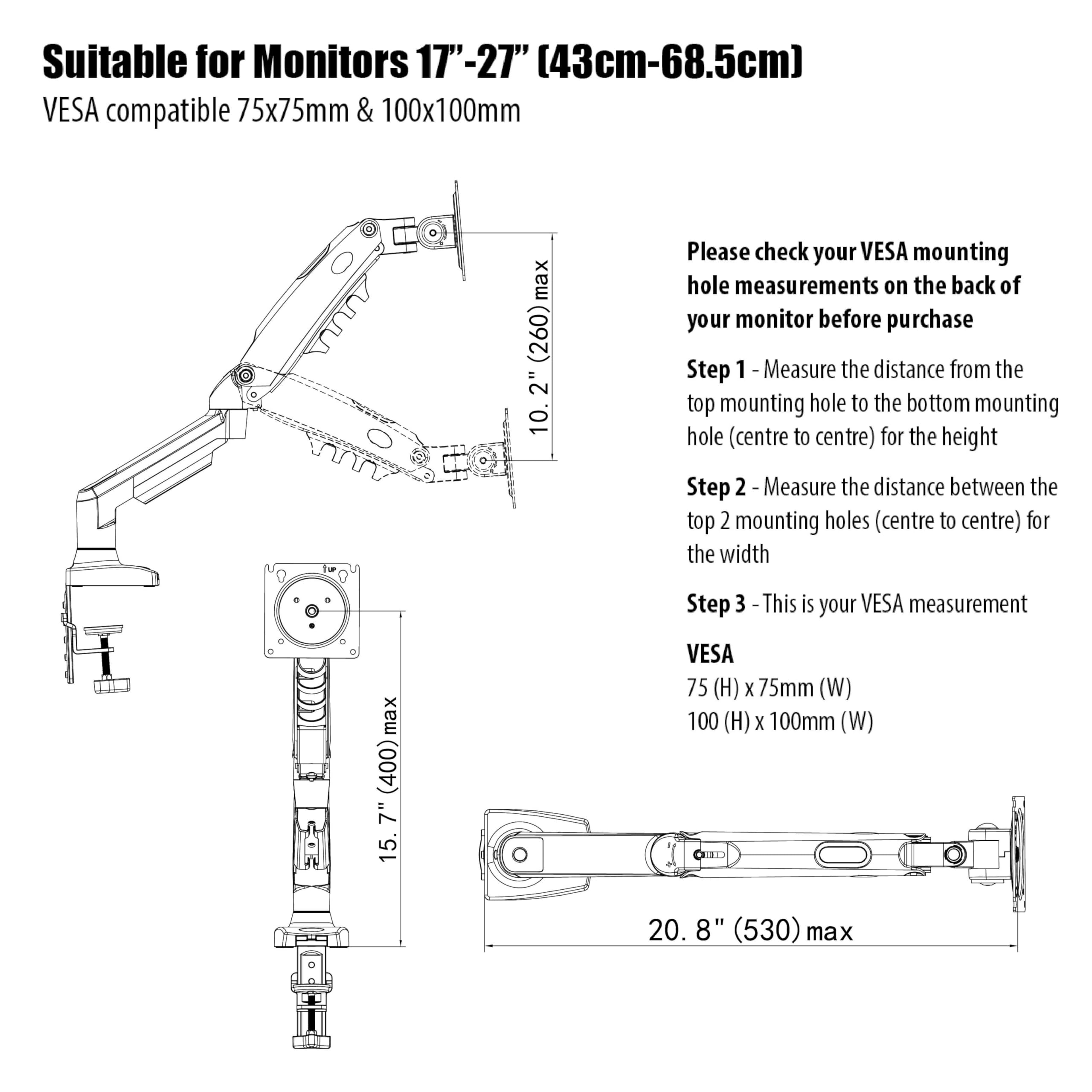
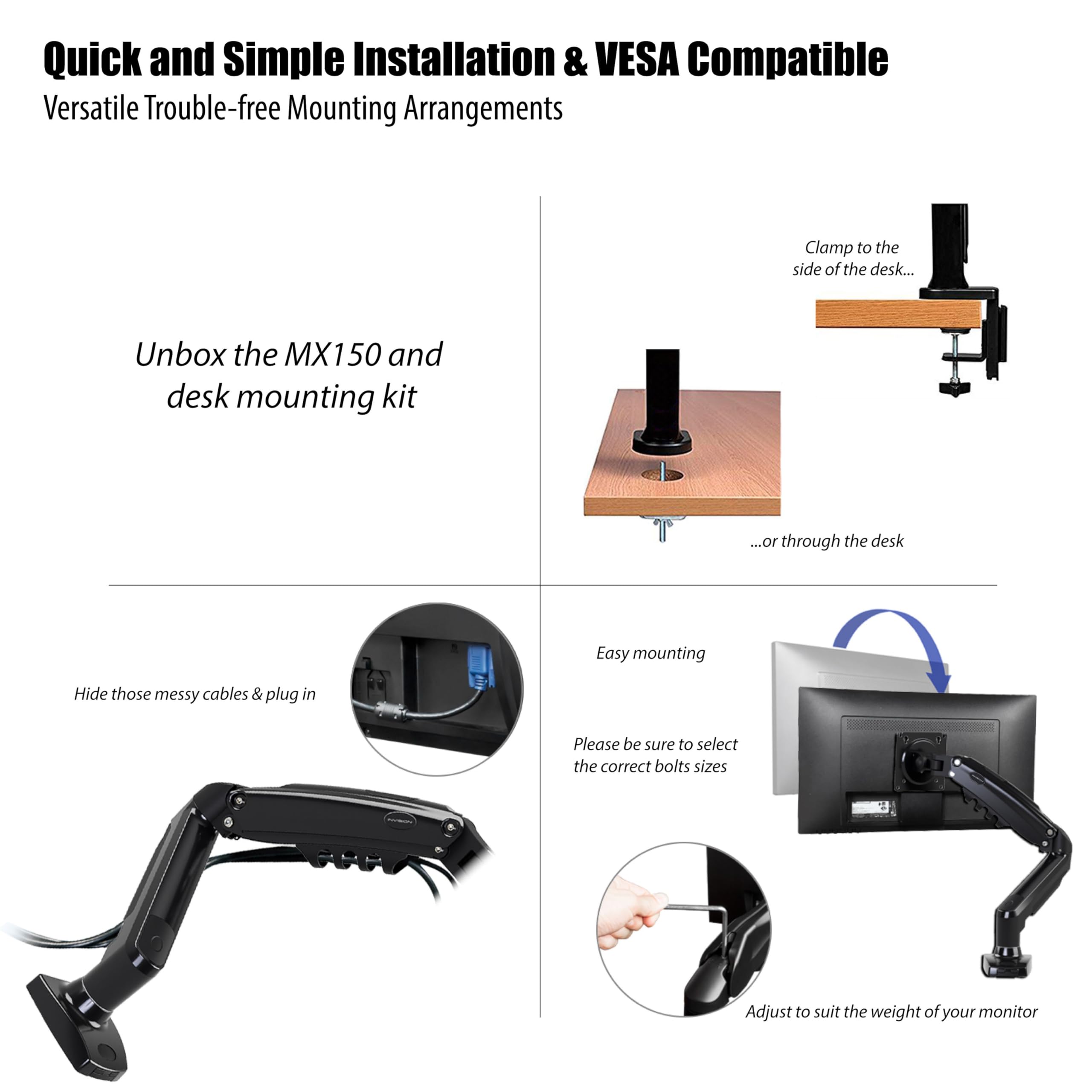
The Invision MX150 is a premium ergonomic monitor arm designed for 17-27” screens weighing 2-6.5kg. Featuring gas-assisted height adjustment, full 360° rotation, and a 530mm extension, it offers unparalleled flexibility and desk space optimization. Crafted from reinforced die-cast alloy and tested for 20,000 motion cycles, it guarantees durability backed by a 2-year warranty. Easy to install with dual clamp options and integrated cable management, it’s the ultimate upgrade for modern professionals seeking comfort and style.





| ASIN | B0765Y4CT5 |
| Best Sellers Rank | 13,354 in Computers & Accessories ( See Top 100 in Computers & Accessories ) 148 in Computer Monitor Arms |
| Box Contents | Monitor Arm, Hardware Kit & Installation Manual |
| Brand | Invision |
| Brand Name | Invision |
| Colour | Black |
| Compatible Devices | PC Monitors and Screens |
| Compatible devices | PC Monitors and Screens |
| Country of Origin | China |
| Customer Reviews | 4.6 out of 5 stars 6,424 Reviews |
| Enclosure Material | High Strength Die-Cast Alloy with Plastic Cable Management Covers |
| Global Trade Identification Number | 05060264558445 |
| Item Weight | 2.51 Kilograms |
| Item height | 1.27 centimetres |
| Manufacturer | Invision Technology |
| Material | High Strength Die-Cast Alloy with Plastic Cable Management Covers |
| Maximum Tilt Angle | 85 Degrees |
| Maximum-Supported Screen Size | 68.6 Centimetres |
| Minimum-Supported Screen Size | 43.2 Centimetres |
| Mounting Type | Tabletop Mount |
| Mounting type | Tabletop Mount |
| Movement Type | Articulating |
| Movement type | Articulating |
| Product Warranty | 2 Year Warranty, all parts covered by Invisions Product Guarantee |
D**N
How did I ever manage before?
Decided I needed to update my desk area as I am now working from home primarily and only going into the office one or twice a month. With that said I can obtain equipment from my work, but as I am sharing a room I decided to invest in the equipment myself so I do not have to return and can use it for my own use. I opted for this gas hydraulic arm bracket due to the ease of use and its ability to hide away the cables inside the arms of the bracket. Also the feature to spin and twist the monitor screen into differing positions was a no-brainer. I also had to check that it could take the weight and size of my monitor screen – and although this said: “for 17–27” Screens and 2kg-6.5kg” it is just right for my 28” widescreen monitor. I also purchased a desk bracket arm strengthening flat-plate clamp to ensure it did not damage the desk edge area. To identify this bracket arm will also fit through a desk hole if your desk happens to have this facility. The parcel was received and it was well packaged. I opened the box and got about checking all the items and ensuring all was present and correct. All the components appear to be well made and designed and no doubt will last a fair while – but only time and use will tell. Reading instructions (as you must always do) I went about fixing the items together prior to readying to fit to the edge of the table. NOTE: please ensure you do not blindly remove the Velcro arm fastening belt without holding the arm in place first as it is under pressure and will expand outwards under the gas pressure! I decided upon where I needed the monitor bracket to be sited then I placed the strengthening plate in situ and then fitted the arm in place. Once tightened using the tools supplied (Hexagonal Key) I went about fitting the cables I needed along the arms. This is done by removing the screws in place and then snapping out the guards. Then placing the power lead and USB/HDMI cable along the routes I replaced the covers and screwed back into place. Then using the screw-bolts supplied I fitted the monitor screen to the face plate – connected the cables and then adjusted the tensioners in the arm (for the added weight of the screen) it was ready to use. I have utilised the 90 degree spin rotation on my widescreen monitor at times when I am writing a word document as this lends a full screen page view as and when needed – you just have to change the display rotation setting as needed. The rotational aspect of this bracket with the cable router design is great and does not twist or pull the cables (just remember to allow extra cable for this purpose). Once I have finished work I just switch off and then push the monitor screen back towards the wall and cover it with the dust sheet I bought. Such simple operation and I really wonder how I ever managed before. The only negative if you can call it that, is there is a small section of the base plate that has a blanking plug that seems it can fit a hub for 2x USB sockets – although I have yet to find anything I can buy that will fit the design of this. However there is an upgrade version that does use the same base plate with USB sockets already fitted – so it must just be a template base they use for this. Having said that I am not really needing extra USB sockets at the moment. Overall I would have to say for the price this is a great bracket arm of its kind especially with so many differing models to choose from. Reasonably priced. I have kept all the supplied extras like the Hexagon Key, Through-desk clamps and a couple of spare screwbolts etc. as they will most definitely come in handy sometime.
P**R
Good product with clear instructions does exactly what it should
This is an outstanding product. I purchased two to use on my desk as the monitor's on the desk were not sitting exactly where they needed to be. Packaging is great, you need to be careful when undoing the Velcro strap holding the arm shut as it’s under tension -there is a warning in the instructions - it’s not difficult though just holding it against you and releasing the strap you can let the arm rise and it’s fine. Fittings are brilliant you can either put it on a desk edge with a G clamp, or through the desk with a bolt and wing nut. I have never found G clamps to be great so I figured I'd be using the latter, however, I used both. The first monitor position required the bolt as it wasn’t near the edge of the desk, it’s really simple following the instructions to prepare the long bolt on the arm and then just drill a 10mm hole to put it through. There’s a plate that goes on under the desk and you just tighten the wingnut. And that’s it. Putting the monitor on was simple you just put two of the supplied Vessa screws (there are two sizes supplied, think and thin) onto the back of the monitor this allows you to hang it on the mount then the bottom two screws can be inserted through the holes in the bracket to secure it then simply tighten all 4 and your done. The second one Athens position was right at the edge of the desk and I thought I'd try out 5he G clamp and it is superb. Really strong and easy to fit, the instructions show you building up the clamp but it actually comes with part of it already assembled. Cable management needs to be done before you mount the arms, it seems a bit strange at first but when you get it done you see why they did it the way they did, and it’s really good. Adjusting the tension is easy just an Allen key and they provide the two you need and you have the monitor moving with the slightest touch. It is really worth reading the instructions. I’m using them for 24 inch monitors one in portrait and one landscape I can’t believe the price of these arms and I can’t recommend them highly enough.
M**M
Good value but take time in preparation
I wanted a monitor bracket and this had very good reviews both on Amazon and independent sites, especially for the price, so I went ahead with the purchase. I consider myself quite capable of DIY, I build PCs and flat pack furniture usually without a problem but for some reason I really struggled with this. The goods arrived quickly and were very well packed, with a velcro strap around the support arm to hold it in a closed position for packing. Another reviewer had mentioned to be careful when removing the strap and to be fair, there is a large yellow warning label under the strap to tell you this as well. Two Allen keys are provided for assembly and fine adjustment although you also need a Philips screwdriver. The instructions looked reasonably clear but I wasn't sure which mounting screws to use for attaching my monitor to the vesa bracket but quick trial and error sorted this. I had two problems during assembly. One was removing the plastic brackets on the support arms that allow you to tuck the monitor cables away for tidy management. I just found this all very fiddly but when I'd finished it does look neat. The second problem was after I had finished mounting my monitor to the bracket and attaching the cables, when I went to attach it to my desk it seemed everything was back to front. I wanted to attached the stand to the back of my desk and have it as flush to the wall as possible and I had to spend some time rechecking I had assembled everything correctly before working out that I had to twist the arms sideways in the desk bracket to make everything fit. Looking at the picture on the box it is obvious that the bracket is fitted to the back of a desk in an open plan environment with the angle of the arms jutting out into space. Since my desk is pushed up against a wall I wasn't able to have this arrangement. It's possible the problems are just down to me not understanding the way the bracket works, and had my desk not been up close to a wall, or I chose to mount the bracket to the side of the desk then I wouldn't have had this problem. Overall though I am very happy with the bracket, it looks good, the cables are tidy, it is very sturdy and I haven't had any issue when adjusting the height or viewing angle. So I would recommend but also say take a decent amount of time working out how you want to position it before you start any assembly.
A**S
A quality product offered at a fair price... Does what it says on the tin...
I was sorry to read people's not so positive reviews for this product but from what was available to suit my needs I felt it was worth getting and to see how it fared in my particular setup. Basically I needed something that brought a second monitor in my little music studio a bit closer to me and I couldn't do that by simply moving it along a desk. So, it is in position and I have it extended almost to its furthest extent. I found it quite easy to assemble, including the routing of the cables. I had a slight accident with the lower plastic cover because I ended up forcing it to get it off and broke a couple of plastic tabs, but once back in place it seems to be okay. I have gone for the clamp to desk option so cannot comment on the through desk option, but from the supplied instructions I can't see it being a problem. The swivel action may be a bit stiff out of the box and I have slackened off some screws to try and ease that a bit, although I should add that this is not in the instructions and therefore may not be a great idea. I will keep my eye on that and re-tighten in the event that the screws become too lose. And perhaps I should contact Invision, just in case it is considered unsafe. My second monitor is quite small at only 20". I do not know how much it weighs. The adjustment of the gas strut, which balances the cantilever arm, was very easy and quick to do and appears to be working fine. Once positioned the monitor stays in place. The swivel and tilt options are not of interest to me but what I can say is that, have had a bit of a play, all seems okay. Like the swivel motion, the tilt and rotation points are quite stiff, but that suits me as I will not be needing to alter those features on the fly. Overall I think that the product looks good, although in my situation I will not normally see it. But its looks and build quality helps to build confidence in its function. If you are mounting a single monitor and require more position adjustment than a stock stand gives then I can highly recommend this product.
S**C
Quality Arm. Easy to Install. Looks amazing!
Before ordering I was worried about a few things, including "what happens if it doesn't hold the screen and falls forwards", "will it be compatible with my screen" and "will it really save me any space". My worries were completely unjustified and I'll clarify why in a moment. When it first arrived I again was really quite worried. Unboxing the arm presents you with a large set of installation instructions and quite a daunting pack of screws and allen keys. But actually when you begin to work through the instructions, they're well laid out and relatively easy to follow. They're very visual instructions - along the same lines as Ikea shelves etc - and the screws etc are clearly labelled A through F, so it's hard to get lost. It's relatively easy to fit together, the only stumbling point I hit was right at the beginning when I realised that you have to remove two sections of the arm and insert your power and HDMI cables, then screw them back on. It's a bit fiddly but the result is that the cables are then forever more inside the arm, so the whole thing is extremely neat and flexible to use. Installing to the desk took very little effort. The arm is so solid, it really didn't take a great deal of effort to tighten the clamp into place (I was worried about this previously, but I have to say that it's incredibly solid). Attaching the screen is easy - it has a standard VESA attachment, so as long as your screen has VESA screw holes then you'll find it very easy. They even provide the screws needed with the arm. The result is incredible, after a little gentle adjusting of the arm tension with a screwdriver (literally 3 or 4 turns of a screw), the arm accepts the weight of my monitor perfectly. My screen (AOC 21.5 inch IPS Monitor) weighs 5kg, and the arm feels like it could easily take another kilo without effort. Previous reviews had me worried about this, but I assure you that they're unfounded - it's likely that they didn't read all of the instructions as on the back page it tells you how to adjust the tension so that the arm can take the weight of your screen. The final installation looks amazing. I have loads of room and no cables in sight. I would highly recommend this product to anyone who is feeling a bit nervous about doing this but wants to give it a go. It won't let you down - this is a quality, high end arm.
L**Y
This item is exceptional quality - theres no need to spend more.
I came actoss this item whilst looking for a monitor riser so I could tuck my keyboard underneath for more desk space when studying. This is a far better solution and looks great. I didnt think I required the adjusrment capabilities but they have already been useful. Now when I study I can swing my monitor right out of the way. This monitor bracket comes fully packaged like an item you'd buy from the store, which I wasn't expecting for the price. As soon as I opened it I could tell the quality, it felt very sturdy and has a fair bit of weight to it. I couldn't make the arm move and thought it needed loosening but later ended up having to retighten it once the monitor was attached, so advise waiting to adjust anything until it's set up. I have attached the arm via the clamp, everything I needed was in the box. I did read all the reviews saying to attach the monitor to the arm first, which I didn't, and then I had to start again. So monitor is definitely worth attaching first. The instructions also say to place the cables into the cable tidy trays 1st. Leave them loose initially so the cables are not accidentally damaged. I realised once the cables are in the tidy, they can be adjusted by feeding them at the ends if they end up too loose. but if the monitor is to be moved around, allow some slack. The monitor is attached by 4 screws (provided), mine was the 100mm option.... Make sure you select the correct screws, my 13 year old daughter was helping me and when I asked for 4 screws she didn't state there was 2 sets. Suffice to say my monitor is attached well, but there is a rattle which sounds like I may have pushed out the little nuts on the inside of the monitor. This is in no way the fault if the product, its either poor monitor design, or poor instruction reading on my part, but now you may avoid my mistake. My monitor works and is stood well in place. I can also tell you that the bolts are quality with no hint of threading. From this point it was really easy to clamp it to the desk, 2 people is handy though because it is top heavy with the monitor attached. I held the weight of the monitor and my teenager tightened the grip enough that I could let go, then I tightened. I did have to retighten the pressure bolt as it was not holding the weight of the monitor (the one I loosenef in the first place ) but that was easy to get to. I placed my arm to the side of the desk so that I could have the monitor quite flat to the back wall with more desk space. The monitor will swing out, tilt up and down and rotate right out of the way, brilliant. I was concerned about the space I'd need to fit the arm since my desk is in the lounge in a very snug space but the arm barely sticks out over the desk, I'd say less than 1cm with the arm set this way. This really is a great product, and the price is amazing for what you get. I would definitely recommend and buy another if needed in a heartbeat. Update it's been 5 years, I found this review and thought I'd add.... The arm is just as solid today as it was then. The monitor is regularly moved and rotated for reading comics and back for work and games. I also built another pc and placed it in a wheeled cabinet, and bought this exact arm... Set up was the same, quality was the same, and if I ever need another... I hope these still exist. I've never had to make any adjustments since the arms were initial set up. The arm still holds my monitor high above the desk with no signs of drooping. And my newer one is always fully stretched with the same consistent result.
M**.
Great monitor stand that helps you save space for a great price.
I used this monitor to hold up a 27inch MSI monitor. The installation is simple enough. I had to use the wall mount screws that my MSI monitor came with which hold the monitor up well - (at first I was worried the screws would not be strong enough but they do the job just fine. The arm itself offers a few nice features: Takes up less desk space than the previous stand Gas assisted for easy lifting Option to tighten or loosen at key points on the arm to match your monitor's size and weight. The cable management is adequate. Things I do not like: The instructions should be more clear when it comes to the cable management covers - I ended up giving up trying to screw in the top one whilst holding the cables. Either my monitor is too heavy or the table is not sturdy enough but it looks as if the monitor arm clamp is leading towards where the monitor is going (lifting up from the table). But for now it works and is holding steady. For some reason I can easily change the tilt position of the monitor - too high and it fall back down (like the monitor faces the desk. I can only get it to be straight which is okay since with a few chair tweaks I can be level with the monitor. If you, like me, have a thinner desk, with a monitor stand that extends outwards and takes up valuable keyboard and mouse space, then this monitor arm will do the job just as well as a more expensive one. I have yet to find out how long the arm lasts but I am hoping that since I am not constantly readjusting it that it will serve me for years to come. Overall a great product, with an affordable price that has made me a satisfied customer. P.S I will maybe add some pictures at a later date if I remember.
A**Y
Good but with one major flaw
This is a sturdy and well made monitor arm. No problem with installation - I use the mounting option through a hole in the desk top rather than the clamp to the desk edge. No problem with the VESA mount. Not sure why others report issues. Possibly it is where someone tries to use recessed mounting holes used by the monitor’s original desktop stand. These can have holes at 100mm distance but is not actually a VESA mount. So check your monitor is actually designed to be VESA mounted. Biggest flaw, which was borderline to make the product unusable for me, was that the tilt mechanism at the end of the monitor arm has no means to adjust the tension. Therefore the monitor can sometimes tilt forward under its own weight. But others have reported the tilt mechanism being very stiff. So maybe there is a lot of variance in what you get. The heavier the monitor the more this will be a problem. For me it was a borderline problem even with a 22inch monitor weighing 4.5kg. So I don’t think it would have worked at the top end of the weight spec. So definitely do not take it beyond the spec. I have just moved to a bigger and heavier monitor (outside the spec for the arm) and so unsurprisingly the monitor tilted forward uncontrollably. So I have had to replace the arm. The replacement arm (different brand) does have a tensioner control on the tilt plate. But it did an acceptable job for 2-3 years so no complaints. Only minor moan is that, on removing the arm, it left 4 circular permanent marks from the pads designed to protect the desk top from damage from the mount!
Trustpilot
2 weeks ago
2 days ago



