
DOWNLOAD THE APP


Customer Services
Copyright © 2025 Desertcart Holdings Limited
DOWNLOAD THE APP


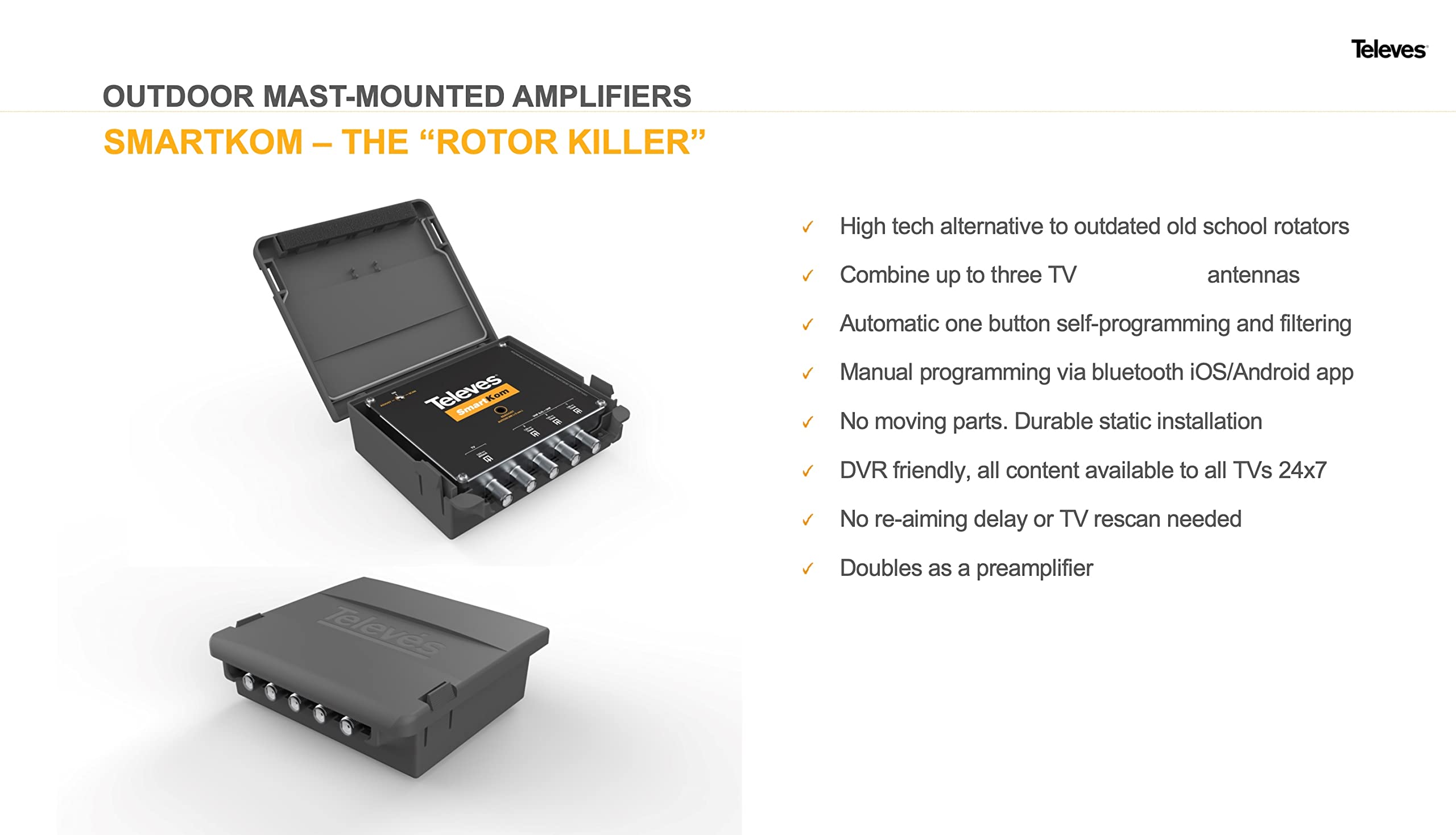
📡 Unlock triple-market TV signals with zero compromise — the future of antenna tech is here!
The Televes SmartKom 531981 is a cutting-edge antenna combiner and preamp that merges signals from up to three antennas pointed in different directions, eliminating traditional signal loss and interference. Featuring 60dB dynamic range filters, automatic gain control, and Bluetooth app-based fine tuning, it delivers optimized, whole-home TV reception from multiple markets simultaneously over a single coax cable. Its weatherproof mast-mounted design and power-over-coax capability make it a durable, professional-grade solution for savvy users seeking superior multi-directional TV signal distribution without rotor complexity.
| ASIN | B0BSG23PHL |
| Best Sellers Rank | #635 in TV Antennas |
| Customer Reviews | 3.8 3.8 out of 5 stars (86) |
| Date First Available | January 16, 2023 |
| Item Weight | 1.98 pounds |
| Manufacturer | Televes |
| Package Dimensions | 6.57 x 5.31 x 3.5 inches |
A**8
Excellent for knowledgeable users
This is an excellent product, if you know what you're doing. Its intended purpose is to act as a smart "combiner" of signals from up to three antennas pointed in different directions. Where no one antenna can adequately receive all desired channels. Once installed, you can press a button and it will cycle through all 35 RF digital TV channels (RF 2 through 36). For each channel, it figure out which of the three antennas has the best reception (if any), and arranges for the combined output to contain only the "winning" antenna for each channel. Out of the box, this function works reasonably well. But this is just a STARTING point. The real magic comes in the ability to tweak the automatic settings. The first thing a prospective buyer must know is that when auto-programming, some RF channels will be deemed (perhaps incorrectly) to have inadequate reception on all three antennas. Such channels will be completely absent from the combined output. Those channels will then NEVER be received AT ALL unless the Smartkom is automatically or manually reprogrammed. Luckily, Televes has a smartphone app that allows the user to make their own channel/antenna assignments. This app is easy to use and there is a YouTube video out there explaining its use. If the autoprogram doesn't assign your favorite RF channel to any antenna, you can easily assign it yourself. The second thing you must know is the difference between virtual channels and RF channels. For example, Pittsburgh has WPXI virtual channels 11.1, 11.2, and 11.3. They are not broadcast on RF channel 11 however! They are on RF channel 23. This type of knowledge is IMPERATIVE and can easily be obtained on a site like rabbitears.info, among others. Lastly, to those complaining that they can't connect via Bluetooth after two hours - that's a feature, not a flaw. Televes is very explicit that the Bluetooth radio is turned off after 2 hours. All one has to do is cycle the power supply to turn it on again. This is done in the house, not at the antenna. The successful user of this product will know exactly which virtual channels they want to receive, what RF channels they broadcast on, in what direction their transmitters are located. Again, all information that can be obtained from rabbitears.info and other places. If successful reception would require 2 or 3 antennas pointed in different directions, this is just the product you need, and it works very well. As an electrical and signal processing engineer myself I am very impressed. I strongly suspect that the negative reviews were from people who didn't know what they needed to know, or expected this to perform some magic other than its intended purpose.M By the way, I use two Televes antennas with this - a DAT Boss full hand, and an Ellipse mix. Both are superb. They can also be powered from the Smartkom - eliminating the need for their own PSU's (Power Supply Units).
M**G
Replaced a multitude of combiners and filters
Previously I had to use a number of filters along with a low noise amp and combiner to pick up the few stations we can get (many of which are distant). We have a lot of radio noise around, and I spent quite a bit of time and money tweaking and trying various combinations. This unit exceeded the performance of my previous setup, and the ability to add a 3rd antenna meant we could pull in a previously off-axis station which a 3rd cheap antenna aimed directly at it. Biggest downside is the price. But it's an impressive piece of gear. It's been going strong for 10 months so far - hopefully it continues for many years. The second-biggest downside is that setup requires you to be somewhat tech-savvy, and requires the use a phone app. I would STRONGLY recommend watching some YouTube videos that show both physical set-up (due to odd labeling on a coax port) and app set-up while you wait for the item to arrive.
D**N
Works Great 👍
Not the product I received..
E**H
Great TV antenna amplifier but not perfect
I have been vacilating for over a year about buying this amplifier. I've been using a Winegard amplifier for many years and had good reception. This amp allowed me to put another antenna on our mast aimed at the repeating tower for our town. The primary is aimed almost 180 degrees from this tower to allow us to receive the NBC affiliate which refuses to add another repeater for our benefit. Thanks to the other reviews that talked about the difficulties in using the smartphone app for this amp I had few problems. Today I just decided to change one channel to the larger antenna and found the system was again receiving another channel we couldn't pick up at all. I highly recommend this amp. I know it is expensive but this amp should last over 20 years. Update: Aug. 21, 2024: I just realized that this amplifier killed our reception of FM radio signals. I haven't seen any info as to the cause. That and poor reception of the NBC channel may force me to send this back.
J**E
Best and only device that does what it can do, at least for now
I set this up to combine signals from two different antennas. It is pretty much working flawlessly. All the channels come in without cross talk, no interruptions. We shall see how long this kind of device lasts, though. While I gave the device 5 stars, their documentation and software NEEDS WORK. All they have are these silly infographic videos which don't go into depth at all about how the device or mobile app works. Caveats: 1. The plug labeled "TV" on the power supply goes to YOUR ANTENNA, not your TV. 2. You connect the mobile app via bluetooth to the power supply that comes with it. After the power supply has been on for a while, it no longer accepts bluetooth connections. So you need to unplug, and replug in the power supply to connect the app to it. 3. Out of the box, this device equalizes the signals of all TV channels to be around the same power level (after you do the autoscan, etc). That power level that all channels are equalized to appears to depend on your antenna strength. In the app, there is a "level" dropdown that goes from 0-25. In my case, at level 0 all channels output around -60dBm from the Smartkom, and at level 25 they output at -35dBm. Raising the level also increases the noise floor and decreases the signal to noise ratio.
Trustpilot
2 days ago
1 week ago