Some deliveries may take a little longer than usual due to regional shipping conditions.

DOWNLOAD THE APP


Customer Services
Copyright © 2025 Desertcart Holdings Limited
DOWNLOAD THE APP

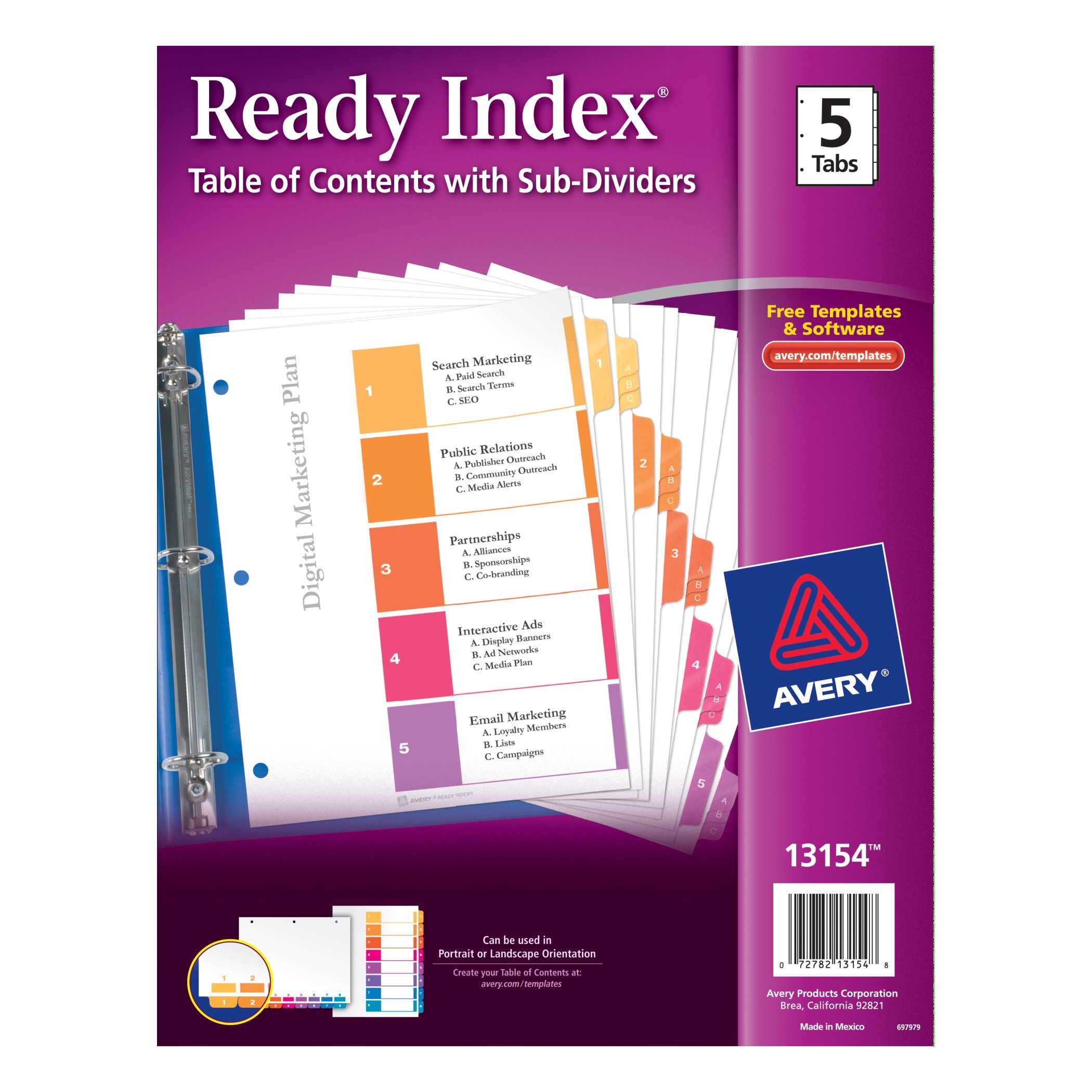
📂 Elevate your document game — organize like a pro, impress like a boss!
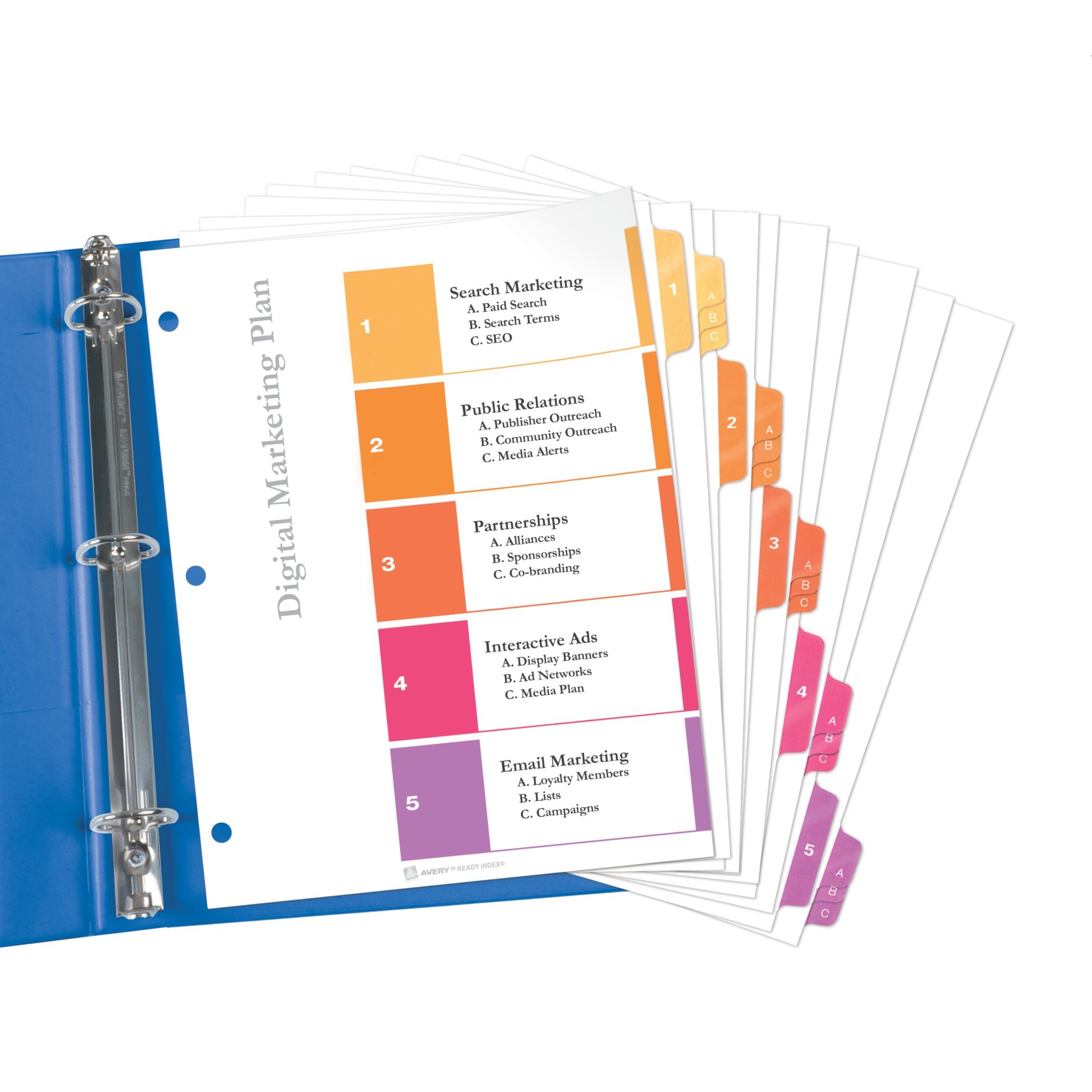
Avery Ready Index Dividers (5 tabs with A, B, C subsections) offer durable, reinforced dividers designed for big projects. Featuring customizable Table of Contents pages via free online templates, these three-hole punched dividers support both portrait and landscape formats, ensuring professional, tear-resistant organization that keeps your reports and manuals impeccably structured.
| ASIN | B00O48ARS4 |
| Brand | AVERY |
| Colour | MULTI |
| Customer Reviews | 4.4 4.4 out of 5 stars (23) |
| Date First Available | 3 Nov. 2014 |
| Item Weight | 113 g |
| Manufacturer | Avery Products Corporation |
| Manufacturer Part Number | 13154 |
| Model Number | 13154 |
| Number of Dividers | 5 |
| Number of Holes | 3 |
| Number of Items | 1 |
| Product Dimensions | 25.4 x 30.81 x 0.38 cm; 113.4 g |
J**N
This divider set is really good if it meets your needs: five main sections with up to 3 sub sections. It has to be five sections because the first page is preprinted with five areas. I found that the online Avery website has very good templates for printing the headings on the title page, with easy to use areas. The result is printed to a PDF file, which will print correctly with the Adobe reader. As usual with the Avery products, the page holds ink well. Each of the tabs in covered with plastic (including the A,B,C sub-tabs), which is very durable, but does not allow you to write on them. The punched holes are also plastic reinforced. Over all, I'd say these are very sturdy tabs that will hold up well. The only drawback is that you really need to be sure this exact layout is what you want. The index page is labeled 1-5, and the sub tabs are labeled a,b,c. You can print on the index page what each number and letter means, but cannot change the preprinted number/letter. So while it is well constructed, this divider set is not very flexible - you have to match it, not the other way around. Summary: If this set matches you needs exactly, this is a great choice. Highly recommended for this specific use.
S**S
Avery makes a good product and provides robust software and support to get the most out of each product. But these 5 subject dividers with 3 sub-dividers each (Avery # 13154) have some issues. It is rather curious and arbitrary why each of these 5 main dividers have only 3 sub-dividers. It makes sense when you realize that all of the sub-dividers hide nicely behind their color-matched main divider. Still, this is rather artificially limiting for larger applications; there is no expandability built in to the design. Only 1 pre-color-coded table-of-contents page is provided. At least 3 would be ideal for inevitable printing mistakes and future re-usability. Thus, it is advantageous to photocopy the original before printing, in addition to pre-testing on blank paper. It would also be better if this TOC page had the same reinforced binding edge that the actual divider pages have. However, this humble set of dividers by Avery becomes more versatile when you take advantage of Avery's customization options for the Table of Contents page. There is some misinformation out there on this. Here's a bit of Q & A : 1) Can I use any word processor to customize my TOC? You can use Word and some Adobe products. Just download the template you need from Avery into your word processor. Avery has a very good pictorial tutorial under the Templates tab. 2) If I use Avery Online, do I have to provide any personal information? NO. You do not need to establish an Avery account. It is very easy to do one-off ad hoc printing. If you choose to save your work, Avery gives you the option to save on your own device: at Avery Print & Design Online, click on the "Choose File" button in the section "Open A Project Saved On My Computer". 3) How difficult is it to use Avery Online? It is extremely easy to use. There are a few tips to make it more productive. Start by entering the product number of interest in the search bar. Don't use your device's back button to navigate, especially when perusing the various designs available for your product number. Use the Avery software's blue back button instead. Do set up an easy-to-find directory on your device for Avery-only work. Take advantage of all the tutorials and read through the examples.
J**N
Extremely useful for organizing presentations and exhibits. Since the federal courts now mandate electronic filing as do many, if not most, state courts, my need for this type of product has diminished. But when I do need to submit a complex presentation or exhibit, these things are great. Like all Avery paper products, they are of high-quality. Reinforced edges for use in three-ring binders and tabs printed with a main number and sub-dividers marked A, B and C. You can print your own custom Table Of Contents page, which can be further customized on the left-hand side with logos, text, graphics, etc. The dividers can be used in portrait or landscape orientation. This set has five tabs with A, B, C sub-dividers. Avewry also makes sets with more tabs. Overall, a great product for organizing presentations and exhibits. Jerry
D**D
I love organization systems for work and home, and this 5-tab Ready Index helps me keep track of the many different projects and other important data that I need in order to spend less time trying to find papers or other items. This set comes with 20 different tabbed sections with each labeled with a number (1-5) and subcategories labeled ABC. The tabs are reinforced to prevent tearing with excessive turning and also those pages are reinforced at the edge where the holes are. The tabs are brightly colored and look very nice with the bright white card stock -- which I do wish was just a little heavier as the pages tend to bend easily. The index page has 5 brightly colored sections for you to print (using an Avery.com template online) or to hand write in your section contents or outline. This section does not have a tab, so I cut off the edge with the holes and slide it into the front plastic of my binder. You'd probably not want to do this if you want the contents to remain confidential, however. I use these in portrait mode since the numbers and ABC tabs are oriented in that direction. The dividers are meant to be used in a 3-ring binder and to separate papers or other data that would need hole-punching. I also use 3-hole clear plastic pockets within the dividers to hold those materials that I don't want to punch holes in. If you don't want or need some of the number or the letter tabs, just remove them and/or use them in a different binder. Uses for this item are only limited by your needs or imagination.
I**E
Colorful...Great organizational tool, and they're designed so they can be used in either landscape or portrait orientation. Separate your project into 5 categories - each category with 3 subsections. (5 color-coded tabs are labeled 1 through 5; each tab has 3 color-coded subsections labeled A, B, & C - colors match the numbered tab). A customizable Table of contents page is included. It is also color-coded and can be customized using Avery free templates. Instructions are included. The dividers are made from quality, medium weight paper & have double-sided, reinforced binding around the 3-hole edge. Each tab is reinforced to prevent tearing. The Table of Contents page is made from lighter weight paper than the tabbed divider pages & the 3-holed side is reinforced on the back. If for some reason, the pre-printed numbered/lettered tabs are not what you need, you could print the info on return address labels & stick the label over the pre-printed numbered/lettered tab. This kind of defeats the purpose of the Ready Index, but would be a work around solution. Great way to organize big project quickly.
Trustpilot
2 weeks ago
1 month ago