
DOWNLOAD THE APP


Customer Services
Copyright © 2025 Desertcart Holdings Limited
DOWNLOAD THE APP



🚀 Mini PC, Mega Power – Elevate your workspace with Mercury EM680!
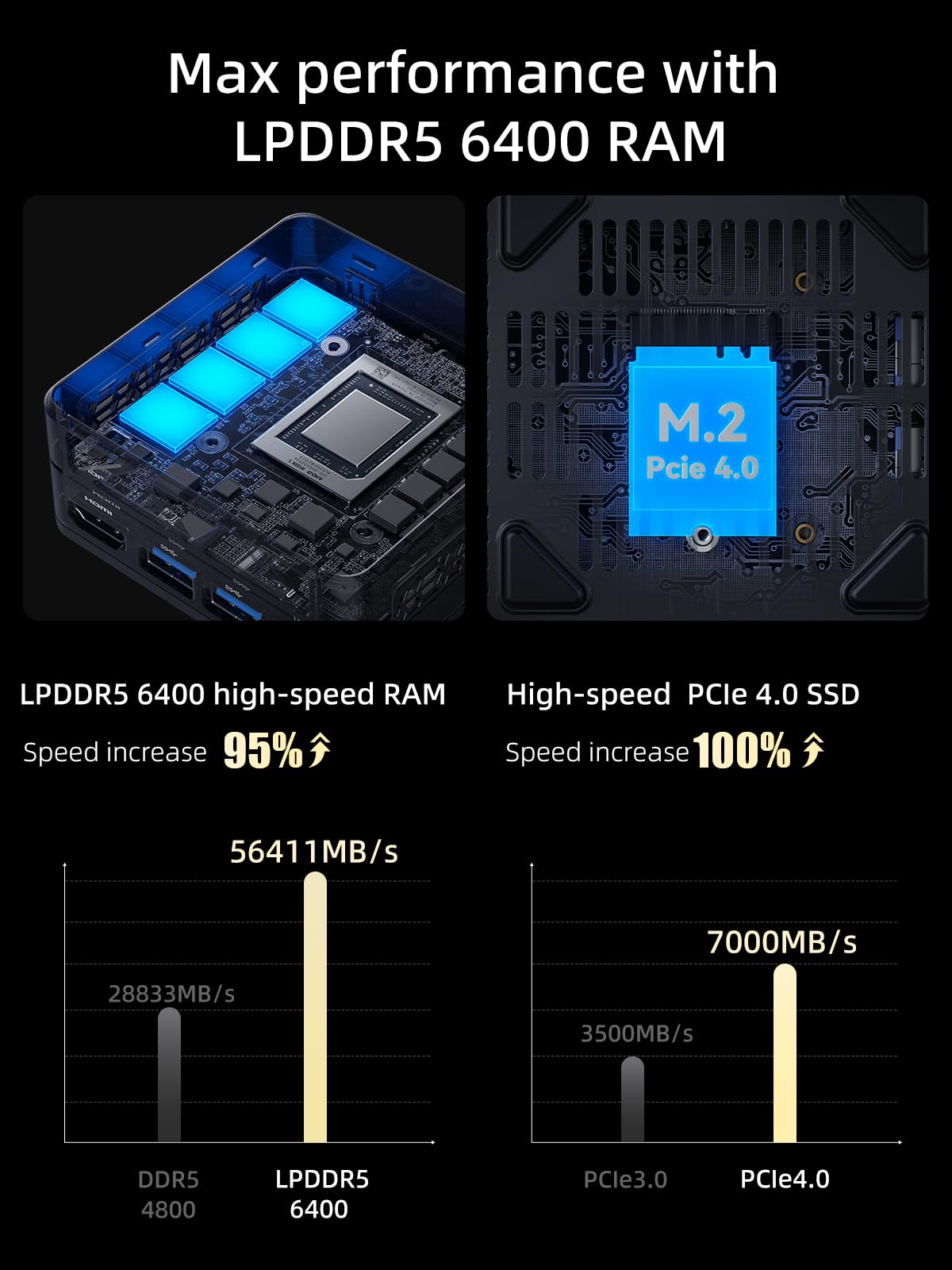
The MINISFORUM Mercury EM680 Mini PC packs an AMD Ryzen 7 6800U 8-core processor, 16GB of blazing-fast LPDDR5 RAM, and a 512GB PCIe 4.0 SSD into a sleek, ultra-compact chassis. Featuring AMD Radeon 680M graphics, WiFi 6E, Bluetooth 5.2, and a versatile array of ports including USB4 and HDMI, it delivers desktop-grade performance and connectivity in a portable form factor perfect for multimedia, everyday use, and professional multitasking.


| ASIN | B0CDWYB4JG |
| Aspect Ratio | 16:9 |
| Available Memory Slots | 1 |
| Best Sellers Rank | 57,692 in Computers & Accessories ( See Top 100 in Computers & Accessories ) 398 in Desktop PCs |
| Box Contents | Monitor |
| Brand | MINISFORUM |
| Brand Name | MINISFORUM |
| CPU Model Number | 6800U |
| CPU speed | 1.9 GHz |
| Colour | Black |
| Compatible Devices | Headphone, Keyboard, Mouse, Printer, Projector, Speaker, Television |
| Customer Reviews | 4.3 out of 5 stars 43 Reviews |
| Display Type | LED/LCD |
| Graphics Card Interface | PCI Express |
| Graphics Coprocessor | AMD Radeon 680M |
| Graphics Description | Dedicated |
| Graphics Ram Type | GDDR6 |
| Graphics card description | Dedicated |
| Graphics co-processor | AMD Radeon 680M |
| Hard Disk Description | SSD |
| Hard Disk Interface | PCIE x 4 |
| Hardware Interface | HDMI |
| Human Interface Types | Buttons |
| Keyboard Layout | QWERTY |
| Maximum Display Resolution | 3840x2160 |
| Memory Clock Speed | 6400 MHz |
| Memory Speed | 64 MHz |
| Memory Storage Capacity | 16 GB |
| Memory storage capacity | 16 GB |
| Model Name | AMD Ryzen 7 |
| Model Year | 2021 |
| Native Resolution | 3840 x 2160 |
| Network Connectivity Technology | HDMI, USB |
| Personal Computer Design Type | Mini PC |
| Power Plug Type | No Plug |
| Processor Brand | AMD |
| Processor Count | 8 |
| Processor Socket | Socket AM4 |
| Processor Speed | 1.9 GHz |
| Product Features | Portable |
| RAM Memory Installed | 32 GB |
| RAM Memory Technology | LPDDR5 |
| RAM Type | GDDR5 |
| Ram Memory Maximum Size | 16 GB |
| Resolution | 3840 x 2160 |
| Specific Uses For Product | Multimedia, Everyday Use |
| Specific uses for product | Multimedia, Everyday Use |
| Style Name | Minimalist |
| Total HDMI Port | 1 |
| Total USB Ports | 5 |
| Total Video Out Ports | 1 |
| Video Output | HDMI |
| Video Output Interface | HDMI |
| Video Processor | AMD |
| Wireless Compability | 802.11ax |
| Wireless Network Technology | Wi-Fi |
| Wireless Technology Type | Bluetooth, Wi-Fi |
M**E
Very nice compact pc
This little box is excellent for my needs (browsing and media mainly) and is incredibly responsive and nice to use. It boots in seconds and everything runs lovely and smooth. It's a dinky little thing that's almost silent most of the time. Even with the fans going full pelt it's not very loud. Win 11 pro is a nice addition and runs without issue after the initial setup. Initially the machine got stuck in a loop updating, rebooting and starting the same update from 0% again. I fixed this by turning off the router(setup won't let you delete WiFi details once you enter them) and selecting 'I don't have internet' in the setup and it completed the setup without issue. Even gave the option to create a local account which bypasses microsofts irritating email sign in requirement. It's a great machine for the price and comes highly recommended by me.
J**C
Impressed with the performance
I have been quite impressed with the performance of the UN100p, one of the basic models of Minisforum, after installing the latest version of Linux Mint. This device is a spare/backup for my main PC & is also used by my grandsons. However, there are a couple of small negatives with the UN100. This includes the lack of online Minisforum documentation, with only the spec available. This doesn't help if you want to go into the BIOS to boot from USB & install Linux. No mention of the BIOS gui provider (AMI) or entry key to access the BIOS. Even Perplexity AI wasn't able to provide an accurate answer. It took 15 minutes of experimenting with all the normal BIOS entry keys until eventually <F12> worked, but with the BIOS entry timing set to a default of 1 second after hitting the power-on button, it doesn't give much time. I would recommend that Minisform at least include the fact that <F12> is the BIOS entry key in their spec to help users. The second niggle is that all four USB ports are installed upside down compared to conventional laptops or PCs. So if you use a USB Yubikey or other security device, the finger contact pad is on the underside of the Yubikey when plugged into the UN100, a little tricky when the UN100 is sat on a desk.
R**N
Worth it if you want it for a media server
It does what it says it does...not that great at multi tasking but if you want it to do the basics, for me it's my 24tb server, it runs Emby 4k videos flawlessly, it's silent and keeps cool according to crystal disk. Fantastic and worth the money It comes with windows 11 pro preinstalled so I don't really care so much about Linux. I set this computer behind my monitor and forget about it while it performs wonderful for my media server! Fantastic 😍
H**H
Silent but strong
Using the minisforum un100p as a Linux box. Running nextcloud and a tailscale exit node. Works perfectly. Silent and just sits plugged in to the router with ethernet. Not the fastest but fast enough. The 2.5G LAN is great for this.
A**R
Fast enough for Microsoft Office and general browsing
Very compact, discreet and fast enough for Microsoft Office and assorted web browsing. Pretty much silent too
M**J
Constant Crashing - RAM issues
Crashing with blue screen errors like (MEMORY_MANAGMENT, HYPERVISION_ERROR) right out of the box. I did a clean windows install but still unstable and I had to return it.
R**G
Very fast, small but slightly noisy mini desktop computer
The good: Do not be put off by its small size. The UN1290 is by far the fatest computer I have owned. I am a business user running Microsoft 365 and Adobe Apps all day long. I am delighted by its performance for these core tasks. My Dragonfly red USB DAC seamlessly manages the audio. The intrenalo wireless is such an upgrade on my old desktop: 180 mbps then; 300mbps now. Build is solid if not Apple quality. Even better ifs: for context, I spend £1,000 on my last mini pc to get a silent desktop. The UN1290 is never silent. I can always hear the fan - epecially on start up, or in process intensive tasks. But the fan is not loud. Just audible. I am getting use to it - a bit like moving from the silent countryside to a house by a road. Conclusion: I am delighted with the size, speed and responsivness of the UN1290. I am learning to live with the quiet hum - hence the 4 star review rather than 5
A**L
Perfect for streaming netflix YouTube etc
Nice little PC does its job of streaming perfectly, quiet and sits very nicely under TV
Trustpilot
3 weeks ago
1 week ago