We remain fully operational. Our teams are working around the clock to ensure your deliveries continue safely.

DOWNLOAD THE APP


Customer Services
Copyright © 2025 Desertcart Holdings Limited
DOWNLOAD THE APP

🔥 Elevate your game with LG UltraGear OLED — where speed meets stunning immersion!
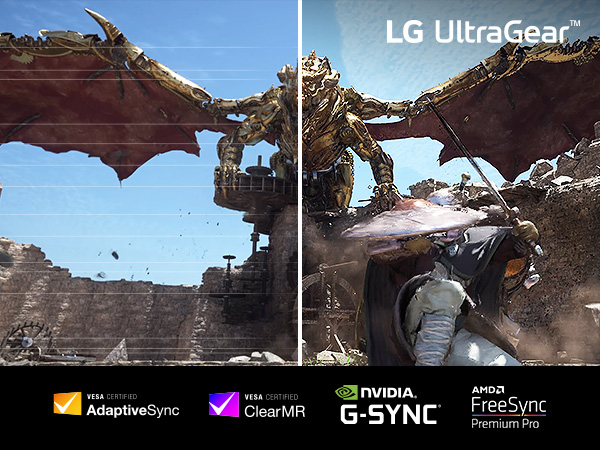
The LG 34GS95QE is a premium 34-inch ultrawide OLED gaming monitor featuring a steep 800R curve, WQHD 3440x1440 resolution, and an ultra-fast 240Hz refresh rate paired with a 0.03ms response time. It supports NVIDIA G-SYNC and AMD FreeSync Premium Pro for smooth, tear-free gameplay. With DisplayHDR True Black 400 and a 1.5M:1 contrast ratio, it delivers vivid colors and deep blacks. The monitor includes versatile connectivity options (HDMI 2.1, DisplayPort 1.4, USB-C) and an ergonomic stand with height, tilt, and swivel adjustments, making it a top-tier choice for competitive gamers and immersive media consumption.




| ASIN | B0CV27X9K7 |
| Adaptive Sync | FreeSync Premium Pro, G-Sync Compatible |
| Additional Features | Adaptive Sync, Anti Glare Screen, Height Adjustment, High Dynamic Range, Tilt Adjustment |
| Aspect Ratio | 21:9 |
| Best Sellers Rank | #3,223 in Electronics ( See Top 100 in Electronics ) #132 in Computer Monitors |
| Brand | LG |
| Brightness | 275 Candela |
| Built-In Media | Display Port Cable, HDMI Cable, Monitor, Power Cord, USB A to B Cable |
| Color | Green/Red |
| Connectivity Technology | HDMI, USB |
| Contrast Ratio | 1.5M:1 |
| Customer Reviews | 4.4 out of 5 stars 929 Reviews |
| Display Resolution Maximum | 3440 x 1440 Pixels |
| Display Technology | OLED |
| Display Type | OLED |
| Hardware Connectivity | DisplayPort, HDMI, USB Type C |
| Has Color Screen | Yes |
| Image Contrast Ratio | 1.5M:1 |
| Item Dimensions D x W x H | 10.97"D x 30.87"W x 23.06"H |
| Item Weight | 20.5 Pounds |
| Manufacturer | LG |
| Model Name | 34GS95QE-B.AUS |
| Model Number | 34GS95QE-B |
| Mounting Type | Wall Mount |
| Native Resolution | 3440x1440 |
| Number of Component Outputs | 2 |
| Picture Quality Enhancement Technology | DisplayHDR True Black 400, 1.5M:1 Contrast Ratio, NVIDIA G-SYNC Compatible, AMD FreeSync Premium Pro |
| Power Consumption | 48 Watts |
| Refresh Rate | 240 Hz |
| Resolution | QHD Wide 1440p |
| Response Time | 0.03 Milliseconds |
| Screen Finish | Matte |
| Screen Size | 34 Inches |
| Screen Surface Description | Matte |
| Specific Uses For Product | Gaming |
| Total Number of HDMI Ports | 2 |
| Total USB 2.0 Ports | 3 |
| Total USB 3.0 Ports | 3 |
| Total Usb Ports | 3 |
| UPC | 195174074633 |
| Viewing Angle | 178 Degrees |
| Warranty Description | 2 Years of Parts and Labor |
| Warranty Type | 2 Years Manufacturer Warranty |
J**.
Nice Monitor
Very good display. Clarity, good color, nice brightness. Default settings are adequate with some fine tuning. If your first OLED monitor you'll want to look into the settings for black levels and black saturation. Adjust to your preference. There are two settings. Black Level and Black Stabilizer. All other settings are much like any other monitor besides those intended for OLED care. Of which there are a few of them. I find picture quality to be very good across all applications and media. Games look amazing. So far as movies, streaming, etc? Outstanding with one caveat. And that is you're still at the mercy of the source material, stream quality, output resolution, etc. A OLED display is like putting on a pair of glasses. You'll see better so to speak, but if what you're looking at is low quality, glasses aren't going to fix it. In fact you may see its flaws even more so. So keep that in mind when viewing video content with this monitor. Yes it could look bad. Because it might be bad. OLED won't fix poor streaming quality, video compression, low resolution. It'll just light it up better. Adjust your display as needed in such cases. And when consuming media remember this is a monitor, not a television. It has no fancy image processing hardware, Dolby Vision, self adjusting this and that. Its a simple panel, looks great, and is basic all around. No built in WiFi, apps, its not a "Smart" anything. That is where YOUR components come in. Computer hardware, gaming console, streaming device/services, internet connection. If those are in order and optimized, so will the monitor be. So far as visual enhancements this has HDR. Thats it. I don't use HDR so can't comment, however. Oh...and browsing the internet, social media, etc, is just as well as with any other monitor. It sure is smooth, though. So far as gaming, its great. Responsive, fast, vibrant. You'll want to adjust your component and game settings anew, and get familiar with the Black Stabilizer. Which reduces or increases black saturation for games. But other than that its a very straightforward task to get the most out of this unit. The stand is "fine" and hunkered down with a weighty anti slip metal base. Its adjustability is good, and movement well damped. If coming from a high quality Mini LED ISP or VA panel, you may not appreciate this upgrade as much. OLED doesn't reinvent the wheel after all, its simply a better mousetrap. Its a computer monitor at the end of the day. Is it worth its price tag here in early 2026? Well...my outgoing Dell was purchased just four months ago. Very basic 1080p, ISP budget monitor. I donated that to a place in need. Not because I didn't like it, I did. A lot. But it had to go. So when replacing it I thought "why not?" And so I got this. As of this writing the LG here cost me $315 more than my Dell did. And tbh I consider that a bit of a bargain, and worth every penny. Just based on my brief experience I see no reason not to have an OLED monitor as my primary from here on in. It is impressive, and LG has done a good job here.
C**A
34 in ultrawide 800r curve 240hz
This monitor is beast and I stole it for 750$. If this was full price though at 1300$ there's better options but this is def a premium monitor. Reminder this is OLED technology so text clarity is not a strong suit due to the technology so that in no way shape or form knocks off any stars from this 5 star product. It's excellent for gaming! Super responsive, high refresh rate, solid build quality. It does have a matte coating but it's really not even remotely close to as bad as people say. Picture quality is still bright, vibrant and crystal clear. One thing to note is normal ultrawides are normally 1800r curve and at this curve being slight makes it wide and immersive. Now this one with 800r curve bends it so aggressively that it honestly takes away from the immersion as the sides of the monitor are brought closer together to make the harder curve but this is not bad at all. You can see the whole monitor better with peripherals making it easier to use for fps games. I was torn between this and immersion but then I decided to return this just cause I came to the conclusion I rather have immersion from 1800r curve so I then picked up the g85sb from Samsung but his LG is so dope and it looks so good! When or if I become a little more competitive I might get this again. Somehow to me I think this 800r curve makes it easier to aim on mouse and keyboard. I feel like seeing the whole monitor easier and the curve fits the eyes natural curve. Might be placebo but it works for me. If your on the fence I'd buy it. Return it if you want to try something else but keep in mind the refund process is 30 days so if your offered payments from Amazon this process would be more appealing as you are not putting the full price down.
R**D
Just buy this.
Coming from an expensive IPS to this glossy WOLED is a game changer. Unbelievable blacks and picture quality. Never gonna get bored watching stuff on this monitor. And yea no grey banding or anything the main stream reviewers talk about. It does pixel cleaning and moving on its own to maintain its health & quality.
J**O
One Year Later, and it’s Still a Beast
This monitor has been an absolute beast!! No ghosting, tearing, any of that nonsense! If you have been having issues with darker panels, this will solve your issues. Colors are vibrant, and brightness is what you want for being able to enjoy a wide variety of games. I have owned for a year now, and there is no looking back! Still no issues on the screen, and I have been playing competitive call of duty on it for the entire year, with Starfield and NBA2k filling in the gaps. Starfield looks absolutely incredible on this thing. Also, for anyone on console, it’s still a great option for 120hz caps I owned an Xbox series X before changing to PC gaming, and while having this monitor definitely made it more enticing to make the jump, I felt like it solved all my problems that I hated about other console monitors. Most were too dark, whitewashed, etc. The price is high, but it’s been high quality. Mounting on my swivel arm was easy, and it’s light enough for the cheaper arms too. Highly recommend, and what a year for gaming it has been!
J**B
Fantastic OLED Monitor for Windows - LG continues to impress me.
Before this monitor I had another LG 34" which was from a few generations ago. I thought that was the best monitor I've ever owned, and until I got this one it was in fact the best monitor I'd ever owned. This monitor exceeds that one in every way imaginable, and by every metric. The colors fly off the screen they seem more real, less muddy than my previous backlight based monitor. The blacks, I had no idea what blacks could be like. I thought "Really how good could it be?".. But trust me, once you have actual black as your base reference every thing else feels more real somehow. The colors seem to come to life. Games I've played, videos I've watch with my prior monitor seem better and newer. This is not hyperbole, it lends dimension beyond just being black. This screen is 240Hz refresh rate and I'm sure that translate to some gaming metrics, personally I play a lot of ARPG games and some other single player games like Cyberpunk 2077 and Horizon Forbidden West for example. So for me I don't really see any difference between my previous 160Hz and this 240Hz with the exception being GtG performance which scene transitions in games and movies is seamless and wonderful. You may notice the additional frame rates in FPS games but I don't play those so I can't say. For what I do, it does it flawlessly. In terms of size and weight this monitor is similar to my previous LG monitor however it is thinner, but I use a monitor arm and not the stand it comes with so thickness doesn't make much difference to me. The LED lights on the back don't do anything for me personally but I use Govee monitor lights for screen color during movies and gaming so I don't really need to use the built RGB lights in the back. The bezel is thinner than my previous LG monitor at the sides which I do like aesthetically. I was concerned about OLED but this monitor has a suite of monitor care you have to enable in settings but I feel that they will certainly help with the burn issues with OLED (at least I hope so). Just know the settings I'm talking about do not come turned on by default and you'll need to enable them yourself which I suggest you do as they are meant to prevent the burn in issues. I really only have one complaint with this monitor at this point, and it's nitpicking but it's the menu button control. It's on the back of the monitor. It's easy enough to reach but my hand cramps if I have to use it for a prolonged period of time (which honestly after you set this up you don't have to touch it again really). But my previous LG has the bottom at the bottom of the monitor and I have to be honest I found it easier to use than the one of this monitor. But I'm nit picking like I said. One last thing, if you use Windows (I have never used a Mac in my life) you'll want to make sure to set your Sharpness settings to 55 and then setup Windows Clear Type and also the HDR profile (the one from RTINGS is SDR only). You'll have to download the HDR utility from the Microsoft store (Windows 11 did it automatically for me). I also found the default a bit to yellow for my liking and put the manual color temp to C2 which looks better to my eyes (whites look white to me now). Anyway with the above adjustments (sans the color temp one) my text looks as good to me as my previous LG monitor did and I have no complaints anymore. Honestly, if you're in the market for a new monitor and your budget allows for it you should seriously consider this one. This is my 2nd LG monitor (two in a row) and they haven't let me down yet.
P**1
Great monitor, bad software
This is a very well-built monitor with amazing picture and color quality. Seriously the picture looks incredible from ANY viewing angle. There are tons of settings for the display for comfort and picture adjustments, and you can configure the software to change the monitor settings based on what program is running. This leads into the negative - the software is just badly made. There is an on-screen popup every time you start your computer that has to be manually closed. Also, the app causes pretty heavy input lag on your computer any time you're switching apps, and sometimes it lasts 10-15 seconds where the computer is not responsive. The software is not necessary - you can manually adjust things from the buttons on the monitor itself, but it would be nice if they fixed the problems with the software.
P**O
Bad value. terrible support
This monitor is for one overpriced the only reason I got this one is because it was on a sale and there are a bunch of other manufacturers that use the same panel for cheaper price it doesnt have speakers which once again I can find some with the same panel that does have built in speaker not a huge deal but still shows you how much they overcharge for this product. I'd also like to add they sent me the monitor with a defective power supply which also isnt the biggest problem but it does kinda suck when u buy a 1000$ monitor on sale for 500 bucks and you dont get a properly working monitor which is honestly mind blowing and on top of that I have troubleshooted this monitor so many times because of the power supply and I finally found out that thats what the issue was so I called trying to get a replacement because im not gonna spend even more money on something that should've been working in the first place and they said yeah no problem we will send you one so I wait about a week and it shows up so im thinking sweet I can finally use this expensive monitor I paid to much for but no. They sent me the wrong part they send me just the cord that plugs into the power brick so I called again told them hey I need the right thing and I've been waiting for over a week now they dont give you any shipping or order status when they send you a replacement and its a terrible system just overall really unhappy with it but im not gonna ship it back for replacement because if it gets lost then I have to pay for it or I have to pay for shipping protection which is insane and then im sitting here for weeks without a monitor that I paid for a month and a half ago and wasted so much time troubleshooting because when I called not even their support was any help they couldnt figure out the issue I had to figure it out my self actually terrible support team and honestly nothing fancy about this monitor it has very basic picture settings and just not worth the money or the headache from going through LG especially with the kind of support I received all I got was a im sorry to hear about that and very bad troubleshooting on their end at one point when i was getting support I sent them and gave them my product number and they somehow pulled up the wrong product complete waste of time and money please for the people looking at reviews of this monitor spend your money elsewhere there are so many good oleds on the market and for this many issues with lack of support its not worth it. Im not saying everyone's experience will be like this but my was and it was very disappointing. Also there photo is a picture of the new cord they sent me when they were supposed to send the whole power brick. :update lg still hasn't gotten back to me with a sorry or anything absolutely nothing I genuinely think they dont care and its very disappointing.
V**E
Dope monitor, especially for the price
Setup was almost too easy. The contrast and colors are incredible. Looks like a $1000 monitor, only cost $500, great value. 10/10 monitor quality. Worth every penny.
Trustpilot
1 month ago
3 days ago