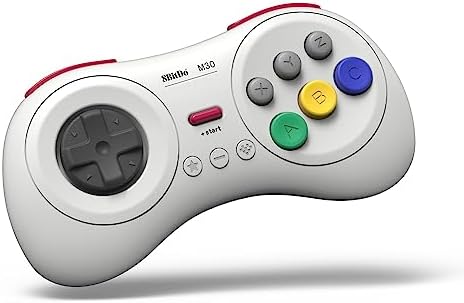


🎮 Level up your retro game with wireless freedom and turbocharged nostalgia!
The 8Bitdo M30 Bluetooth Gaming Controller is a white, 6-button wireless gamepad designed for seamless compatibility with Nintendo Switch/Switch 2, Windows 10+, Android, macOS, Steam, and Raspberry Pi. Featuring a rechargeable battery, turbo function, and upgradable firmware, it delivers authentic SEGA-style gameplay with modern convenience and cross-platform versatility.


| ASIN | B0C6MW2748 |
| Amazon Bestseller | #903 in Video Games ( See Top 100 in Video Games ) #51 in Nintendo Switch 2 Controllers |
| Batteries | 1 Lithium Polymer batteries required. (included) |
| Country of Origin | China |
| Customer Reviews | 4.1 4.1 out of 5 stars (3,267) |
| Item model number | 6922621504023 |
| Language | English |
| Rated | Suitable for all ages |
A**様
同社のレシーバーも購入してセガサターン用の無線コントローラーとして使用してます。 特に問題なく使えています。
P**ー
使いやすいです! レトロゲーム、特にセガ系のエミュを遊ぶために購入しました。 PS用のコントローラーで遊んでたのですが、やはりセガにはこの形が使いやすいです! ただ、最初設定がわかりづらく、PC用に設定するのに時間がかかりました。 初期不良を疑ったのですが、説明書と格闘し、無事接続できてからは、普通に使えてます。 バッテリーの持ちも今のところ良好です!
木**三
まあ便利です。格闘ゲームはたのしくやれます。
棒**棒
Switch2で使用 この十字キーを使ったら純正のプロコンやjoyconが使えなくなるぐらいとても気持ちがいい その気持ちよさだけで買う価値があった ただ難点があってXボタンが押しにくい Xを押そうとするとAやらBに親指の腹が当たってしまうのでキーコンフィグで変えました Switch2本体にキーコンフィグ機能があるので問題なしですね
A**ー
買ってからすぐに動かなくなった。 特定のコマンドをずっと勝手に打ち続けてるようでキーコンフィグ画面でずっと同じ変更を勝手にやり続けている しかもこちらの操作を全く受け付けない。特定の操作を記録する機能はないらしいがもう最悪
M**ん
switch2で6ボタン型PADとして使えました。 PCからパッチファイルをダウンロードしてアップデートする必要があります。 またswitch2との接続はBluetooth無線のみとなります。 そのため使用中にBT通信を阻害する電子機器(電子レンジ等)が動作すると明らかに入力遅延が発生するので注意。 PCへの入力はUSB-C有線でできるのでこちらはとても使いやすいです。 コントローラーの特性としては子供でも持ちやすい小さめの形、ボタンや十字キーにおいてそこそこの耐久力。応急処置のしやすさと安さでバランスがとれています。
こ**よ
Switchで、主にオールド格闘ゲームに利用しています。 気になる点は以下の通りです。 ・コントローラーの接続 説明書記述の「スタート+Y」が無反応。 スタート長押しでようやく下部ランプ点灯しました。 ・電力の状況 上部ランプで電力の状況がわかるようです。 暫く放置(放電)したためか、点滅(電圧低下)したのでケーブルを接続して給電したが反応変わらず。SwitchへBluetooth接続していない状況で起こりました。 ・ボタンの配置 主に6ボタンを使用するゲームですが、親指で押す操作だけでは同時押しができないため、ゲーム側でLRで補助ボタンを登録したいのですが、クレジットやスタートなどでボタンが足りなくなる。これは仕方ないとは思いますがね。 操作感はバッチリです。サターンより多少重かったり、操作感が若干違いますが、マイナスなイメージはないです。
M**I
天面六ボタンコンに初チャレンジしましたが、十字キーが微妙でした クリック感があるタイプに慣れきっていたので、ペコペコしたこのコントローラーでは斜め入力自体の成功率が低く操作不備が続出しました また、switch2でスト6用に買ったのですが、スト6では対戦以外のシチュエーションではかなり高頻度でアナログパッドを使うので滅茶苦茶不便でした この2点から星2とします 個人的感想なので、これがこのタイプのコントローラーの正解の操作感だったらごめんなさい
S**M
So from what I've been reading, a vintage Japanese Sega Saturn controller is considered the ultimate gamepad for shoot-em-ups. Some people prefer the arcade stick, but I think the Saturn controller is more popular in the SHMUP community. It's also considered the best gamepad for retro fighting games, though an arcade stick is favored over the traditional gamepad for fighting games. However, there aren't any adapters that will let you use a real Saturn controller on the Nintendo Switch, so I decided to give this a try. Well, my SHMUP skills shot through the roof as soon as I tried out this pad. I never got seriously into the genre, but I'm now starting to since I have the proper equipment for it. I found modern analog sticks terrible for SHMUPS. There are many instances where you'll need to slowly move in one direction with the bullet patterns(or in some games like Radiant Silvergun or Ikaruga, to get through tight corridors), and this can only be accomplished on an analog stick by tapping the stick to one side over and over again, which works horribly because it's an analog stick, not a button. The Sony/Microsoft/Nintendo d-pads work for moving slowl, but they're still bad for SHMUPS since it's hard to move diagonally or in a circle. However, the 8-direction Sega-style d-pad is perfect. You can move slowly to one side by clicking the d-pad repeatedly and easily move in 8 directions. I wish I could compare this to a vintage Saturn controller or the officially licensed Retro-bit Saturn controller for Switch, but I haven't used either. I can't say if those are better or worse than those. All I know is that this blows away trying to play SHMUPS on a a DS4, Xbox One controller, or Switch Joy-cons(some people do actually like the DS2 for SHMUPS though, try if if you want :Þ). Games I've tested on it include Radiant Silvergun in Retroarch, DoDonPachi Dai-Ou-Jou in Retroarch, Ikaruga on PC, Touhou 16 on PC, Danmaku Unlimited 3 on Switch, Gunbird 2 on Switch, and Aero Fighters 2 on Switch. All controlled beautifully. A few things to note. For Retroarch I had to put it into Android mode(start+B). Windows mode(start+X) had a glitch where the R-button was just a duplicate of the Z-button and L wasn't recognized at all. For Touhou I had to put it into Windows mode and to use Joy2Key, since Joy2Key would not recognize Android mode. Both Android and Windows mode work with Steam, however, in Windows mode LB is mapped to L on the gamepad, LT to R, RB to Z, and RT to C. With Android mode it's mapped like it is on the Switch where L is LB and R is RB, which makes way more sense. But the bottom line is, if Windows mode is not working right on PC then use Android mode, Windows will recognize either(note that I do not know if Android mode works in wired mode, I tested with bluetooth mode). Apparently one is Xinput and one is Dinput, hence the different compatibility. And of course, Joy2Key is always an option for games that refuse to recognize the gamepad like Touhou. I had no issues with it on Switch since the Switch let's you remap controls now. However, the manual doesn't tell you how to change the D-pad from emulating the left analog stick to emulating the D-pad, even though it does have that feature. It's so typical of retro stuff to put features in and not tell you they exist. The pad also worked great in the Sega Genesis classic collection on Switch with Sonic 2 and Streets of Rage 3, and it worked well with Sonic Mania. I'll have to try it with Streets of Rage 4 soon. So bottom line, I can't compare it to the officially licensed Retro-bit controllers for the Nintendo Switch, I just know this a really good gamepad on it's own. And of course a vintage Saturn controller and an adapter is probably superior if you're serious about PC SHMUPS, but they won't work on Switch and will cost you more than this gamepad and lack bluetooth and the extra buttons. Also, while Retroarch, Steam, Joy2Key, and Switch all worked perfectly with this gamepad in the end, it did take some trial and error(that is the norm for anything other than Xbox controller/Windows and pro controller/Switch). I'll just say if you want a gamepad for PC and Switch that's great for SHMUPS and fighting games and classic Sega games, this works great.
L**S
El control es de buena calidad. Los botones tienen buen tacto. A pesar de ser bluetooth no tiene lag.
W**L
The build quality is great, but I wouldn't recommend the Bluetooth version. I have been trying for hours to get the "Ultimate Software X" to even RECOGNISE my device so that I can customise my controller inputs. I have had it plugged in and still says "Please connect an Xbox licensed 8BitDo device" I managed to update the firmware, which seemed to recognise it was plugged in, but not the worthless software they supply? Sorry, but if I am spending money on a controller like this, I think I deserve it to function like all the other products. I found there is another app they have for their higher-end controllers, and that doesn't recognise my device either. I suggest combining the two software and removing the Ultimate Software X from the Microsoft App Store, as it often freezes and fails to launch. It's honestly such a shame. I really wanted to enjoy this controller, but in the current state of the program side of things, I'd say it's best to steer clear of this brand, as I doubt they will last much longer if this is how they handle things.
M**S
For a hybrid between the Saturn and Mega Drive Joypads, the 8BitDo M30 looks and feels like the best of both retro worlds. If you like the way a Mega Drive controller feels in your hands, you'll love this one, and even if not, it still feels plenty comfortable. The D-Pad has the right amount of travel, 6 action and 2 shoulder buttons means that it has no fewer buttons than a PS-style controller, and even the mushiness/clickiness of the buttons feels just right. For 30 bucks, this is a reasonably priced joystick with matching quality. It's excellent for emulators and older games, and great for modern games that don't require dual sticks, like Stardew Valley, Sonic Mania, or Puyo Tetris. Just make sure you have a decent bluetooth connection - my notebook's a bit spotty (also with bluetooth audio) and sometimes input is stuck; getting closer to the computer solves the problem, but I know mine is an extreme case, and it will still work flawlessly up to a meter and a half away.
G**R
Mando de muy buena calidad para emulación y juegos retro. El mando está inspirado en el mando de 6 botones de Mega Drive (inspirado, que no igual). Es bastante cómodo y trae dos botones superiores L y R aparte de los seis frontales (ABC XYZ), un botón Start y tres botones de función (de izquierda a derecha: turbo, back y home). La conexión bluetooth funciona muy bien y también se puede usar con cable USB-C. Muy importante si se usa por bluetooth: se apaga automáticamente si no está conectado por bluetooth tras 1 minuto de inactividad, o si está conectado, 15 minutos sin usarse. Bien pensado para ahorrar batería. La ergonomía es muy buena y la cruceta es cómoda para cualquier tipo de juego.
Trustpilot
1 month ago
3 days ago