We remain fully operational. Our teams are working around the clock to ensure your deliveries continue safely.

DOWNLOAD THE APP


Customer Services
Copyright © 2025 Desertcart Holdings Limited
DOWNLOAD THE APP


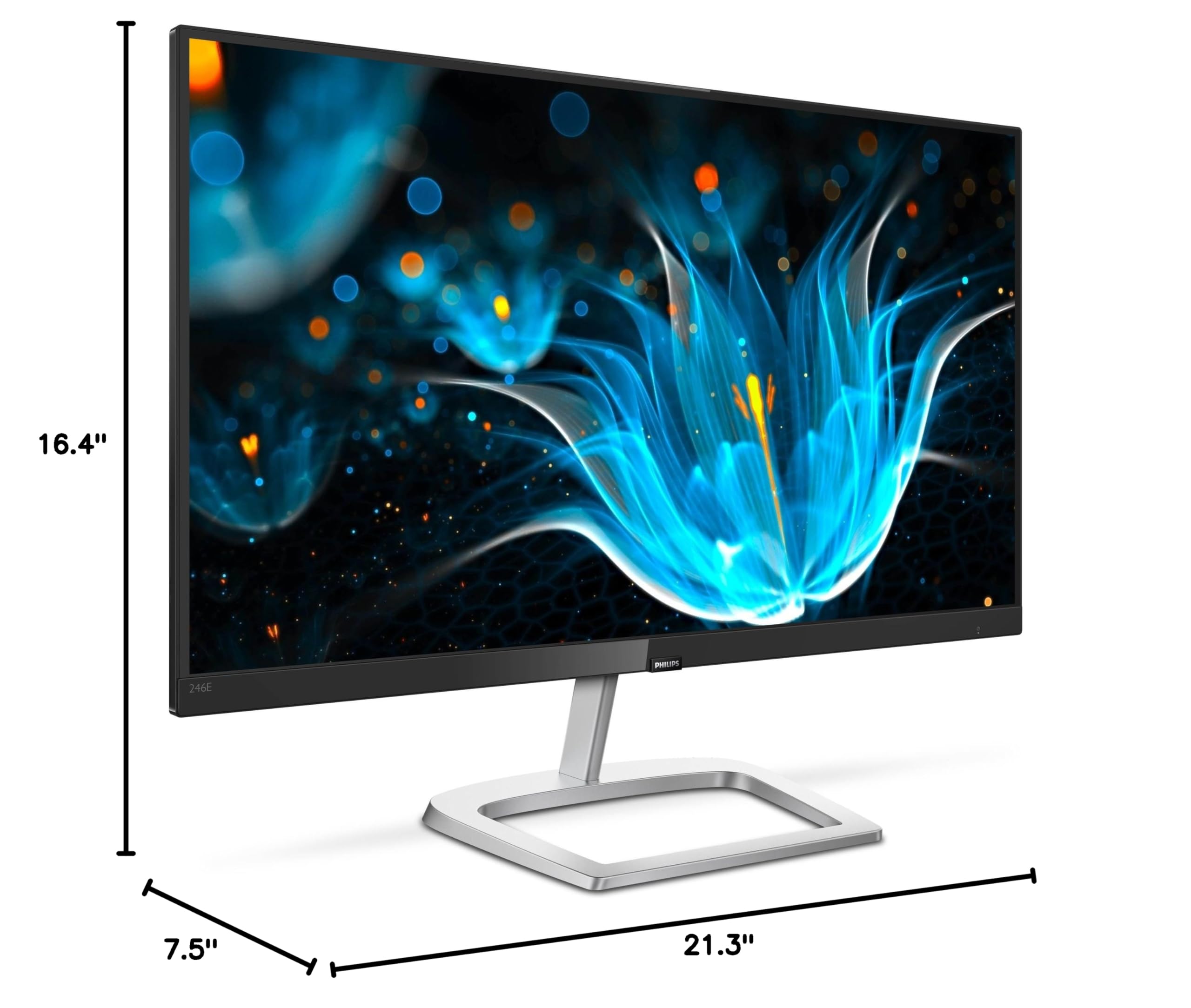
🖥️ Elevate your workspace with style, clarity, and comfort — because your screen should work as hard as you do.
The Philips 226E9QDSB is a 22-inch Full HD monitor featuring an IPS panel for wide viewing angles and vivid colors. Its ultra-narrow borders enable seamless multi-monitor setups, while AMD FreeSync technology ensures smooth visuals at 75Hz. Designed with eye-care features like LowBlue Mode and Flicker-Free technology, it supports long hours of comfortable use. Backed by a 4-year advance replacement warranty, this monitor blends style, performance, and reliability for professionals and gamers alike.


| ASIN | B07CK4W58Y |
| Best Sellers Rank | #155,265 in Electronics ( See Top 100 in Electronics ) #3,240 in Computer Monitors |
| Brand | Philips |
| Color | Black |
| Customer Reviews | 4.6 4.6 out of 5 stars (5,357) |
| Date First Available | May 28, 2018 |
| Is Discontinued By Manufacturer | No |
| Item Dimensions LxWxH | 7.5 x 21.3 x 16.4 inches |
| Item Weight | 6.47 pounds |
| Item model number | 246E9QDSB |
| Manufacturer | ENVISION |
| Max Screen Resolution | 1920 x 1080 Pixels |
| Product Dimensions | 7.5 x 21.3 x 16.4 inches |
| Screen Resolution | 1920x1080 |
| Series | E9 Line |
| Standing screen display size | 24 Inches |
| Voltage | 200 Volts |
T**N
So nice had to buy it twice
Purchased the 24" FHD model and I love it. First of all the design makes it look much more expensive than it is. Very modern and clean design aesthetic with small bezels and a really nice stand that looks like it's made of aluminum (even though it's covered in plastic). The black/silver colors go really well with my whole setup with a matching keyboard and mouse as well. The screen quality is fantastic and looks very sharp and color-accurate. I ran multiple tests on the monitor and there have been no dead pixels or other quality control issues. The best thing about this monitor is the price - any other monitor in this price range looks incredibly cheap and outdated, even if they also offer 75 Hz 1080p on a 24" screen. The downsides to the monitor are the very confusing joystick-like controller on the back for navigating the menu because you never know which direction to pull it for what. The lack of adjustable heights or rotation limits how much you can move the monitor around but you can always mount it on an arm for that. Also, when you first plug in this monitor (at least for me) on Windows it defaults to 60 Hz. You have to dig through the advanced display settings to set it to 75 Hz. Overall the monitor is still overall 5 stars because the design is so clean and it works really well. Ended up purchasing a second one because the price point is so good.
D**O
Reasonably_Priced High Performance Monitor
The monitor, Model 246E9QDSB/27, ordered with free shipping, arrived six days after the order was placed. It was in top condition due to manufacturer's styrofoam inside a strong box inside an Amazon box. The monitor setup was easy and I used the DVI connection. I was very taken aback when I turned the unit on and got a full color, brilliant display that was decidedly better than the monitor I replaced. Overall I am very pleased with the performance so far. The ISP screen is very applicable to our family needs as we frequently Skype with our grandchildren. Two of us sit side-by-side, dividing the screen, and each of us has a great view due to the very wide viewing angle (178 deg). I believe gamers might find this monitor to be very adequate but have not tried it for gaming use. There is absolutely no apparent flicker and the Low Blue Light setting gives a very normal brightness for almost all of our normal viewing needs. Toggling between Low Blue Light and Normal Light mode is a quick and simple procedure once you locate and learn the function of the single switch (see comment below). There are a few items that I will note. First, although the monitor does comply with the VESA mounting standard (in this case, 75mm by 75mm) for monitor mounting, I could not use my very flexible tilt and rotate desktop monitor stand I had anticipated using because the input fittings which extend out perpendicular from the monitor back, both DVI and VGA, interfere enough with the stand column as to prevent the use of the stand. I could use HDMI for this model number but to do so would require some challenging cabling mods for my particular setup. Secondly, the on/off and mode selector switch is rather cryptically described in the manual. I finally found the switch and discovered that it was a multi-function toggle-type switch located at the bottom center of the monitor back. The diagramatic instructions should be augmented by stating in words, "The on/off and multi-function toggle-type switch is located about one inch from the bottom center of the monitor back. This switch is used for selecting the monitor functions and for making monitor adjustments." Thirdly, there was no CD or DVD included with the order. I went online to the Phillips website under Support, downloaded the driver file and User Manual and easily found the latest driver with the helpful instruction as to how to verify that the generic Windows 10 driver was being used and instruction as to how to install and verify that the correct driver had been installed. I consider these to be minor critics. In short, I am very pleased with this high-quality, very modern and up-to-date monitor...good job Phillips!
J**Z
Good monitor
This review is for the Philips 276E8VJSB 27" Monitor, 4K UHD model. I originally bought the Philips 276E9QDSB 27" 1080p FHD monitor and wound up returning it because although the picture quality was good the viewing angle was horrible. The red saturation was over the top as well. On top of that, the particular one I got had several random blemishes on the sides and back of the monitor. It almost seemed like it was a refurbished monitor repackaged and presented as a new item. I went ahead and bought the 276E8VJSB 27" Monitor, 4K UHD model and it was a very good decision. The difference in picture quality and clarity between the 1080p FHD and 4k UHD model is significant. The viewing angle on the 276E8VJSB is very good (much better than the 1080p FHD model) and the colors are deep and vibrant. I was initially concerned that a 27" would be too small for 4k but so far the scaling in Windows 10 has worked like a charm. I have it set to 200% which presents icons and text the same as 1080p, but, with MUCH better clarity. Text and fonts look great and it puts less strain on my aging eyes. You don't see any rough edges or pixels at any distance. I had to tweak a few things, like the dpi settings (right click>properties>compatibility>change DPI settings>high DPI scaling override> check system enhanced box) for a few individual programs here and there but it took all of five minutes of my time. I still play games at 1080p and they look fine. If there's blurring I don't notice it, so I don't care. One thing I will say, there's a decent amount of IPS glow with these monitors and I did return a second 276E8VJSB because it had excessive IPS glow and bleeding on two corners. And like the 27" 1080p I returned it also had several scratches and blemishes on the back even though the box was sealed with Phillips tape and all the protective wrap was on the monitor. Starting to wonder as I mentioned earlier if some of these are refurbished and re-boxed as new. I decided to just keep the original 276E8VJSB I bought, it had the best screen out of the ones I tried.
A**L
Large vivid screen. Found it just right for whatever I need: movies, games or just browsing the web without glitching. Make sure to use a new HDMI cable of good quality
C**N
Este a mi parecer es un excelente monitor para diseño si no puedes permitirte algo mas grande. A decir verdad estaba algo escéptico en cuanto al precio y el tamaño de la pantalla pues se recomiendan pantallas mas grandes para la labor de diseño, sin embargo e de decir que este monitor me sorprendió, la calidad del mismo es bastante buena que cumple bastante bien en cuanto a mostrar calidad y colores se trata. En cuanto a calidad para gaming si siento que deja un poquito que desear pues el refresco de cuadros no se siente tan rápido como lo exige un juego actual, aunque a mi parecer eso no le baja la calificación pues es un monitor bastante barato para la calidad de imagen que ofrece.
M**.
The bad: Phillips messed up the VESA mount placement on this monitor but with a bit of creativity, you can VESA mount it and fit the cables in. The good: It's sad how everybody is focusing on just the VESA mount, cause this is hands down the best-looking IPS I've ever seen. I have a 280Hz VG258QM TN that's super fast in games but it doesn't have the best colors so, I was looking for a 60Hz IPS monitor to put next to it for browsing the web, watching movies, and for singleplayer games. I tried a lot of budget IPS 24'' inch monitors and none looked as good as this Philips 246E9QDSB. I even returned a $300 Dell 23'' 1440p IPS and a 144Hz 1440p IPS LG 27GL850 for this. I really can't fully express how good the colors look on this monitor. The whites are white and the blacks are black. no green tint or weird gamma like that DELL. Vibrant colors yet not too oversaturated like that LG 27GL850. When you get the monitor, set the gamma to 2.2 in the OSD and that's it. Here are the settings I'm running. Brightness 40 (personal preference) contrast 50 gamma 2.2 sharpness 90 response time FAST smart contrast OFF color: user define: Red100 Green100 Blue76 EDIT: I was previously using the monitor with a DVI-D cable and I recently switched to HDMI. The monitor looks slightly more saturated with a HDMI cable. I also put both cables through my DataColor SpiderX pro calorimeter and I got 133% sRGB, 92.6% Adobe RGB, and 94.2% DCI P3. With a DVI cable, I got 99.8% sRGB, 72% Adobe RGB, and 74.1% DCI P3. in terms of color accuracy, on both cables I got an average deltaE of 0.10 👌 If you think that the monitor looks a bit oversaturated, use the DVI-D port. if you wanna use the HDMi port, limit the gamut to sRGB in AMD control panel. (if you have an intel or Nvidia GPU, use a tool novideo_sRGB to limit the gamut to sRGB.) I'll keep my current setup until OLED technology matures.
G**O
CONSEGUÍ ESTE MONITOR POR $1700, MUY BUEN MONITOR! EXCELENTE :D ESTOY MUY CONTENTO
B**A
I have been looking to get a monitor for a while now, and I have done probably a couple of hours of research. From what I found this is the best monitor for daily use (not gaming). I currently have the 27-inch model. -This monitor has a good picture and colour display -IPS panel (in-plane switching panel) meaning you can look at the monitor pretty much from any angle -Slik design with tiny bezels (half of an inch) -Easy to assemble -Comes with an HDMI cable (I am pretty sure it's only with 27- inches) Some cons are: -60 Hz refresh rate, not ideal for gaming but manageable for casual gaming -No speakers, but the computer's speakers usually suffice -Made out of plastic and feels cheap So, if you are looking for a monitor for daily use for school or work or casual gaming or even watching movies, this monitor offers all these. Now I have read most of the 1-star reviews, so beware mistakes can and will happen so there is as always a tiny chance you get a faulty product, but again it is unlikely. Happy monitor hunting.
Trustpilot
3 days ago
2 months ago