
DOWNLOAD THE APP


Customer Services
Copyright © 2025 Desertcart Holdings Limited
DOWNLOAD THE APP

🚀 Elevate your home network — speed, security, and coverage that keeps you connected!
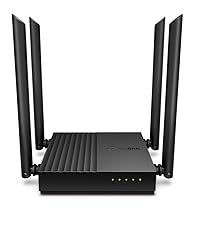
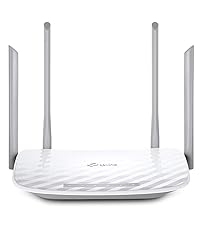
The TP-Link Archer C6 is a high-performance AC1200 dual-band WiFi router featuring 4 external antennas with Beamforming technology for enhanced coverage and signal focus. It supports MU-MIMO for simultaneous multi-device streaming, WPA3 security, and VPN server capabilities. Easy to set up via the TP-Link Tether app, it also offers Access Point mode and is compatible with EasyMesh for scalable home networking. Ideal for professionals and gamers seeking reliable, fast, and secure internet connectivity.




| ASIN | B07L5YRYF4 |
| Antenna Location | Home |
| Antenna Type | Fixed |
| Best Sellers Rank | 334 in Computers & Accessories ( See Top 100 in Computers & Accessories ) 1 in Routers |
| Box Contents | Power Adapter, Quick Installation Guide, RJ45 Ethernet Cable, Wireless Router Archer C6 |
| Brand | TP-Link |
| Brand Name | TP-Link |
| Colour | Black |
| Compatible Devices | Laptop, Personal Computer, Smart Television, Smartphone, Tablet |
| Compatible devices | Laptop, Personal Computer, Smart Television, Smartphone, Tablet |
| Connectivity Technology | Ethernet, Wi-Fi |
| Control Method | App |
| Controller Type | Ios |
| Country of Origin | China |
| Coverage | Boosted with Beamforming technology |
| Customer Reviews | 4.4 out of 5 stars 17,236 Reviews |
| Data Transfer Rate | 1200 Megabits Per Second |
| Frequency | 5 GHz |
| Frequency Band Class | Dual-Band |
| Frequency band class | Dual-Band |
| Global Trade Identification Number | 06935364089399 |
| Has Internet Connectivity | Yes |
| Has Security Updates | Yes |
| Is Modem Compatible | Yes |
| Item Dimensions L x W x H | 11.7L x 3.2W x 21.5H centimetres |
| Item Type Name | WiFi Router |
| Item Weight | 50 Grams |
| LAN Port Bandwidth | 1000 Mbps |
| Manufacturer | TP-Link |
| Maximum Upstream Data Transfer Rate | 866.7 Megabits Per Second |
| Model Name | Archer C6 |
| Model Number | Archer C6 |
| Model name | Archer C6 |
| Number of Antennas | 4 |
| Number of Ports | 5 |
| Operating System | Android and IOS |
| Other Special Features of the Product | Beamforming,Parental Control,Access Point Mode |
| Product Warranty | Manufacture's 3-year warranty |
| Router Firewall Security Level | High |
| Router Network Type | WIRELESS |
| Security Protocol | WEP, WPA-PSK, WPA2-PSK |
| Special feature | Beamforming , Parental Control, Access Point Mode |
| Voltage | 230 Volts (AC) |
| Wireless Compability | 802.11ac, 802.11n |
| Wireless communication standard | 802.11ac, 802.11n |
M**E
Sim Card routers should be more mobile phone based
A good item but could be improved by a notification light on the front panel for SMS messages, it would also benefit from the ability to plug in a phone handset. TP-Link are great with routers but when dealing with mobile sim card dependant items they are a little lacking in their design from mobile phone makers as in order to use this properly with multiple wireless devices you need a high rate or unlimited data plan and these come with unlimited call and texts that this device makes hard to use on the SMS side and impossible for the call side. Data only plans I have found to be more expensive than plans including voice and SMS. After 1 month of using this I have had good signal strength throughout my house, the colour is great as it needs to be mounted in a window for best mobile reception and being white in sunlight prevents it from getting too hot, the power cable is not long enough for window mounting so have had to find a way to extend it (it was easier to move a mains extension to the plug than extend the power cable). Having to log on the router home page to check for messages is a pain so you can't really use the message side. Mobile broadband is good for singles or those with lower internet (non gamer and no HD streams) but you can't really plan how much data you will need, for example you tube does let you pick different resolutions but does not specify how much data you will need to watch a video. Not many singles and couples really need fibre band-with. As I am using this with an unlimited internet plan that gives me calls and texts unlimited too I have tried to switch to a Motorola FW410 4G (after only 1 month) which did not provide as good a signal throughout the house but was able to use all 3 parts of my plan - calls, texts and internet. unfortunately the hot-spot side of this item packed up after only 5 days of use, it was a hot-spot not a router. This TP-Link router is a good reliable solution for data only with limited SMS function. If calls are required on top (like with my requirement) you may need 2 sims and 2 devices (and 2 accounts/bills), 1 to handle calls and texts (a basic Nokia 105 mobile will do this for around £20 equipment cost) and this router which gives the added bonus of being able to accept add on aerials which can be either indoor or outdoor mounted further improving mobile reception (did not need these and have not tried these, may need after house move). Most people already own a mobile so should not have this issue, the use of a non smartphone is due to battery life, recharge interval and better reception. My circumstances: due to probate (death of the home owner who paid the broadband bill) I will be leaving this house soon, could not justify a 2 year broadband contract and mess around with number changes when I move. This mobile system means I pay less for phone services (no line rental), get the bandwidth I need, have uninterrupted number portability and choice (albeit limited) of my own equipment. Landlines are lv ike TV licences, a thing of the past that you don't need (if you don't use TV) and there are newer alternatives to consider. This way I only have to inform of number change once which with the house move is required anyway.
M**R
Superb 5G Router
Superb router if you don't have good DSL broadband. I'm in the country with only 50% signal strength on 4G+, but I bought the NX210 as soon as my mast was upgraded to 5G. On an EE 5G contract, I am now getting 100% signal strength and 245Mbps, which is more than I've ever seen here. Very good user configuration via the user interface, or you can use the Tether app if you don't want to tweak. I like that the front lights face me so that I can see them easily. Neat, tidy design with three rear LAN ports. Works with TP-Link mesh units for extended wi-fi in a large house.
C**Y
Good all round 5G router.
I have had this for a couple of weeks to replace a Zytel MC888 Ultra that failed after just over a year so I decided to try a different make. It performs well inside in the very strong signal area I live in giving a download speed of around 400Mb/s and up to 650Mb/s at quiet periods during the night. It is very sensitive to small movements in its position and you can add or lose 50-100Mb/s by moving the router less than a couple of millimetres. Feature wise it has the full range of settings you would expect of a router at this price level and more than the Zytel although things like port forwarding (or virtual servers as TP-Link call it) is of little use behind the CG-NAT used by most 5G providers. I changed the IP Address range to match that of the ZYtel (from the default 192.168.1.xx to 192.168.0,xx to enable it to be just connected to my existing devices without having to change the static IPs I had set in the devices. I have had a couple of issues with the DHCP server allocating dynamic IP addresses that have already been fixed in some devices and causing a conflict and having to switch one device off whilst manually changing the other device’s IP address. There is a setting to program an automatic reboot at regular intervals and I would recommend that this is done once a day, perhaps in the middle of the night when no one is likely to be using the internet as after a few days without a reboot the router it no longer delivers internet although devices can still talk to each other on the local network e.g. I can still access the drives on my Asustor NAS devices that are mapped on my PC and my Alexas still work and I can still give instructions to turn lights on and off etc which means there must be some connection to the internet or the echo devices wouldn’t work at all. But internet speed measured on my PC drops to zero. Rebooting restores it to normal speed and doing this as a precaution once a day appears to prevent loss of internet access. I tried attaching a dual cabled external antenna to the connectors on the router but it actually reduced the speed I was getting and the unit performs best without it. This could be just because I live in a very strong 5G signal area and it may make more of a difference if the signal levels indoors are lower. I switched the wi-fi off as I use four Mercusys mesh devices string my home, all connected via Ethernet. I only use one of the three RJ45 sockets on the rear of the router to connect the main mesh device and then take two cables from the mesh device to two switches and from there to all my devices to three more mesh units set as access points or connect devices by Ethernet. The router appears to handle the 64+ devices connected to the network without any difficult except for the occasional allocation of an IP address I have already allocated as a static address. However, I learned that the router allocates IP addresses in order starting at 2 so if I set the static IP addresses at 100 or more, there is no risk of the DHCP issuing one of the static addresses and this seems to have solved the problem. There are lots of things in the NAT forwarding settings that you can switch off and if you use VOIP you will want to disable the SIP ALG at least as it caused my VOIP phones to cease to work at all. You may also want to disable the RSTP ALG as well although this didn’t make much difference for me. Most of the other settings you are not likely to need to change although it depends exactly how you are going to use it. Overall, I am quite happy with the router. It doesn’t quite get the speed the Zytel did and having to reboot it regularly is a bit of a pain but I would recommend this device if you live in a good 5G signal area and can’t get fibre.
M**.
Excellent router
Plug and play worked immediately with a Smarty SIM, so very easy to set up, and network signal sensitivity is also very good.
R**S
Amazing, worked first time with easy setup
Fabulous little sim router. Simple to setup and worked first time out of box. I'm very impressed and this has helped me out of a scrape with minimal spend. I'm using a Three data only nano sim.
C**N
Great boost to wifi.
I was having problems with my Virgin broadband router and the WiFi signal so I did some research and this router was highly rated. Firstly, the router looks great, it looks like it means business and is made to serve a purpose. I placed the virgin broadband into router mode and connect this device. After connecting via the app the whole setup was so simple and easy that even a not so tech savvy person like myself found it a breeze. I positioned the antennas in different positions and connected to the router using the original ID and password from the virgin router. This can be set during set up and is completly customisable. There are many different settings to choose from including 2.4 and 5 ghz and also guest networks. The speed of my WiFi increased drastically once having this plugged in and went from around 190Mbps to 270Mbps and the coverage also greatly improved across the house. I have had no complaints in regards to the router itself, my firesticks found it difficult to connect at first but once I connected using the WPS button they have worked as normal. I would highly recommend this item if your wanting to replace your ISP router. It is so easy to set up and use it is actually a doddle. I have since purchased additional booster for the garage which easily connects through the mesh network and again is so simple to install its virtually fool proof. If you want a new router, this is the one. Ive found it great for daily streaming in a house of 5.
A**W
Nice features on older LTE tech
Pretty easy to set up and great 2.5Gz WiFi connection. 3 lights on the front show LTE signal strength, one each for 2-bars, 3-bars and max 4-bars. I got this device to complement my phone, which only gets an LTE/GSM signal by one of the windows - a nice 80-100Mbps data download (50-70ms ping) and fairly strong voice connection. I was hoping to put this router in the same spot in the window, then the phone could be anywhere in the house and could revert to WiFi calling. My home is only temporary, so fibre is not an option - too pricey for short-term use - hence using LTE. BTW, I found a virtual UK provider that gives me 100GB/month for £10. More than enough for me, as a non-gamer and casual interweb browser. But I since found out that there's various categories of LTE. This router is LTE Cat 4 (which all the cheap ones appear to be), but my Pixel 9 Pro is way higher (likely cat 18 or 20). This LTE cat 4 router only delivered a max 17Mbps, usually only 10Mbps and sometimes very much lower. Quite a performance hit. Many users might find this enough, but I notice the lag between using my phone hotspot or this router on other devices. I also got 5db external antennas, but these didn't appear to make the slightest difference. Maybe more directional ones may have helped, but I quit this device in favour of a more expensive LTE 5G option (with LTE Cat 12).
T**G
⭐️⭐️⭐️⭐️ ⭐️ Great Value 4G Router – Reliable, Easy to Use, and Perfect for Backup Internet
I’ve been using the TP-Link TL-MR105 N300Mbps WiFi 4G Router for a few weeks now, and I’m genuinely impressed with what it offers at this price point. If you need a simple, sleek design and no-frills 4G router for your home, office, or while traveling, this is a great choice. ✅ Easy Setup & User-Friendly Setup was a breeze—just insert your SIM card, plug it in, and it’s ready to go. The web interface is clean and intuitive, even for beginners. I had it up and running in under 5 minutes with zero technical hiccups. ✅ Stable 4G Performance Speeds are consistent for general use like web browsing, streaming, and video calls. While it’s not designed for heavy gaming or ultra-fast downloads, it works well for day-to-day needs. The connection remains stable even with multiple devices connected. ✅ Compact & Travel-Friendly The small footprint makes it ideal for small spaces or travel. I used it on a weekend trip where WiFi wasn’t reliable, and it worked flawlessly with a local SIM. 🔍 A Few Trade-Offs (But Not Deal-Breakers) • It only supports 2.4GHz WiFi (no dual-band), so you might see interference in crowded areas. • There’s no built-in battery, so it needs to stay plugged in—keep that in mind if you’re planning to use it on the go. • Advanced users may miss features like VPN support or robust parental controls. ✅ Final Thoughts For anyone looking for a reliable, affordable, and easy-to-use 4G router, the TP-Link TL-MR105 is an excellent option. It’s especially useful as a backup internet source or in rural areas with limited wired options. While it doesn’t have all the bells and whistles, it delivers solid value and dependable performance.
Trustpilot
1 month ago
1 day ago