Desert Online General Trading LLC
Dubai, United Arab Emirates
Desert Online General Trading LLC
Dubai, United Arab Emirates


📈 Elevate Your Office Game with EcoTank!
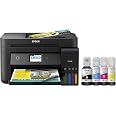
The Epson EcoTank ET-4760 is a versatile all-in-one printer designed for modern businesses, featuring cartridge-free printing with high-capacity ink tanks, impressive print quality, and robust connectivity options. With the ability to print, scan, copy, and fax, this printer is engineered for productivity while offering significant savings on ink costs and reducing environmental waste.


| Duplex | Automatic |
| Ink Color | Black |
| Resolution | 1200x1200 dpi (color), 4800 x 1200 dpi (black-and-white) |
| Additional Printer Functions | Copy, Scan, Fax |
| Maximum Copies Per Run | 30 |
| Control Method | Voice |
| Controller Type | Android |
| Print media | Paper (plain) |
| Scanner Type | Sheetfed |
| Maximum Copy Speed Black and White | 15 ppm |
| Display Type | LCD |
| Compatible Devices | PC, Laptops |
| Printer Type | Inkjet |
| Additional Features | Wireless |
| Printer Output Type | Color |
| Item Dimensions D x W x H | 13.7"D x 14.8"W x 9.1"H |
| Paper Size | 3.5" x 5", 4" x 6", 5" x 7", 8" x 10",8.5" x 11", 8.5" x 14", A4, A6, A3, A3+, half letter, executive, user definable (3.5" x 5" – 8.5" x 47") |
| Maximum Sheet Capacity | 250 |
| Media Size Maximum | 8.5 x 14 inch |
| B&W Pages per Minute | 15 ppm |
| Color Pages per Minute | 8 ppm |
| Wattage | 12 watts |
| Is Electric | Yes |
| Power Consumption | 12 Watts |
| Total Usb Ports | 2 |
| Hardware Connectivity | USB, Ethernet |
| Connectivity Technology | Wi-Fi, USB, Ethernet |
| Color | Black |
M**X
Great light-weight printer
I read many reviews on different brands of printers and chose this one. I'm 63 and I found it easy to set up with no problems, I did not encounter any of the ridiculous complaints that are in some of these reviews. However, I've dealt with computers since the days I had to write MS-DOS batch files in order to get my old IBM AT PC to do anything. This is my first Epson printer since the dot matrix days when Epson ruled the world. I have used Canon, and then HP printers, since inkjet printers became reliable in the early 90s, and now I just refuse to pay a minimum of $150 for a complete set of cartridges for my HP. I only have three things negative to say about this printer: 1) the brilliance of the ink is not as good as HP, although the print quality is excellent in terms of the definition of characters in lines, the blue and red inks are just not as bright doesn't have the snap to them that HP ink has. I'm sure the Epson ink engineers could easily change that. 2) if they are going to insist that the printer update the firmware during the set up process, then the firmware process should work. I tried twice and the firmware update failed, that should be a pretty simple process they could've worked out by now because I noticed that same complaint was on a review several months back as well as some YouTube reviews I watched. Apparently Epson is not paying attention to its customers. Firmware controls everything this printer does and could probably even fix my complaint about the ink without any changes to the ink itself. 3) The touchscreen is a little small and hokey, you really need a stylus unless you have very small fingers, but once you're through the initial set up process of putting in date time etc., I can't see that I would need to use it a lot.During the set up process don't be alarmed by the amount of noise the printer makes, once you start printing it's no more noisier than any other inkjet printer and in fact it's much smoother and quieter than my current big heavy HP 87xx printer which shakes the table as it prints.After two days I can't say I've used it a whole lot, maybe about 50-75 pages so far, which includes high quality 22 pound paper, and 110 pound card stock that I used to make checklist for my job as a flight instructor. I encountered absolutely no problems with double sided printing or the card stock. I do print a lot, that's why I have chosen the ink tank printers this time around and I will probably order the print head cleaning kit that will also remove bubbles from the ink tank lines, which will cause the printer to stall and not print a certain color when it encounters an air bubble in the line. Removing air bubbles and cleaning the printhead looks like a pretty simple process from the videos I watched. I think it would be handy to have on hand since it's relatively inexpensive, rather than waiting several days to order one when you encounter the problem, which I'm sure it will happen to all of us at some point in the future.I did not rate tech support because I have not used it and I don't have any other Epson products to reference. I'm sure, or I would certainly hope, if I did call them they would give me a workaround process to update the firmware since the printer obviously isn't going to do it on its own.Like everyone else, Epson is playing "invasion of the body snatchers," by asking you to give them permission to search your computer during the set up and registration process, to find all your software and products so it can improve the operation of your Epson printer, with the promise that it will not transmit or collect any of your personal information. It may not collect your personal data and passwords, but trust me, their software will gather every thing it can find about you so they know your every move on your PC, everything you search for on Amazon, FB, TickTock or Google by collecting those cookies, so that they can then target you for advertising etc. etc., and even though your name and personal information may not be attached... they will sell it. I'm sure that is the primary goal...it's not to assist their printer work better on your PC as stated. So my advice is don't give them permission together any of your information on your computer usage.Overall if you're looking for a fantastic printer that's lightweight, this baby is first class.
R**J
Good bye HP !!!
I had an HP office jet that for some reason I tolerated for several years....after my financial advisor told me that the money I spent on HP ink was the primary reason for the need to delay my retirement, I woke up.This printer is a Godsend....fast, easy to use, low cost...the quality is perfect for what I need....are the pictures 100% perfect, no, but for what the average person needs it's great.The ink quality so far has been great, and the touch screen very intuitive. The ink bottles are great and I love how I can see the actual ink levels in the tanks themselves !! how novel!Epson also doesn't install 2.7 Terrabytes of shovel ware and call them "drivers". The software is clean and you can install what you need.The other thing I like is that when you print, the printer prints....you don't need to sit there while it jerks back and forth for 23 minutes having a seizure like HP's do.All in all, if you do moderate printing and have school aged kids and need a copier/scanner/fax in the house, you need to get this model and ditch the HP.
N**.
Best printer I've ever had, hands down
Beautiful color photos, extremely high resolution scans, 600 DPI prints, it does everything it says and I can print remotely away from home, no phone line required. I've had this thing for 2 years, using it quite a bit, 3000 prints, only refilled the ink once.
D**S
So disappointed.
I am so disappointed with everything about this ET-4760 except the ink cost. I've been using the Epson XP-7100 and like it very much EXCEPT I spent $500 for ink for it in 6 months. What I’ve printed so far on the 4760 would have used $100 worth of ink on the 7100, but I can SEE that I’ve barely used any ink on the 4760. For that I would be willing to accept some feature compromises. But there are just too many issues with this printer and I believe it is a flawed design. I’m really disappointed that it didn’t perform better.I did work with Epson online support but they were not able to help. They responded in a reasonable time, and they were polite, but they couldn’t resolve any of my issues. They want you to try the same things over and over, and they often asked, “How many times did you try that?” At one point they actually said, “Although you may have already tried these steps, we believe the following steps will resolve the issue”.When I asked if they thought I had a defective printer or if these were common problems with this printer, they told me I had exceeded their online capability and I needed to call for continued support.Here is my review of the ET-4760 printer:SETUP: Initial setup and WiFi connection was easy and painless. However, the 4760 stopped responding when I uninstalled my 7100 printer, and I had to uninstall the 4760 and start over. It took 15 minutes to get the printer to connect to my WiFi the 2nd time, but I’ve had no connection issues since.PHOTO QUALITY; Glossy paper, High Quality mode: Acceptable to Good, Skin tone a bit washed out, but not that bad.PHOTO QUALITY: Any kind of Plain paper, Any Mode: Typically unacceptable and disappointing results (especially when compared to the XP-7100). With enough tweaking and trial and error, you can usually get acceptable results. To be clear, that is “acceptable” quality, not “GOOD”. And it varies from image to image. I couldn’t find a common setting that worked acceptably for all images on plain paper.TEXT QUALITY: Depends on color of text and paper used. Black, Blue and Green are OK. Yellow is too light to read, but who prints in yellow? Red text on photo paper & high quality mode is Acceptable to Good. I could not find ANY way to get the 4760 to print dark red on any paper other than photo paper.Attached is a picture showing the difference between the XP-7100 and ET-4760 printing the same document on the same paper (HP Premium 32, 100 Brightness), using the same program and printer setting. You can see the 7100 prints dark red and orange nicely, but the 4760 prints the red circle much lighter.COPY QUALITY: In addition to not being able to print dark red, the 4760 doesn’t copy dark red either, so printing copied dark red onto plain paper is even worse than printing directly from a document. The attached picture also shows a copy made of the red circle that was printed on the 7100. The copied print looks almost like 2 orange circles.ADDRESS LABEL PRINTING: The “vertical pitch” is wrong. I don’t know if that is the correct term, but when printing address labels using an Avery template, the top row of labels are perfectly centered vertically in the label. But every row afterwards is printed slightly more to the top than the row before it. The printing on the last couple of rows is partially off of the label. I can print these same labels on the 7100 printer without any issues.DOUBLE SIDED PRINTING: 3/16” vertical offset between the front and back sides. Probably the same “pitch” problem mentioned above. I print double sided ID tags with the same design on both sides, including a border. The 7100 vertical alignment is almost perfect on both sides, but I can’t print them on the 4760 printer because the front and back are not aligned.SCAN QUALITY: Default scan settings result in terrible scans. You have to scan at 600dpi to get scans that are close to the same quality as the original. At this setting it takes forever to scan a document.DOUBLESIDED SCAN: Not Available. Even though there is an ADF, it won’t do duplex scanning. I knew this when I bought it, but I forgot what a huge pain it is to scan double-sided documents manually.ERROR MESSAGES: Too many error messages regarding wrong paper type in printer, even when the correct paper is installed. These messages can only be resolved using the touch screen on the printer. There isn’t a pop-up message on the pc to tell you there is a problem, not even if the paper runs out. It’s frustrating to find out that nothing you’ve tried to print for the last hour has printed because it needed to verify what paper is in the printer. I’ve never had this issue with any other printer.INK MAINTENANCE BOX: I didn’t even know what this was, but I’ve already used 25% of my Ink Maintenance Box. Turns out this is a bucket where ink used during print head cleaning is disposed of. I’ve done numerous print head cleanings trying to get the printer to print red, but 25% of its life used in a week seems excessive. However, it can be user replaced for under $20. If I only have to change it once a year, it would be a small price to pay for the increased ink capacity, BUT ONLY IF the rest of the printer was any good.
Trustpilot
4 days ago
1 month ago
4 days ago
3 weeks ago